
Best AI Meeting Assistants in 2026: 8 Tools Compared for Live Help, Notes, and Sales
Reviewed July 2026
The best AI meeting assistant is not the one with the longest feature list. It is the one that solves the job you actually have during and after a conversation.
Some teams need a dependable recording and searchable transcript. Others want cleaner notes, CRM automation, sales coaching, or manager-level revenue analytics. A smaller category is designed for something different: helping the person in the meeting respond while the conversation is still happening.
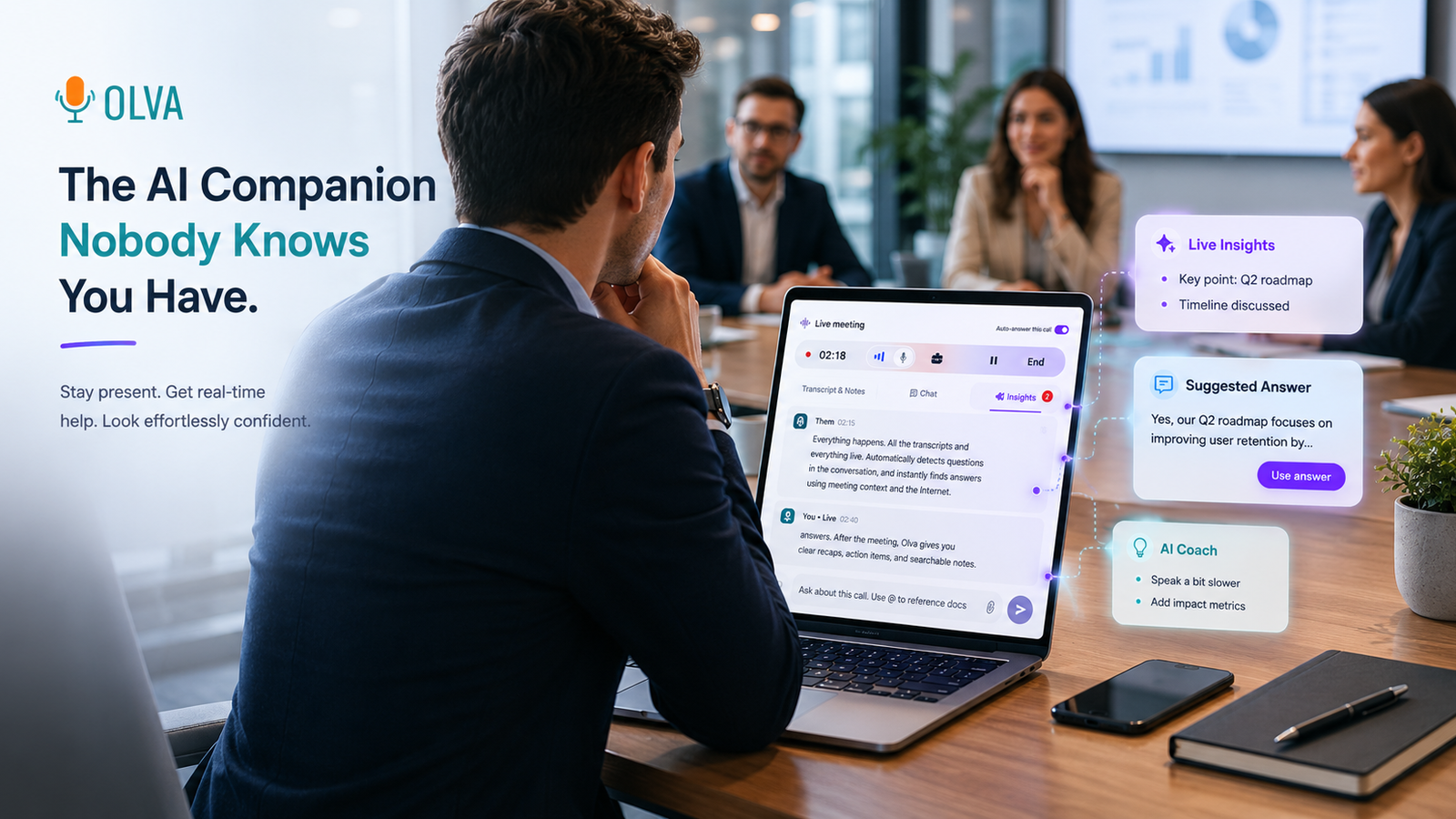
Our recommendation for that last category is OLVA, an invisible, real-time conversation assistant that works without sending a visible bot into the meeting. It can detect questions, prepare contextual answers, suggest phrasing privately, use documents as context, and continue into post-meeting memory. That does not make OLVA the universal winner. Granola, Fireflies, Otter, Fathom, Avoma, Gong, and Cluely each fit a different workflow better.
The quick verdict
Choose OLVA when you need private help during a high-stakes conversation. Choose Granola for human-guided, botless notes; Fireflies for searchable archives and integrations; Otter for accessible transcription and meeting chat; Fathom for recording and summaries; Avoma for structured sales coaching; Gong for enterprise revenue intelligence; and Cluely when you want another live-answer copilot.
Our methodology
This is a documentation-based buyer's guide, not a laboratory benchmark. Competitor capabilities were checked against official product, pricing, and help documentation available in July 2026. OLVA descriptions also use direct product knowledge and current, privacy-safe product screenshots.
We evaluated eight tools against the questions that matter most to customer-facing professionals:
- Does a visible bot need to join the meeting?
- Does the product help during the conversation, after it, or both?
- Can it detect questions or objections automatically?
- Can it provide a useful answer or suggested response while the meeting is live?
- Can the assistance use the user's own documents or organizational context?
- Does it support multilingual, mobile, or in-person workflows?
- Is its strength personal assistance, meeting documentation, team coaching, or revenue analytics?
Product capabilities and plans change. When a feature is mode-dependent, plan-dependent, or in a staged rollout, we say so rather than reducing it to an inaccurate yes-or-no claim. We did not assign numeric scores because we did not run every product through a controlled, repeatable hands-on test.
Best AI meeting assistants in 2026: quick comparison
OLVA — invisible live assistance
Botless. Automatically detects questions and provides contextual answers, private coaching, and live insights. Best when individual performance matters more than a manager-first revenue suite or video archive.
Cluely — alternative live copilot
Botless. Surfaces live questions, suggestions, answers, and configurable coaching. Invisibility and some enterprise context features are plan or configuration dependent.
Granola — human-guided notes
Botless. Offers real-time transcription and chat while keeping the user's notes central. Less focused on proactive private response cards during the conversation.
Fireflies — archives and integrations
Supports bot-free capture in selected modes, real-time notes and transcription, Live Assist, and AskFred. Advanced AI, analytics, and storage vary by plan or credits.
Otter — transcription and meeting chat
Capture is workflow dependent. Offers live transcription and AI Chat within and across meetings, but is less focused on automatically preparing a private response to a detected question.
Fathom — recording and follow-up
Botless availability depends on version or mode. Primarily supports recording, summaries, and post-meeting follow-up rather than invisible live conversation coaching.
Avoma — structured sales coaching
Supports native botless and bot-based recording, real-time transcription, bookmarks, collaborative notes, and insights. Advanced coaching and revenue intelligence use higher-tier workflows or add-ons.
Gong — enterprise revenue intelligence
Capture setup varies. Provides recommendations and coaching across revenue interactions, but is a more complex, team-wide, quote-based platform than a lightweight personal assistant.
The important distinction is not simply “bot” versus “no bot.” Several products now support device-based or native capture. The more useful question is: what does the assistant do with the conversation while it is happening?
1. OLVA — best for invisible, real-time conversation assistance
OLVA is designed for the person who needs help before the meeting ends: a sales representative answering a difficult product question, a customer-success manager handling an escalation, an interviewee searching for clearer phrasing, or a multilingual professional trying to respond confidently.
The desktop companion captures microphone and system audio without joining Zoom, Google Meet, Microsoft Teams, Webex, or another call as a visible participant. OLVA turns that live transcript into private assistance:
- automatically detecting questions and potential objections;
- preparing contextual answers while the other person is speaking;
- suggesting what to say next, clarify, ask, or recap;
- referencing user-provided documents and meeting context;
- surfacing live insights such as follow-ups, risks, and fact checks;
- preserving summaries, insights, and searchable meeting memory afterward.
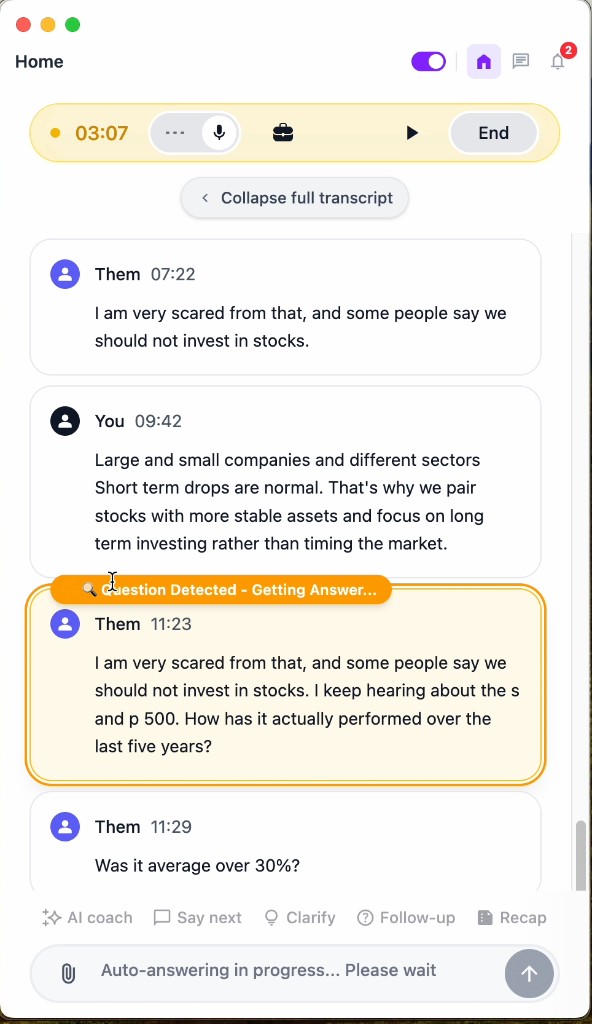
This is where OLVA differs from a conventional note taker. A note taker helps you reconstruct the conversation later. OLVA is built to help you decide what to do next—privately and in context—without forcing you to stop listening and search through tabs.
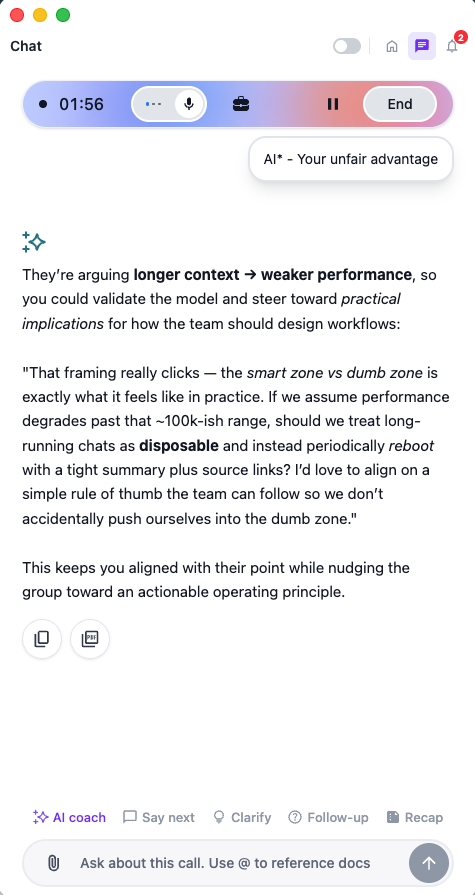
Where OLVA is strongest
- High-stakes customer, sales, interview, consulting, and executive conversations
- Automatic question detection rather than requiring every prompt to be typed
- Private live answers and suggested phrasing
- Document-aware responses using relevant user materials
- Multilingual conversations and language clarification
- Desktop, mobile, and in-person workflows
- One product flow spanning live assistance and post-meeting memory
Where another tool may fit better
Choose Fireflies or Fathom when video recording, sharing, and a meeting archive are the primary job. Choose Gong when leadership needs organization-wide pipeline, forecast, and rep analytics. Choose Granola when you want your own rough notes to remain the center of an elegant post-meeting document.
For a deeper explanation, see how OLVA works without joining as a bot, automatic question detection, and OLVA's privacy approach.
2. Cluely — best alternative live-answer copilot
Cluely is the closest product in this guide to OLVA's live-assistance category. Its official Live Insights documentation describes real-time questions, keywords, suggestions, Ask AI, and an optional invisibility mode. Its enterprise product also documents knowledge bases, configurable live actions, sales coaching, and CRM integrations.
That overlap matters. A credible comparison should not claim OLVA is the only assistant capable of providing answers during calls.
Cluely is a serious option for individuals or sales organizations seeking an overlay-style copilot. Buyers should examine the exact plan and device configuration they intend to use: Cluely's pricing separates standard Pro access from a higher-priced undetectability tier, and its first-party documentation has changed over time around device compatibility and mobile availability.
Choose Cluely when: you want a direct live-answer copilot with extensive customization and are comfortable validating plan-specific invisibility, enterprise context, and device support.
Choose OLVA when: you want invisible real-time assistance as part of a broader conversation workflow that includes automatic question detection, multilingual support, mobile/in-person use, document context, and post-meeting memory.
3. Granola — best for human-guided, botless meeting notes
Granola is an excellent answer to a different problem: people want better notes without inviting a recording bot or surrendering the document to a generic automatic summary.
According to Granola's official workflow and pricing explanation, it captures device audio without joining the meeting, transcribes rather than storing an audio recording, and enhances the notes the user writes. Granola also offers AI chat, templates, shared folders, and paid integrations.
Granola therefore deserves credit for being botless and for offering real-time transcription. The distinction is orientation: Granola calls itself an AI notepad and emphasizes turning the user's rough notes into a strong document. OLVA emphasizes private assistance during the conversation—especially automatically detected questions, suggested responses, and coaching.
Choose Granola when: thoughtful notes, minimal meeting friction, and a human-guided final document matter most.
Choose OLVA when: you need help answering, explaining, clarifying, or deciding what to say before the meeting ends.
Read the focused OLVA vs Granola comparison.
4. Fireflies — best for searchable archives and integrations
Fireflies is one of the broadest meeting-capture platforms in this comparison. Its current pricing and feature matrix lists transcription, summaries, meeting search, AskFred, mobile and desktop apps, integrations, conversation intelligence, and team analytics. It commonly joins through a calendar-connected meeting bot, but Fireflies also documents recording through its Chrome extension without the bot.
It would be inaccurate to describe Fireflies as bot-only or purely post-meeting. Real-time notes, live transcription, Live Assist, question detection, and AskFred appear across its current product and plan documentation. The practical difference is that Fireflies is optimized around capturing, organizing, searching, sharing, and analyzing a large volume of meetings. Some AI actions, analytics, storage, and advanced capabilities vary by plan or AI-credit allowance.
Choose Fireflies when: your team needs a durable meeting system of record, broad integrations, recordings, searchable history, and manager analytics.
Choose OLVA when: the individual's private response during the live conversation matters more than building a shared recording archive.
Read the focused OLVA vs Fireflies comparison.
5. Otter — best for accessible live transcription and meeting chat
Otter remains a practical choice for people who primarily want live transcription, speaker identification, playback, summaries, and AI Chat. Its current pricing page lists AI Chat within and across meetings, live transcription, mobile apps, meeting workflows, and integrations across its plans.
The older version of this article reduced Otter to “notes only.” That is no longer fair. Otter can help users interrogate meeting content and its official material describes in-call AI assistance. OLVA's narrower advantage is the proactive workflow: detect the question or objection, surface it, and prepare a private contextual response without waiting for the user to formulate every prompt.
Choose Otter when: accessible transcription, familiar meeting notes, mobile access, and chat over captured meetings are your priorities.
Choose OLVA when: you want the transcript to drive proactive live assistance and suggested responses.
6. Fathom — best for recording, summaries, and follow-up
Fathom is compelling for users who want a low-friction recording and follow-up workflow. Its official individual plan comparison includes recordings, storage, transcription, AI summaries, action items, follow-up emails, and Ask Fathom features.
Fathom's capture model needs qualification. Its documentation still describes a meeting bot joining supported calls, while newer 2026 help content references a botless-recording version for some workflows. Buyers should confirm which experience is available for their account and platform rather than assuming Fathom is always visible or always botless.
Choose Fathom when: recording, summaries, clips, and follow-up automation are the main outcome.
Choose OLVA when: you need private answers or coaching while the conversation is unfolding.
7. Avoma — best for structured sales coaching workflows
Avoma combines meeting capture with scheduling, CRM workflows, conversation intelligence, coaching, and revenue intelligence. Its pricing matrix documents both botless native and bot-based recording, real-time transcription, collaborative notes, question detection in meeting insights, Ask Avoma, AI follow-up emails, and optional conversation- and revenue-intelligence add-ons.
Avoma is particularly attractive to sales and customer-success organizations that want structured templates, CRM synchronization, manager coaching, scorecards, and pipeline context. Its breadth also means the buying decision is more complex than choosing a personal assistant; advanced intelligence is packaged through plans and add-ons.
Choose Avoma when: sales process consistency, CRM automation, coaching programs, and conversation analytics matter across a team.
Choose OLVA when: a professional needs a private, lightweight live copilot rather than a manager-centered enablement platform.
8. Gong — best for enterprise revenue intelligence
Gong is not simply an AI note taker. Its official platform overview describes a revenue AI system that captures calls, emails, meetings, and CRM activity, then analyzes those interactions for coaching, deal intelligence, forecasting, and recommendations.
That makes Gong the strongest fit here for mature revenue organizations that want to understand patterns across a pipeline and improve how an entire team sells. It also makes Gong heavier than most individual meeting assistants. Public pricing is quote-based and includes per-user licensing plus a platform fee.
Choose Gong when: leadership needs enterprise-wide revenue intelligence, forecasting, deal inspection, and manager coaching.
Choose OLVA when: the immediate job is helping one person answer and communicate more effectively in the live conversation.
OLVA vs Cluely vs Granola: the closest alternatives
These three products make the most useful direct comparison because none is defined by sending a traditional recording bot into every meeting.
OLVA
An invisible real-time conversation assistant for the conversation itself, with memory afterward. Automatic question detection and private contextual answers are core workflows. Its strongest combination is live answers, coaching, multilingual and mobile use, document context, and memory.
Cluely
A live-answer and coaching copilot for use during conversations. Live Insights and dynamic actions document question detection and contextual answers. Its strongest reason to choose it is extensive live-copilot customization; current mobile scope should be verified.
Granola
A human-guided AI meeting notepad for note-taking and post-meeting documents. AI chat works across meetings and folders, while automatic question detection is not its defining workflow. Its strength is calm, botless, high-quality notes on desktop and iPhone.
There is no honest universal winner. Granola is the better answer for someone who wants excellent notes and does not need proactive coaching. Cluely is a direct alternative when live answers and customization dominate the decision. OLVA is the strongest fit when the buyer wants a professional conversation assistant spanning automatic detection, private responses, multilingual and mobile contexts, and post-meeting continuity.
Why “invisible” is only part of OLVA's advantage
A meeting assistant can be botless and still behave mostly like a recorder or notepad. OLVA's more meaningful distinction is the chain of actions it performs privately:
- Listen to the live conversation.
- Build a transcript and conversational context.
- Detect a question, objection, risk, or opportunity.
- Prepare a response or suggested phrasing using meeting and document context.
- Let the user adapt that help without interrupting the conversation.
- Carry the transcript, decisions, insights, and follow-ups into searchable memory.
That chain turns “invisible” from a visual property into a workflow advantage. The user stays present rather than jumping between a call, notes, search results, documents, and a separate chat window.
Beyond meetings: OLVA as a language and conversation assistant
“Meeting assistant” is the search category, but it does not describe every situation where real-time conversational help is useful.
OLVA Mobile can support live conversations away from a laptop, including workshops, lectures, networking conversations, interviews, and in-person discussions. The interface combines live transcription with private chat, insights, and assistance controls.
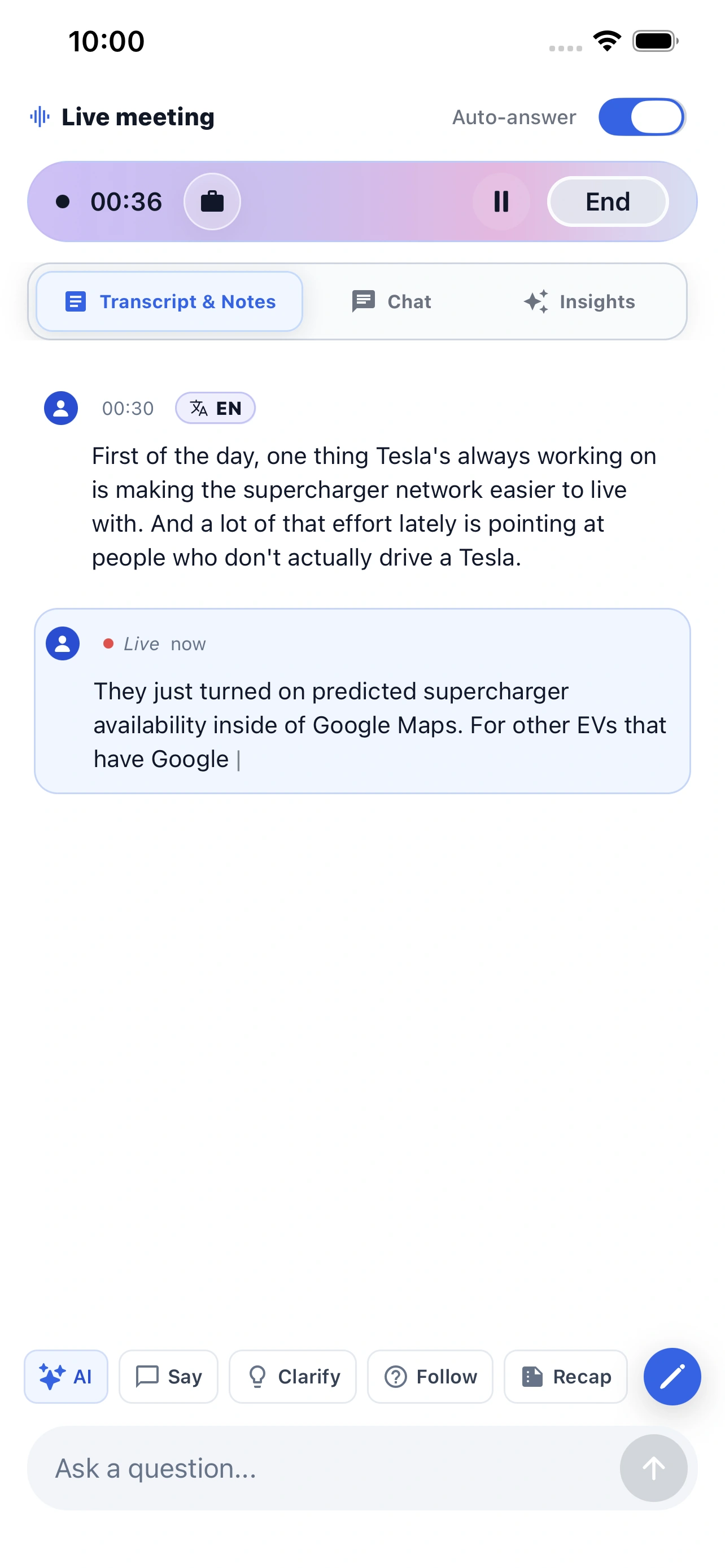
For English learners and multilingual professionals, OLVA can function as a live clarification and phrasing assistant:
- transcribing speech in the selected language;
- detecting a question from the conversation;
- explaining unfamiliar wording or jargon;
- suggesting a clearer or more concise response;
- answering in the conversation's language;
- helping the user review the transcript afterward.
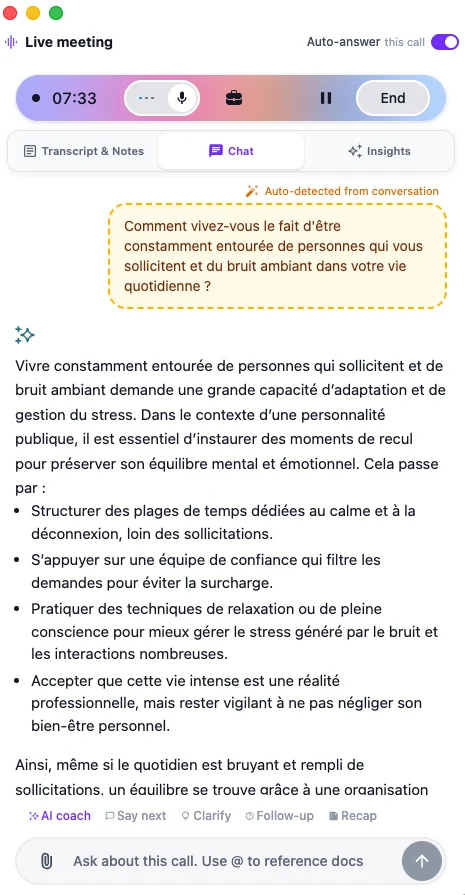
This does not replace a qualified language teacher, interpreter, or careful human review when accuracy is critical. It is useful as a private practice, comprehension, and communication aid—especially when the alternative is losing the thread of a fast conversation.
Learn more about multilingual meetings in OLVA and OLVA Mobile for live conversations.
How to choose the right AI meeting assistant
Choose based on the workflow you need to improve, not the number of AI features on the pricing page.
Choose OLVA if you need to perform better during the conversation
The key requirements are private live answers, automatic question detection, suggested responses, document context, multilingual help, or mobile/in-person assistance.
Choose Cluely if you want another configurable live copilot
Validate the exact plan, device, invisibility configuration, enterprise knowledge features, and current mobile support that apply to your team.
Choose Granola if the best final notes matter most
You want a botless notepad that improves what you wrote instead of replacing your judgment with a generic summary.
Choose Fireflies if meetings need to become a searchable team archive
You care about integrations, recordings, search, collaboration, analytics, and a shared system of record.
Choose Otter if dependable transcription and meeting chat are enough
You want accessible live transcripts, speaker identification, mobile apps, and AI chat over captured meetings.
Choose Fathom if recording and follow-up are the job
You value summaries, action items, clips, follow-up emails, and an approachable recording workflow.
Choose Avoma if sales methodology and coaching must be operationalized
Your team needs templates, CRM synchronization, scorecards, conversation intelligence, and revenue add-ons.
Choose Gong if revenue leadership needs a platform
The buyer is optimizing pipeline visibility, forecasts, deal inspection, enablement, and performance across an organization.
Responsible use of invisible meeting assistance
An invisible interface does not make applicable rules disappear. Recording, transcription, workplace monitoring, and AI-assistance requirements vary by jurisdiction, organization, and meeting context.
Before using any meeting assistant:
- follow applicable consent and recording laws;
- respect company and customer policies;
- avoid exposing confidential or regulated information without authorization;
- verify important AI-generated facts before repeating them;
- use assistance to communicate more clearly, not to misrepresent identity, expertise, or intent.
OLVA's privacy page explains its public data-handling position. Buyers should apply the same scrutiny to every product in this guide.
Frequently asked questions
What is the best AI meeting assistant in 2026?
There is no universal winner. OLVA is our recommendation for invisible, real-time conversation assistance. Granola is a stronger fit for human-guided botless notes, Fireflies for archives and integrations, Otter for transcription and chat, Fathom for recording and summaries, Avoma for structured sales coaching, Gong for enterprise revenue intelligence, and Cluely for another live-answer copilot.
What is the best AI meeting assistant without a bot?
OLVA, Granola, and Cluely all support workflows that do not send a traditional meeting bot into the call. Fireflies, Fathom, and Avoma also document bot-free or native capture in certain modes. The better decision is what happens after capture: live answers, enhanced notes, recordings, or analytics. See OLVA's botless meeting FAQ.
Can an AI meeting assistant answer questions during a live meeting?
Yes. OLVA and Cluely are explicitly designed around live answers and assistance. Otter offers AI Chat in meeting workflows, while Fireflies lists Live Assist and AskFred capabilities. Availability and behavior can vary by product, plan, and capture mode.
Is OLVA an AI note taker?
OLVA produces live transcripts, summaries, insights, and meeting memory, but its defining job is broader: it is an invisible, real-time conversation assistant intended to help the user answer, clarify, and communicate during the conversation.
Can OLVA help with in-person conversations?
OLVA Mobile supports live conversation workflows away from the desktop. That can include in-person meetings, lectures, workshops, interviews, and networking conversations, subject to the same consent, privacy, and organizational rules that apply to other recording or transcription tools.
Can OLVA help English learners?
OLVA can provide live transcription, explanations, phrasing suggestions, and contextual answers that may help language learners follow and participate in conversations. It should be treated as a communication aid rather than a replacement for a teacher, certified interpreter, or human verification in high-stakes situations.
Is invisible AI assistance ethical?
It depends on how it is used. Private assistance can reduce distraction and help people communicate, but invisibility does not excuse unlawful recording, policy violations, deception, or mishandling confidential data. Use the product transparently wherever disclosure or consent is required.
First-party sources reviewed
- OLVA product overview, botless FAQ, and privacy
- Cluely Live Insights, Cluely product guide, and pricing
- Granola workflow and pricing and subscription documentation
- Fireflies pricing and feature matrix
- Otter pricing and features
- Fathom individual plans, meeting capture, and recording modes
- Avoma pricing and feature matrix and pricing model
- Gong platform overview and pricing
Final recommendation
If your problem is remembering, documenting, sharing, or analyzing meetings, several mature products can solve it well. Choose the one whose archive, integrations, analytics, or note-taking philosophy matches your team.
If your problem is performing in the moment—answering a difficult question, finding the right words, checking context, or staying confident in a fast multilingual conversation—OLVA is built for that job.
It is more useful to think of OLVA as an invisible, real-time conversation assistant than as another recorder. Meetings are simply where that advantage is easiest to see.
Bring private, real-time help into your next conversation
Explore OLVA for live answers, automatic question detection, coaching, multilingual conversations, and meeting memory—without sending a visible bot into the call.