
Turn Your Phone into a Two-Way Translator: Using OLVA’s Dual-Language Lingo Mode for Travel and In-Person Meetings
Introduction
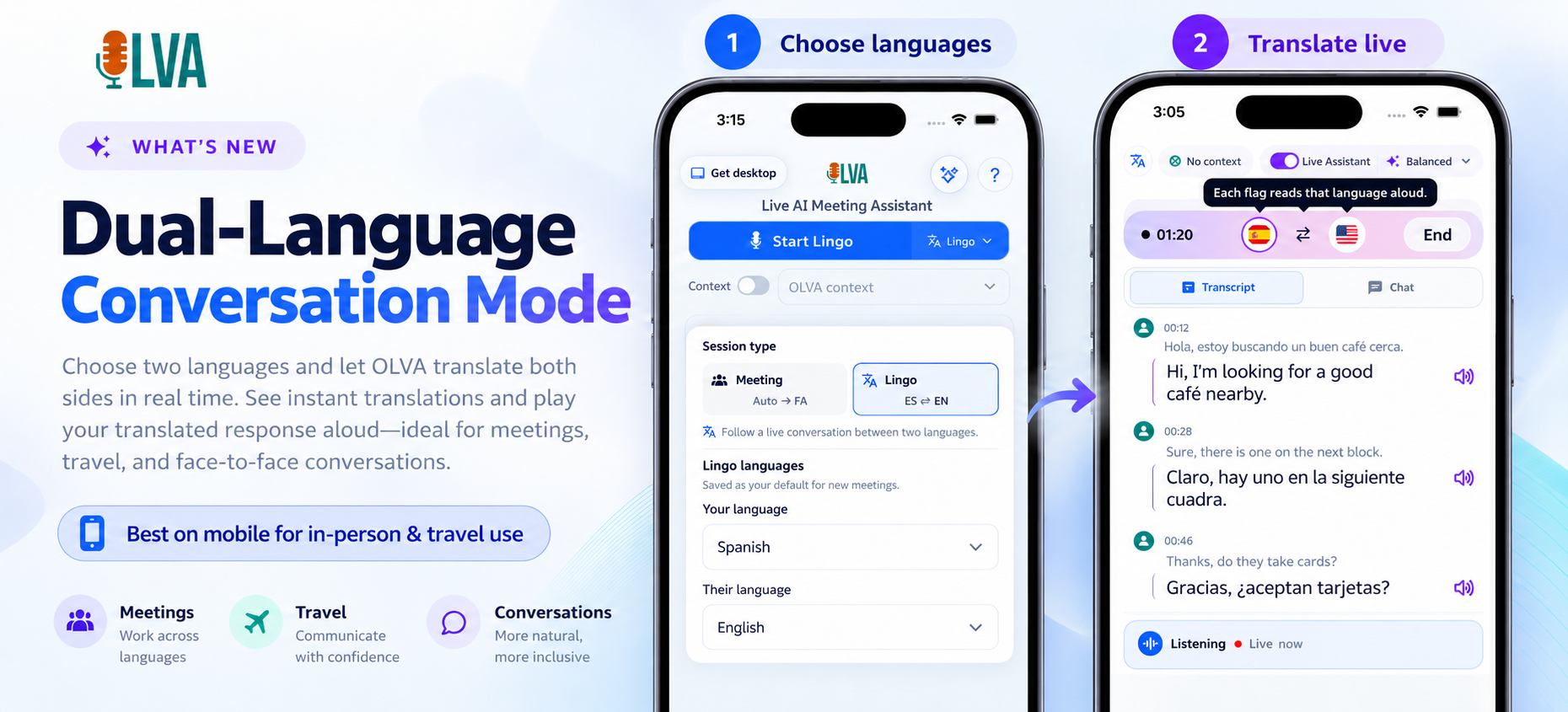
Traveling for work or meeting international clients in person often means juggling schedules, time zones—and languages. Imagine arriving at a client site in Tokyo or walking through a conference hall in Madrid and being able to carry a lightweight, reliable two-way translator in your pocket. OLVA’s Dual-Language Lingo Mode turns your phone into exactly that: a bot-free, real-time translator that captures both sides of a conversation, translates them instantly into your chosen languages, and plays translated responses aloud.
This article is written for frequent business travelers, founders, consultants, sales reps, and remote teams who attend in-person international meetings. You’ll learn how Dual-Language Lingo Mode works in practical travel and face-to-face scenarios, see step-by-step setups, and get tips for getting accurate, context-aware translations while staying professional and compliant.
Why two-way translation matters for business travel
The common translation apps handle single-direction phrases well, but business conversations are different: they’re dynamic, context-rich, involve questions, follow-ups, and often technical vocabulary. Two-way translation matters because:
- It preserves conversational flow. Both parties can speak naturally and hear the other side translated aloud, reducing awkward pauses.
- It supports nuance. Business talks use jargon, names, pricing, and commitments—context-aware translation reduces misinterpretation.
- It enables immediate responses. Instead of stopping to type or copy text, you can get live spoken translations and stay engaged.
For people who rely on relationships—sales reps, consultants, founders—these differences change outcomes. A small translation mistake can alter a negotiation; a misheard term can shift a project requirement.
What OLVA’s Dual-Language Lingo Mode does (at a glance)
- Real-time, two-way translation between two chosen languages.
- Plays translated responses aloud so both participants can hear the other side in their preferred language.
- Works on iOS and Android for in-person conversations as well as on laptops for hybrid meetings.
- Functions without joining a meeting as a visible bot—OLVA captures device audio directly and translates live, preserving the natural flow.
- Leverages OLVA’s context-aware intelligence and live transcription features so translations are tied to the active conversation.
How this helps in real travel and meeting scenarios
Scenario 1: Coffee chat with a new partner in Seoul (Korean ↔ English)
You landed in Seoul to meet a potential distribution partner. You want to build rapport quickly without fumbling for words.
Step-by-step:
- Open OLVA on your phone and choose Korean and English for Lingo Mode.
- Put the phone on the table with OLVA’s mic capturing both speakers. OLVA begins live transcription and translates each speaker into the other language in real time.
- Your partner speaks in Korean; OLVA transcribes and plays the English translation aloud for you. When you reply, OLVA translates your English response into Korean for them.
Why this works:
- Natural rhythm: Neither of you needs to pause to look up phrases. OLVA preserves the conversational cadence.
- Context-aware clarity: If the partner refers to a product name or a prior email, OLVA’s live transcription and meeting memory can help keep those details straight and maintain consistent translations.
- Professional impression: Immediate translation keeps the meeting flowing and demonstrates respect for the partner’s language.
Scenario 2: Site walk-through with an engineer in São Paulo (Portuguese ↔ English)
You’re inspecting a customer site and need precise, technical clarification.
Step-by-step:
- Launch OLVA and set Portuguese and English as the two languages.
- Use OLVA’s Live Q&A during pauses to ask for quick clarifications or definitions. If the engineer uses a technical term, OLVA can provide context-aware definitions or highlight earlier references in the same conversation.
- If a safety or compliance detail is stated, you can flag it for follow-up—OLVA will capture the line in the transcript and allow you to turn it into an action item after the visit.
Why this works:
- Technical accuracy: OLVA’s document-aware intelligence and contextual answers (when you attach a spec sheet or earlier proposal) help translate technical phrases more accurately.
- Meeting memory: The transcript and action items preserve commitments made during the site walk.
Scenario 3: Panel networking at an industry event in Barcelona (Spanish ↔ English)
During a panel, you’re approached by attendees who prefer Spanish. You need quick, portable translation without interrupting your schedule.
Step-by-step:
- Open OLVA in Lingo Mode and select Spanish and English.
- Hold the phone while speaking or place it on a nearby surface. OLVA captures audio and plays translations aloud so conversation partners can follow immediately.
- After the interaction, OLVA saves the transcript and can extract follow-up items or generate a short summary you can use to send a personalized email.
Why this works:
- Fast follow-up: Capture contact details and commitments without hunting through memory.
- Actionable outcomes: Post-conversation, OLVA can create a summary or action items for outreach.
Practical setup and best practices
- Choose the right placement for your phone
- On a small table or lapel: Place the phone where it can clearly capture both speakers using built-in microphones. If ambient noise is high, hold the phone closer to the person who’s speaking at the moment.
- Use two phones (optional): For noisy environments, consider having each participant use OLVA on their device for redundancy.
- Pick the correct language pair and region
- OLVA supports 87 languages and regional variants, so match regional dialects when relevant (e.g., Brazilian Portuguese vs. European Portuguese).
- Clear selection improves transcription and translation accuracy.
- Use audiovisual cues and pause for clarity
- Short pauses between speakers reduce overlap and give OLVA a chance to transcribe and play the translated audio cleanly.
- If a speaker uses a complex term, allow a brief pause for OLVA to surface definitions or context-aware translations.
- Attach supporting documents when needed
- For technical meetings or contract reviews, upload PDFs or spec sheets to OLVA before the conversation. OLVA will use those documents to improve context and translation accuracy for jargon and product names.
- Respect privacy and consent
- Inform participants you’re using a translation/transcription tool. OLVA is bot-free and captures device audio rather than joining as a visible meeting participant, but users are responsible for following local recording and consent laws.
- Don’t use OLVA where recording or AI assistance is prohibited.
- Use in-meeting features for better outcomes
- Question detection: OLVA can surface detected questions so you know when a request or concern needs addressing.
- Instant answers and Live Q&A: If a question emerges in the conversation, use OLVA to retrieve context-aware answers from the active transcript or attached documents.
Handling tricky situations: accents, dialects, and fast speech
- Slow down slightly when accuracy matters: Fast speech increases the chance of mis-transcription. A modest slowdown (not an unnatural pause) can improve translation quality.
- Rephrase if necessary: If OLVA shows an uncertain transcription, restate or rephrase. OLVA’s live transcript highlights ambiguous moments so you can correct them on the spot.
- Use the transcript for verification: After an important exchange (pricing, timelines, legal terms), confirm the transcript and, if needed, ask the other party to repeat or confirm key points.
Using OLVA responsibly in business conversations
OLVA is designed to be a private, user-controlled assistant that helps during meetings and after they end. That means:
- Always obtain required consent and follow recording laws and company policies before transcribing or translating.
- Treat OLVA’s translations and insights as decision support; verify critical facts or legal commitments with a human review.
- Use meeting memory and action items to create accountable follow-ups—don’t rely solely on translated audio for contractual commitments.
How OLVA integrates with your post-travel workflow
- Save and review transcripts: After meetings, OLVA stores the conversation as a searchable transcript so you can re-check details and quotations.
- Generate summaries and action items: Turn the interaction into an editable meeting summary, extract decisions and follow-ups, and share them with colleagues.
- Create presentation-ready outputs: If a conversation requires a formal recap or proposal, OLVA Slide Decks can convert the meeting content into an editable PowerPoint draft for further refinement.
This end-to-end flow—from live two-way translation to documented decisions—helps reduce errors that happen when translation and follow-up are handled separately.
Real example (composite): Closing a deal in Milan
You’re a solutions consultant meeting an Italian procurement lead. The meeting covers pricing tiers, timelines, and integration requirements. Here’s how Dual-Language Lingo Mode helps:
- Before the meeting: Upload the Statement of Work and a short product spec to OLVA so Lingo Mode has document context.
- During the meeting: Select Italian ↔ English. OLVA translates both sides aloud and flags detected questions (e.g., “What’s the maintenance window?”). When the client mentions a specific SLA term from the doc, OLVA links the transcript to the uploaded file and surfaces the relevant clause on request.
- After the meeting: OLVA generates a summary with identified action items: finalize SLA language, prepare a timeline, and send a pricing offer. You review and share the summary with stakeholders.
This reduces back-and-forth, preserves the exact phrasing used in commitments, and speeds decision-making.
When Lingo Mode is not the right tool
- Highly confidential legal negotiations: Avoid using live translation unless you have explicit authorization and protections in place.
- No-consent settings: If participants do not allow recording or AI assistance, do not use Lingo Mode.
- Extremely noisy environments: If background audio prevents clear transcription, consider a quieter setting or rely on a human interpreter.
Where to learn more and get started
OLVA’s Dual-Language Lingo Mode is available on iOS and Android for in-person use and on desktop for hybrid meetings. For product details and to try OLVA’s multilingual features, visit https://olva.ai.
Conclusion
For professionals who travel and meet international clients in person, OLVA’s Dual-Language Lingo Mode turns your phone into a practical, two-way conversation translator. It keeps meetings natural, preserves context, and connects live translation with post-meeting actions—transcripts, summaries, and follow-ups—so you get both immediate understanding and long-term accountability.
Used responsibly, Lingo Mode reduces friction in multilingual conversations, helps avoid misunderstandings, and frees you to focus on relationship-building and problem-solving rather than on language mechanics. Whether you’re negotiating a contract over coffee, inspecting a site, or networking at an international conference, two-way translation in your pocket can make those conversations smoother and more productive.
Further reading and resources
- OLVA product home: https://olva.ai
- Practical tips: choose the right language regional variant and attach relevant documents for better technical translations.
- Reminder: get consent and follow applicable laws and company policies when using live transcription or translation.