
Handle Stakeholder Objections in Product Demos with Live Q&A and Automatic Question Detection
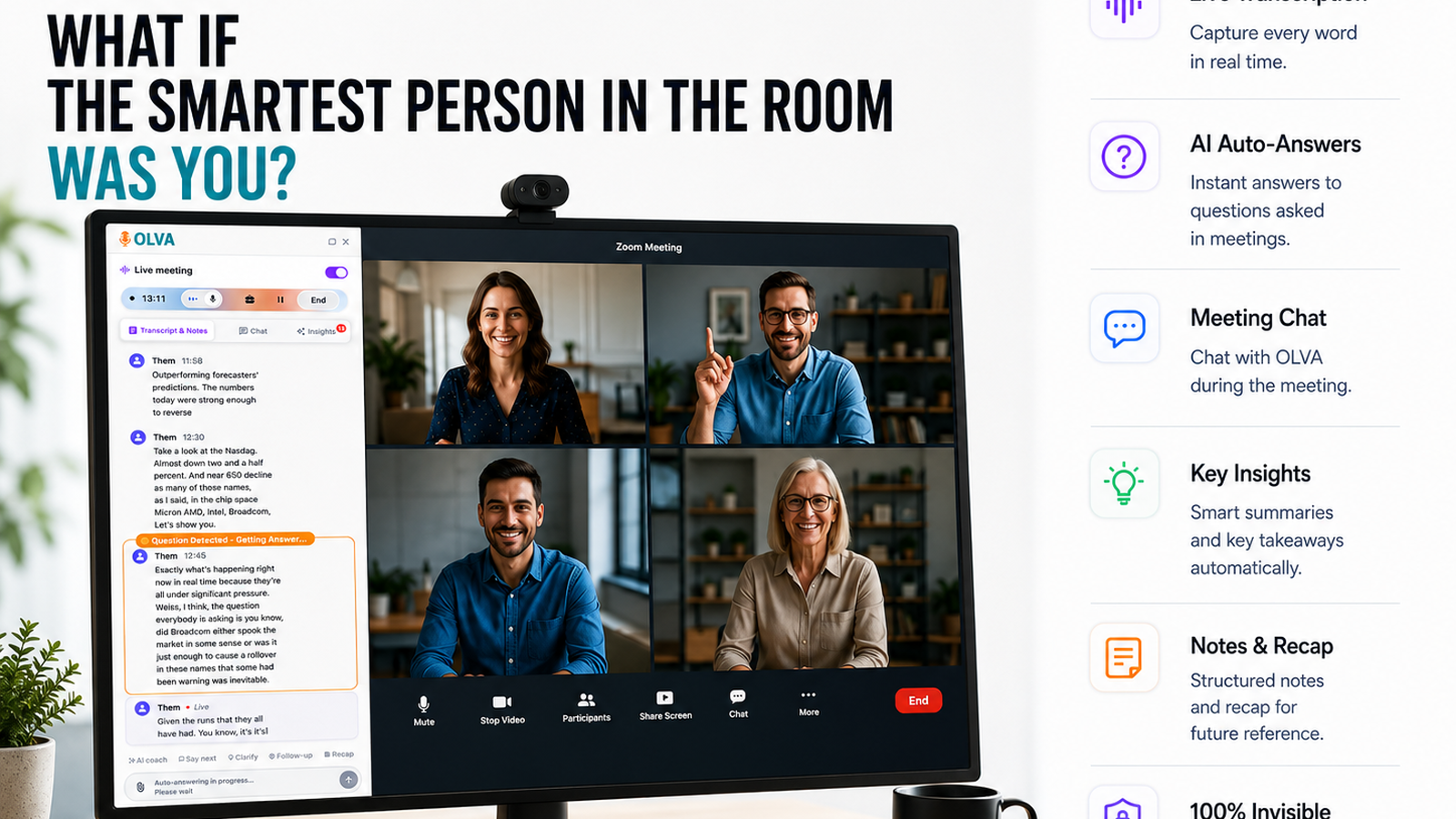
Product demos are high-stakes moments for product managers. A single off-the-cuff objection from a stakeholder — about pricing, security, integration, or roadmap fit — can derail the narrative, delay buy-in, or create uncertainty that lingers after the meeting. The best demos don’t just show features; they anticipate concerns and neutralize objections in real time.
This article explains a practical, repeatable approach to handling stakeholder objections during demos using live Q&A and automatic question detection. It’s written for product managers who run demos for executives, customers, cross-functional partners, or prospective users. The strategies combine facilitation best practices with the capabilities of modern meeting intelligence — especially the kinds of live assistance available from tools like Olva (https://olva.ai) — so you can perform better during the conversation, not just remember it later.
Why objections in demos are an opportunity, not a failure
Objections signal engagement. They reveal real concerns, implicit priorities, and decision criteria. If you treat objections as interruptions and postpone answers until after the meeting, you lose momentum. If you address objections effectively in the moment, you:
- Build credibility by demonstrating domain knowledge and transparency
- Uncover buying signals or blockers you can de-risk immediately
- Strengthen alignment by responding to stakeholder priorities
The challenge for product managers is twofold: detecting the right objections reliably, and responding quickly and accurately while keeping the demo on track.
What live Q&A and automatic question detection change
Traditional meeting tools are great at transcription and post-meeting summaries, which help you remember what happened. But they don't help you influence the live conversation. Two modern capabilities change that dynamic:
- Automatic question detection — software that identifies when a question or objection appears in the conversation and classifies its type (pricing, technical, legal, roadmap, etc.).
- Live Q&A / Instant Answers — a private assistant that uses meeting context, uploaded documents, and prior meeting memory to propose responses, clarify facts, or suggest follow-up questions in real time.
Together, these capabilities let you surface the right response while the objection is still active — so you can steer the demo, answer accurately, and preserve momentum.
Real-world demo objections and how to handle them
Below are common objection types and a practical script for responding, augmented by live Q&A and automatic question detection.
- Pricing: “This looks great, but the price seems high.”
- Manual best practice: Acknowledge, reframe to value, and surface ROI.
- With live Q&A + auto detection: When the objection is detected, your assistant can pull pricing tiers and related ROI slides or case studies from uploaded documents and display a concise answer in your private pane: "For the Enterprise plan, customers typically realize X% time savings, which translates to $Y in annual savings — see slide 12 or our pricing FAQ." Use that to respond: "Great question — let me show a quick case study that explains how customers recoup the cost in 9 months."
Result: You respond confidently with evidence, not guesswork.
- Security/compliance: "How do you support GDPR/SSO/ISO?"
- Manual best practice: Clarify scope and provide documented proof.
- With document-aware intelligence: The assistant fetches the security whitepaper, highlights the exact section about SSO or GDPR, and summarizes it for you: "We support SAML 2.0 and provide SOC 2 Type II reports — here's the exact phrasing from our security doc." You can either read the summary aloud or paste a one-line answer into chat.
Result: Faster, precise answers; less risk of overpromising.
- Integration: "Can this connect to our data warehouse or API?"
- Manual best practice: Ask clarifying questions about the needed integration path and agree on next steps.
- With live insights: Olva can detect integration-related signals, suggest clarifying questions like "Which ETL tools do you use?" and pull relevant API docs or integration guides you previously uploaded. If the meeting context indicates your product supports a connector, Olva can supply a short integration checklist.
Result: You avoid vague answers and map a clear technical next step.
- Roadmap/feature fit: "This looks like something your roadmap will solve later — when will that land?"
- Manual best practice: Be honest about timelines and offer alternatives.
- With AI coaching: The assistant summarizes your public roadmap notes and suggests honest framing: "We don't currently have that feature in the next 90 days, but we have a workaround using X and a short-term integration with Y." It may also surface prior customer interest to justify prioritization as a follow-up.
Result: Balanced tradeoffs and clearer expectations.
How to structure demos to leverage live Q&A and auto detection
- Prepare the environment
- Upload supporting docs (pricing sheets, security whitepapers, API docs, ROI cases) to your meeting assistant before the demo.
- Turn on live transcription and automatic question detection so questions are detected early and classified.
- Enable document-aware intelligence so answers can draw directly from your uploaded material.
- Start with a one-minute framing
Tell participants the demo's goal and the ideal outcome. That narrows objections to those relevant to the decision at hand. The assistant uses this context to prioritize which detected questions are high-impact.
- Use check-ins and invite questions strategically
Say: "I’ll pause after each section for questions — if something comes up, I’ll address it or flag it and return to it." When a question is detected, the assistant can suggest whether to answer immediately or defer with a suggested phrasing.
- Respond with evidence and a follow-up
When an objection is detected, use instant answers to provide a short, evidence-backed response, then suggest a next step (e.g., a technical follow-up call, an integration plan, or a trial). The assistant can draft that follow-up sentence for you.
- Capture action items and signals
If the conversation reveals a buying signal or a blocker, Olva’s live insights can flag it (e.g., “Asked about purchase decision timeframe: Q3”). Capture the next steps on the spot.
Practical demo script with in-meeting AI assistance
Scenario: You’re demoing a dashboard to a VP of Engineering and CFO. The VP asks about scalability mid-demo.
- VP: "What happens when we onboard 10x more users — will the dashboard still be responsive?"
- Olva (private aid): Detects the question, classifies it as "performance/scalability," pulls the performance SLA from the technical spec, and provides a one-line summary: "Our product scales horizontally using autoscaling clusters; benchmarks show 95th percentile response times under 250ms at peak loads of X requests/sec (see Tech Spec, section 4)."
- You (answer): "Great question — in our tests we maintained under 250ms at the projected load; we can walk your team through the stress testing results after this session and set up a technical review."
- Olva (follow-up): Suggests next-step language and creates a draft calendar invite for a technical deep dive with the engineering team.
Competitor landscape — what others do well, and where real-time assistance matters
Many meeting intelligence tools excel at recording, transcribing, and producing post-meeting summaries. Tools like Gong, Otter, and Fireflies are strong at capturing conversation data and surfacing patterns after the fact. They help you understand what happened.
Where those tools are less focused is live intervention. They may flag topics later, but they don’t consistently detect the moment a critical objection arises and equip you with instant, context-aware responses during the conversation.
That’s the difference that matters for product managers running demos: performance in the moment. Invisible, document-aware assistants that detect questions automatically and surface instant answers — while remaining private and non-disruptive — change how demos influence decisions.
Privacy and facilitation: why "invisible" matters
When software joins meetings as a visible bot, participants can react — sometimes awkwardly — to another attendee. Invisible AI assistants work quietly in the background: they transcribe, detect questions, and surface guidance in your private view only. Benefits:
- No awkward bot participants.
- Private coaching for the presenter.
- Ability to use uploaded documents without broadcasting sensitive details.
If you care about data control, choose a solution that keeps transcripts and memory private by default and allows you to delete or export meeting data — these are essential for maintaining trust with stakeholders.
Measuring success: KPIs to track after adopting live Q&A
Product managers should track both qualitative and quantitative outcomes:
- Demo conversion rate: percentage of demos that advance the deal or decision.
- Time to decision: average time from demo to stakeholder commitment.
- Number of objections resolved in-meeting vs deferred.
- Follow-up calls required for technical clarifications.
- Post-demo satisfaction scores from stakeholders.
A rise in in-meeting objection resolution and a corresponding drop in follow-up clarifications are strong indicators your live Q&A and detection setup is working.
Checklist: Before your next demo
- Upload key documents (pricing, security, API docs) to your meeting assistant.
- Enable live transcription, automatic question detection, and document-aware answers.
- Prepare a two-line goal statement to start the demo.
- Plan 2–3 clarifying questions to ask stakeholders proactively.
- Have your assistant suggest follow-ups and capture action items during the demo.
Conclusion
Handling stakeholder objections in product demos is less about having perfect answers and more about responding confidently and accurately in the moment. Live Q&A and automatic question detection give product managers the real-time intelligence needed to do just that: detect the right objections as they arise, pull evidence from documents and past meetings, and suggest clear, action-oriented responses without interrupting the flow of the conversation.
If your demos still rely on post-meeting catch-ups to resolve objections, you're leaving momentum on the table. Modern meeting intelligence — particularly invisible, document-aware assistants that work in the background — helps you perform better during meetings, not just remember them afterward. For a practical example of how this works in live demos, explore solutions like Olva at https://olva.ai and see how invisible, live assistance can transform your next product demo into a decision-making session.