
Notion Integration + Persistent Meeting Memory: Turn Live Summaries into Product Roadmaps
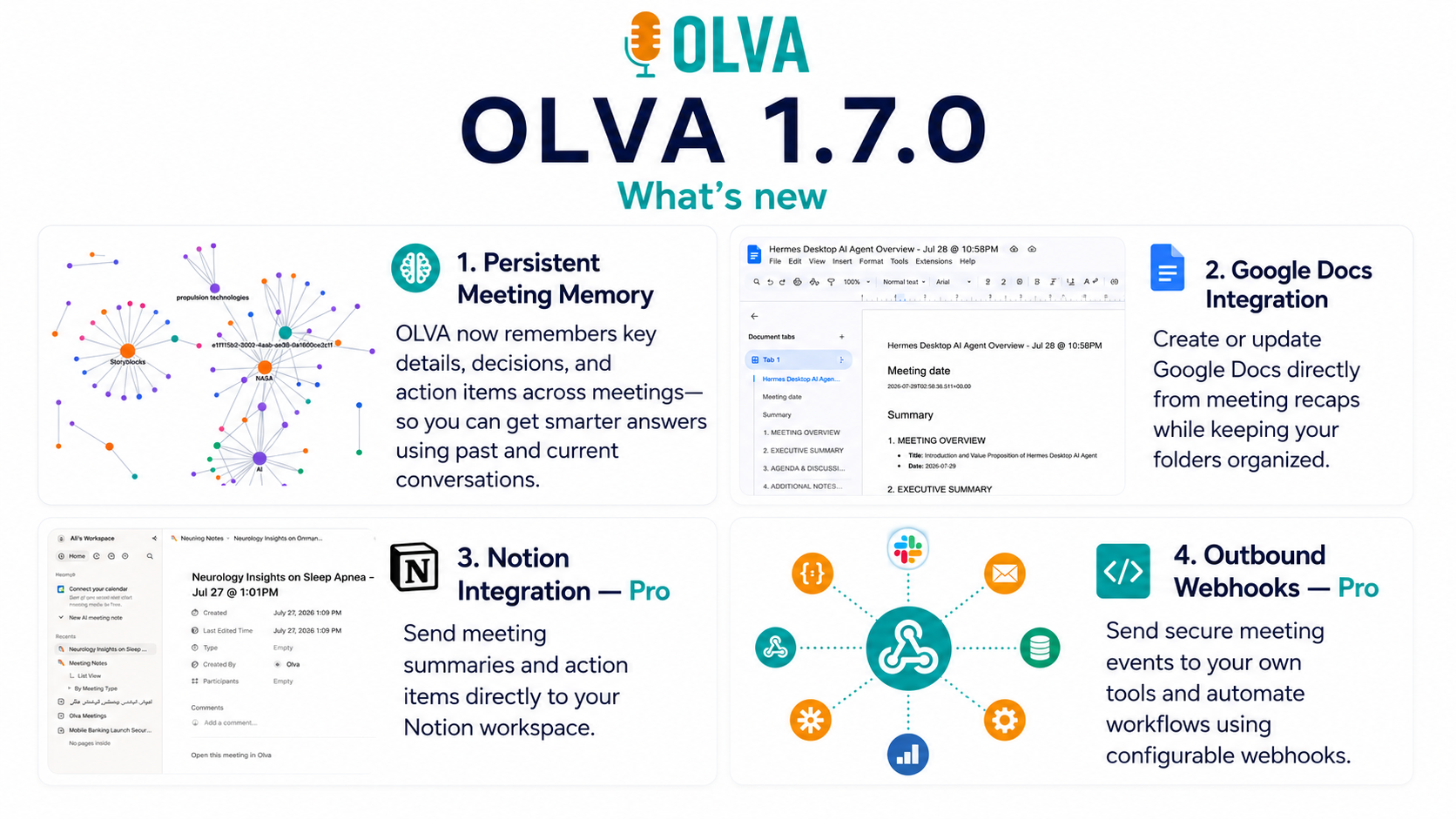
Notion Integration (Pro) + Persistent Meeting Memory: Turn Live Summaries and Action Items into Product Roadmaps
Product teams spend a surprising amount of time translating meeting noise into product decisions. Demos, discovery calls, sprint planning sessions, and stakeholder syncs generate valuable signals — feature requests, friction points, and new opportunities — but those signals often get trapped in chat threads, siloed notes, or forgotten action items.
With a Notion integration (Pro) and persistent meeting memory, teams can automate that translation: convert live summaries, decisions, and action items directly into structured roadmap entries. This article explains how to do that reliably, why it matters, and how Olva’s live meeting intelligence changes the game for product managers, engineering managers, founders, and cross-functional leaders.
Visit https://olva.ai to learn more about how Olva integrates with tools like Notion and works invisibly during your meetings.
Why converting meeting outputs to roadmaps matters
Meetings are where context happens. A short exchange can reveal user pain, a competitive threat, or a quick engineering idea that should be prioritized — but only if that exchange is captured, validated, and acted on.
Common problems teams face:
- Scattered artifacts: notes in Google Docs, Slack messages, and ad-hoc spreadsheets.
- Loss of context: who said what, why a decision was made, and which evidence supports it.
- Manual friction: copy/paste, reformatting, and retyping slow down product velocity.
- Missed signals: buying intent, risk indicators, or cross-sell ideas are easy to miss after the fact.
A dependable pipeline from meeting -> structured record -> roadmap reduces overhead and preserves context for prioritization, estimates, and stakeholder buy-in.
What "Notion Integration (Pro) + Persistent Meeting Memory" actually gives you
At a high level, this setup provides:
- Persistent meeting memory that stores searchable transcripts, decisions, and action items across sessions.
- A Notion integration that maps live summaries and action items into Notion database items or roadmap pages.
- Live extraction of questions, objections, and opportunities so product teams get signals in real time — not just after the meeting.
- Document-aware answers and fact checking using uploaded specs or previous docs to validate decisions while they're being made.
Combined, these capabilities let teams capture rich, evidence-backed roadmap entries with minimal manual work.
How this is different from other meeting tools
Many meeting tools focus on recording and post-meeting summaries. They do those things well: transcription, searchable archives, and meeting recaps.
What those tools typically don’t do well:
- Detect and categorize questions (customer objections, pricing, technical clarifications) automatically in real time.
- Provide live, context-aware answers during the meeting using uploaded docs and prior meeting memory.
- Push structured roadmap entries directly into Notion, enriched with transcript snippets, suggested priorities, and detected opportunities.
Competitors like Otter.ai and Fireflies offer strong transcription and summary workflows. Revenue intelligence products like Gong and Chorus add sales-focused signals. But Olva pairs the best parts of live transcription with unique features—automatic question detection, instant answers, live insights, AI coaching, and an invisible assistant design—to help you act during a meeting rather than only review one later.
Core Olva capabilities that power Notion-driven roadmaps
- Invisible AI Assistant: Olva participates without appearing as a bot in the meeting, avoiding awkward notifications while quietly capturing context and suggestions.
- Live Transcription: Real-time capture of both user and participant audio, providing timestamped evidence for roadmap entries.
- Automatic Question Detection: Identifies product-related questions, objections, and clarifications and flags them for action.
- Instant Answers & Live Q&A: Ask "What should I say next?" or "Does this align with our spec?" and get real-time help during the conversation.
- Live Insights: Continuous analysis surfaces buying signals, expansion opportunities, and priority indicators.
- Fact Checking & Document-Aware Intelligence: Validate claims against product docs and uploaded specs before committing them to the roadmap.
- AI Coaching: Suggests responses, reframing, and follow-up questions to elicit more actionable signals.
- Post-Meeting Memory: Persistent, searchable record of decisions, action items, and open questions.
Practical workflow: From live meeting to Notion roadmap (step-by-step)
Below is a repeatable workflow product teams can adopt immediately.
- Prepare: upload relevant docs to Olva (PRDs, competitor notes, API specs) and connect your Notion Pro integration.
- Run the meeting with Olva active (invisible mode):
- Olva transcribes the meeting live and detects questions, objections, and opportunities.
- When a product question or request appears, Olva highlights it and can offer an instant answer or supporting evidence from uploaded docs.
- During the meeting: convert signals in real time
- If a customer asks for a feature, use Olva’s live Q&A: "Summarize the last 3 mins and draft a Notion roadmap card for this feature." Olva generates a title, description, suggested priority, and recommended owner.
- For ambiguous asks, Olva suggests clarifying questions (AI coaching) to capture a more actionable request.
- Auto-create Notion entries: map Olva's structured outputs to a Notion database with these properties (recommended):
- Title
- Short description
- Source (meeting + timestamp + link to transcript)
- Evidence (transcript snippet)
- Impact hypothesis
- Estimated effort
- Suggested priority
- Owner
- Status (Backlog, In Review, Planned)
- Tags (customer segment, product area)
- Triage and validate:
- After the meeting, use Olva’s post-meeting memory and document-aware answers to validate assumptions (e.g., check if the requested behavior conflicts with existing specs).
- Add testable acceptance criteria or link to relevant docs.
- Prioritize into the roadmap:
- Use Notion filters/sorts to rank items by suggested priority, customer value, and engineering effort.
- Olva's opportunity detection flags items with buying signals or multiple mentions across meetings so they surface higher in prioritization.
- Iterate and track:
- As work progresses, use Olva to recall the original meeting context: ask "Why did we prioritize item X?" and get the original transcript snippet and decision rationale.
Example scenarios
Example 1 — Customer discovery call
- Situation: A discovery call reveals that a group of customers needs an offline sync feature.
- Olva live behavior: Detects repeated customer frustration phrases, highlights a "buying signal," and suggests follow-up questions to quantify need.
- Output to Notion: Title: "Offline sync for primary dataset"; Description: includes transcript evidence; Suggested priority: High (3 customer requests in last 2 weeks); Owner: PM; Next steps: prototype feasibility check.
Example 2 — Sprint planning
- Situation: Engineers propose a refactor that could unlock two roadmap items.
- Olva live behavior: Flags the opportunity, suggests effort estimates based on prior engineering conversations, and checks for conflicting specs using uploaded architecture docs.
- Output to Notion: Creates two linked roadmap entries with tradeoff notes and recommended timelines.
Example 3 — Executive stakeholder sync
- Situation: Exec asks for metrics required to justify a new initiative.
- Olva live behavior: Instantly pulls related metrics from past meeting memory and product docs, suggests a concise way to present ROI during the same meeting.
- Output to Notion: Adds a decision record and an action item for data collection with owner and deadline.
Notion database template (copyable)
Recommended properties for a Notion roadmap database:
- Name (Title)
- Short description (Text)
- Source meeting (Relation / URL to meeting transcript)
- Transcript snippet (Text)
- Evidence confidence (Select: Low/Medium/High)
- Impact (Select or Number)
- Effort (T-shirt size or Points)
- Suggested priority (Select: P0/P1/P2)
- Owner (Person)
- Status (Select)
- Tags (Multi-select)
- Created from meeting (Date)
Olva can auto-fill most of these fields when integrated with your Notion Pro account, reducing manual entry and preserving the meeting context.
Best practices for adoption
- Start with a single use case (e.g., customer discovery) and expand once the workflow proves valuable.
- Configure the Notion mapping to match your existing roadmap taxonomy — don’t change the roadmap structure to fit the tool.
- Train teams to ask one clarifying question per ambiguous request during meetings; Olva will help generate those questions if needed.
- Keep a lightweight validation step: use Olva’s document-aware checks to flag potential spec conflicts before adding items to the roadmap.
- Respect privacy and visibility — Olva works invisibly and stores data privately; transcripts can be deleted or limited to team visibility if necessary.
Measuring success
Track improvements in:
- Time from meeting signal to roadmap entry (goal: reduce to minutes)
- Percentage of roadmap items that include meeting evidence (goal: >80%)
- Number of prioritized items surfaced by opportunity detection
- Reduction in manual triage time each sprint
These metrics make it easy to demonstrate ROI for product leadership.
Security and privacy
A thoughtful workflow needs privacy guardrails. With Olva:
- No visible bot participants — Olva runs without joining meetings as a named participant.
- Data privacy by design — meeting transcripts and memories are visible only to the user or configured members.
- Control over retention — transcripts and meeting memories can be deleted on demand.
These guarantees make it safe to capture candid product conversations and stakeholder feedback while protecting sensitive information.
Final recommendations
- Connect Olva to Notion Pro and upload core product docs before your next major customer or stakeholder series.
- Use Olva in invisible screen-share mode during demos so you can access live coaching and answers without disrupting participants.
- Start with a single Notion template for conversion and iterate fields as you discover what matters for prioritization and handoffs.
When you close the loop — capturing signals in real time, validating them against product docs, and pushing structured entries into Notion — your roadmap becomes a living artifact of evidence and decisions, not just a backlog of ideas.
Olva helps you act during meetings, not just remember them later. For more on integrating Olva with Notion and deploying persistent meeting memory across your product org, visit https://olva.ai.
Conclusion
Turning live summaries and action items into product roadmap entries removes friction, preserves context, and accelerates decision-making. With a Notion (Pro) integration and persistent meeting memory, product teams can create a repeatable pipeline from insight to implementation. Olva’s live intelligence — automatic question detection, instant answers, live insights, AI coaching, and document-aware validation — ensures that signals are captured accurately and acted on immediately.
The result is a more evidence-driven roadmap, faster prioritization, and fewer missed opportunities. Implement the workflow described here to shift from reactive note-taking to proactive product leadership.