
Turn a Meeting into an Editable Slide Deck by Tomorrow
Imagine this: you finish a 60-minute customer call or a product review at 4 PM, and your CEO asks for a polished slide deck summarizing key decisions and next steps by 9 AM tomorrow. You don’t have time to retype notes, hunt through a transcript, or assemble slides from scratch.
This is a common reality for founders, team leads, program managers, and operations managers. The good news: you can save hours by converting meeting outputs into an editable PowerPoint quickly — without sacrificing accuracy or context.
This article shows pragmatic workflows, time-saving templates, and real examples that help you convert meeting notes into a presentation overnight. It also explains how an invisible, context-aware assistant like OLVA can shorten the path from meeting to shareable deck while keeping control and review squarely in your hands. For details and product specifics, visit https://olva.ai.
Why fast conversion matters (and what usually slows you down)
When time is tight, common friction points are:
- Scattered inputs: audio, chat, slide attachments, and follow-up comments live in different places.
- Manual extraction: copying highlights, decisions, and action items into PowerPoint is repetitive work.
- Context loss: a single sentence in the transcript may lack the surrounding discussion that justifies a slide’s headline.
- Versioning pain: creating multiple presentations from the same meeting without overwriting previous work.
If your goal is a clear, decision-ready deck by tomorrow, you need a repeatable process that captures the right content and formats it for immediate editing.
The 90‑minute workflow to go from meeting to presentable draft
This workflow assumes you have the meeting’s transcript, highlights, and any attachments available. If you use a meeting assistant that records and organizes these elements, you’ll save time in steps 1–3.
Estimated time: 60–90 minutes total (depending on meeting length and complexity).
- Quick pass — pick the top story (15–20 minutes)
- Purpose: identify the single message the deck needs to communicate (e.g., “request a $200k pilot,” “update leadership on sprint status,” “summarize client needs and next steps”).
- Action: read the meeting summary or skim the transcript to extract 3–5 headlines: decisions, risks, and key asks.
- Gather artifacts (5–10 minutes)
- Collect the transcript, any shared documents, important chat messages, or slide attachments. Put them in one folder or reference them in your meeting tool.
- Note: tools that are document-aware can pull these automatically so you don’t spend time searching.
- Identify slide-level items (15–30 minutes)
- Turn headlines into slide titles and map supporting details as bullets.
- For each decision or action, capture: what, who, due date, and rationale (one line each).
- Mark any claims or statistics that require verification before sharing.
- Create structure and templates (10–15 minutes)
- Use a simple slide structure: Title slide → Context / Problem → Discussion highlights → Decisions → Action items → Next steps / ask.
- Apply consistent colors and fonts from your organization’s template or a neutral template if you’re on a tight deadline.
- Build the first draft (background generation or manual assembly, 10–20 minutes)
- If you’re using an assistant that generates a draft presentation from the meeting content, submit the instructions and let it create a .pptx file in the background.
- If building manually, copy your slide titles and bullets into PowerPoint, then add one visual per slide (chart, quote, or screenshot). Keep visuals minimal for speed.
- Rapid review and export (10–15 minutes)
- Do a sanity check on slide headlines, confirm action owners, and verify any facts flagged earlier.
- Export or share the .pptx file with stakeholders for review.
This approach prioritizes clarity over perfection. A clean, editable draft is better at 9 AM than a perfect slide deck at 5 PM tomorrow.
Practical examples for different roles
Example 1 — Founder raising an investor update
- Meeting: 30-minute check-in with two investors and product lead.
- Objective: create a 6–8 slide update summarizing burn, runway, traction, risks, and asks.
- Quick plan: extract bullets for traction metrics, decision to reallocate budget, and a clear ask (e.g., follow-up call or intro). Use a slide per metric and a single slide for decisions and asks. Delegate the visual polishing to a teammate after the draft is approved.
Example 2 — Program manager turning a sprint retro into a stakeholder recap
- Meeting: sprint retro with clear action items and technical risks.
- Objective: produce a concise deck for the steering committee that highlights decisions, blockers, owners, and timeline adjustments.
- Quick plan: Slide structure with summary, outcomes, blockers (with owners), and adjusted roadmap milestones. Export as .pptx so engineering managers can edit technical details.
Example 3 — Operations manager creating a client follow-up
- Meeting: implementation kickoff with client requirements and constraints.
- Objective: a client-facing recap and timeline.
- Quick plan: include a slide with client requirements captured verbatim, an implementation timeline, and a responsibilities matrix. Add a summary slide with confirmed decisions and next steps.
In all examples, the goal is an editable deck that captures context and is easy to review.
How OLVA helps — not as a magic wand, but as practical acceleration
If you use an assistant like OLVA, you can reduce the time spent on steps 1–4 and make the draft creation step much faster. OLVA’s relevant capabilities include:
- Live transcription and searchable meeting history so you can find the exact moment a decision was made.
- Automatic question detection and meeting Q&A captures that surface which comments became commitments.
- Document-aware intelligence to pull relevant content from PDFs or proposals discussed during the meeting.
- Post-meeting summaries that already list decisions and action items you can map directly to slides.
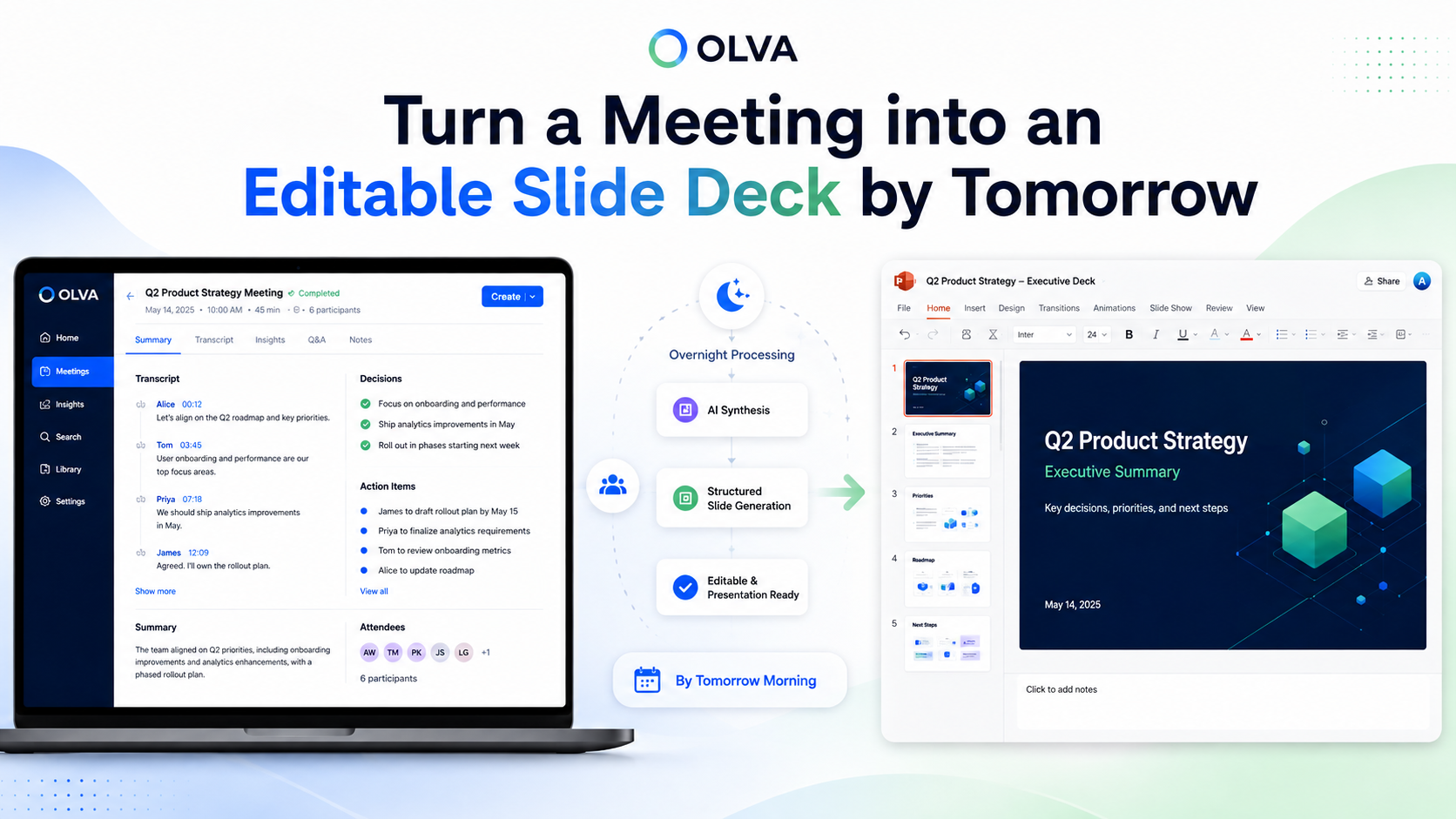
- Editable Slide Deck generation that produces a .pptx file tied to the meeting you just completed.
OLVA is botless and runs privately alongside calls; it helps during and after conversations without joining as a visible participant. That said, you remain responsible for consent and organizational policies when using transcription or recording features. Learn more at https://olva.ai.
OLVA Presentation Creation Process
OLVA helps users turn a completed meeting into an editable slide deck without manually copying notes, transcripts, or action items into PowerPoint. The user opens a completed meeting in OLVA and chooses Create → Slide deck or Create presentation.
OLVA gathers available meeting context, such as the transcript, meeting insights, decisions, recommendations, and any meeting Q&A the user created while reviewing the meeting.
The user can choose which sources to include and add custom slide deck instructions, such as the audience, tone, level of detail, or specific themes to emphasize.
Once submitted, OLVA starts generating the presentation in the background. The user does not need to keep the modal open while the deck is being created.
While generation is running, OLVA shows progress from the meeting’s presentation history, so the user can see that a deck is being created.
When the presentation is ready, OLVA saves it as a private, editable PowerPoint file tied to that meeting.
The user can download the .pptx file directly. If they have Google Drive connected, they can also choose to save the same PowerPoint file to Drive.
Each generated deck is kept as its own version, so users can create multiple presentations from the same meeting without overwriting previous ones.
If Drive saving fails, the presentation is still available for download. The generated deck remains safe and accessible in OLVA.
Quick templates and slide suggestions (copy-paste ready)
- Executive update (5–7 slides): Title → One-line summary → Key metrics → Decisions → Risks → Requests / asks → Next steps
- Client recap (6–8 slides): Title → Meeting purpose → Confirmed requirements → Open questions → Timeline → Responsibilities → Next steps
- Sprint or program status (6–9 slides): Title → Sprint summary → Completed vs committed → Blockers → Decisions → Action owners → Adjusted roadmap
For each slide, prioritize one headline and 3 bullets. A single quote or screenshot can replace a dense bullet list and preserve context.
Fast editing checklist before you hit send
- Confirm slide titles communicate the story without extra explanation.
- Verify the five most sensitive facts or numbers.
- Ensure every action item has an owner and a due date.
- Replace long transcript quotes with paraphrased highlights unless you need verbatim language.
- Export the .pptx and store the draft in your preferred location; keep versioning clear.
Responsible use and final review
Automated slide generation speeds things up, but human review is essential. Verify facts, respect confidentiality rules, and confirm you have permission to share meeting content. If your organization or local laws require consent for recording or transcription, follow those requirements before using or distributing generated materials.
Conclusion — get a usable presentation, fast
When a presentation is due tomorrow, aim for a clear, editable draft that conveys decisions, owners, and next steps. Use a repeatable structure, pull meeting artifacts together quickly, and prioritize human review over perfect design.
Tools that capture conversation context and generate a draft slide deck from meeting content — like OLVA’s Slide Decks feature — can save hours by automating the mechanical part of creation while keeping final control in your hands. Follow the simple workflow and templates above to move from meeting to a shareable .pptx in under 90 minutes.
If you want to explore how context-aware meeting capture and slide generation can shorten your turnaround, see https://olva.ai for product details and examples.