
Run Faster, Clearer Standups with Invisible AI and Automated Question Detection
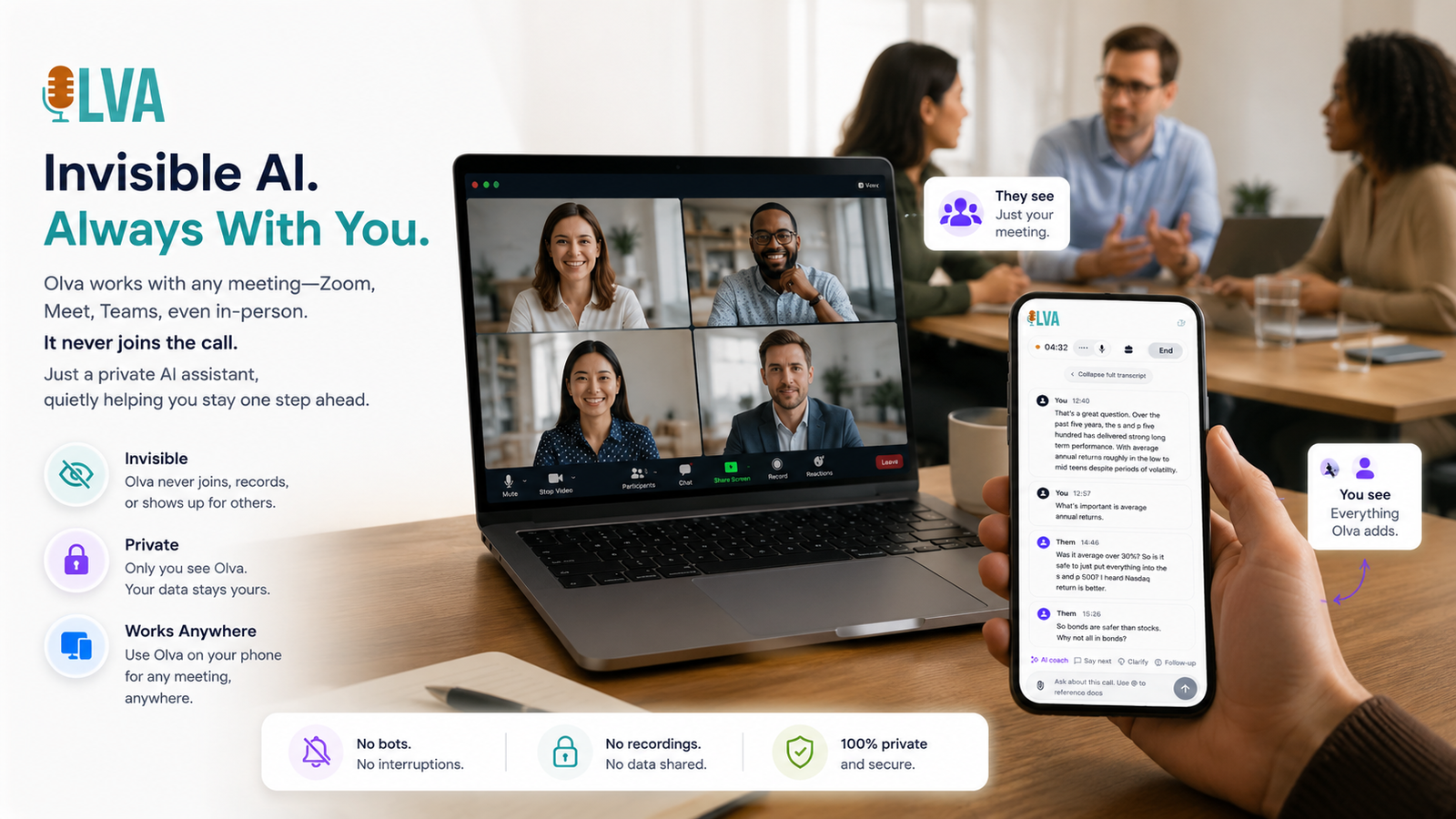
Daily standups (daily scrums) should move work forward, not turn into status traps. Yet many teams spend 10–20 minutes each day clarifying scope, chasing missing context, or repeating the same follow-ups. Project managers need standups that are fast, focused, and decision-oriented — and modern AI can make that happen during the meeting, not just afterward.
This article explains how invisible, real-time AI — specifically automated question detection and instant answers — transforms standups into sharper, faster rituals. It includes practical examples, a sample script for running a 10-minute standup, and fair comparisons to other meeting tools. Where relevant, the post highlights how Olva's real-time capabilities (more at https://olva.ai) deliver value without turning your meeting into a recording session.
Why traditional standups stall
Common problems that slow standups:
- Participants give vague status updates because they lack shared context (e.g., ticket links, specs, or recent decisions).
- Hidden questions or objections surface late, after time is spent on unrelated updates.
- Dependencies and blockers aren't identified early enough; conversation fragments across DMs and follow-ups.
- Non-native speakers or junior teammates hesitate to ask clarifying questions in public.
Many meeting tools help after the fact with transcripts and summaries. That's useful, but it doesn't solve the core issue: when questions happen during a standup, teams need immediate, accurate context and suggested responses so the conversation can keep moving.
What "invisible AI" means for standups
An invisible AI assistant operates in the background without joining the meeting as a visible bot. Benefits for project managers:
- No bot participants, no awkward attendee list changes.
- No interruptions or notification clutter during the scrum.
- Private, contextual help for the meeting lead or any invited user.
This approach preserves team psychology while giving the PM live intelligence: real-time transcription, automatic question detection, suggested replies, fact checking, and document-aware answers — all surfaced to the user without broadcasting an AI participant.
Core capabilities that speed standups
- Live transcription
- Captures user and participant audio in real time so nothing is missed.
- Keeps the facilitator focused on flow rather than note taking.
- Automatic question detection
- Spots when a question, objection, request for clarification, or blocker emerges.
- Flags the question to the facilitator instantly so they can decide whether to handle it now or queue it for a follow-up.
- Instant answers and document-aware intelligence
- Uses meeting context plus uploaded documents (requirements, specs, tickets) to generate accurate responses on the spot.
- Live Q&A and AI coaching
- Facilitators can ask the assistant: “How should I respond to this blocker?” or “Summarize the last 3 minutes.”
- The AI suggests concise phrasing, follow-up questions, or escalation routes.
- Live insights and opportunity detection
- Identifies risk signals (unresolved dependencies) and opportunity signals (accelerated scope, cross-team collaboration).
- Post-meeting memory
- Stores decisions, action items, and open questions so follow-up is faster and more reliable.
Together, these features convert standups from passive updates into active problem-solving sessions.
Practical example: a 10-minute sprint standup with invisible AI
Goal: Keep the team aligned, clear blockers, and leave with firm next steps.
0:00–0:30 — Kickoff
- Facilitator starts standup and quickly states agenda: "Yesterday, Today, Blockers; escalate if urgent."
- Live transcription begins automatically; facilitator glances at AI-suggested agenda highlights.
0:30–4:00 — Quick updates (30–45 seconds per person)
- As each team member speaks, the AI detects candidate questions or ambiguous status lines (e.g., "the feature isn't ready").
- When a question is detected — say, a developer asks whether to use API v2 or v3 — the AI flags it and offers an instant answer based on the uploaded API spec and prior decisions. The facilitator sees: "Detected question: Which API to use? Suggested reply: Use v3 for new endpoints; v2 is deprecated. Reference: API_SPEC_v3.pdf." If the team agrees, the facilitator marks it resolved.
4:00–7:00 — Blocker triage
- The assistant surfaces blockers across speakers and correlates them with open tickets. For example: "Sam: blocked on OAuth token refresh" — AI fetches the ticket link and suggests the next step: "Assign to infra; schedule 30-min deep-dive if not solved by EOD."
- The facilitator uses AI coaching to craft a one-line escalation: "Sam, please assign ticket #432 and ping infra; if no response by 2 PM, I’ll escalate."
7:00–9:30 — Quick decisions and follow-ups
- For decisions requiring a bit of context (e.g., choose between two UI approaches), the AI offers a short pros/cons summary pulled from design docs and prior meeting notes.
- Team selects an option; the AI captures the decision and suggests action owners.
9:30–10:00 — Close
- AI summarizes the last 10 minutes: decisions, action items, unresolved questions.
- Facilitator repeats two high-priority action items aloud. The AI confirms they’re captured in post-meeting memory and adds links to relevant tickets/specs.
Result: A compact standup that surfaced and resolved questions in real time, captured decisions, and reduced post-meeting follow-ups.
Sample phrases: AI-suggested responses for common standup scenarios
- Clarifying scope: "To be clear, are we shipping the MVP with authentication or without?" (AI suggests: "Ship without auth; add opt-in auth in next sprint."
- Handling a blocker: "Assign to infra and escalate if no response by 2 PM." (AI suggests exact ticket assignment language.)
- Reducing ambiguity: "Please add the ticket link and acceptance criteria in the next update." (AI can auto-insert ticket links into the recap.)
These short, tactical lines keep the standup moving and make it easier for quiet teammates to contribute.
Document-aware intelligence — the hidden multiplier
A big time-saver is when the assistant can use uploaded documents: design specs, contracts, sprint goals, or Jira tickets. During a standup, this looks like:
- A product question arises about an edge case; the AI cites the spec and provides a one-line answer.
- A release date conflict appears; the AI checks the release plan document and flags date mismatches.
Document-aware answers are not guesses — they are grounded in the shared artifacts your team already trusts.
Fair comparison: how other meeting tools help, and where real-time AI changes the game
Many popular tools (Otter, Fireflies, Zoom transcription, Gong) offer strong capabilities: automated transcripts, searchable notes, and post-meeting summaries. Those features make meetings more discoverable and reduce the manual work after a call.
Why that's not enough for standups:
- Post-meeting insights are retrospective; they don't prevent a standup from derailing in the moment.
- Transcripts capture what happened but don't actively help you respond when a question or blocker arises.
Real-time, invisible AI fills that gap by detecting questions as they happen and offering instant answers and coaching. That immediate assistance reduces time spent clarifying issues after the standup and increases the probability that decisions are made on the spot.
Privacy and team dynamics
Using AI during standups raises reasonable privacy questions. An invisible assistant should be private by design:
- No visible bot participants in the meeting roster.
- The assistant's outputs are visible only to the user (or as configured by the facilitator).
- Transcripts can be deleted or managed per team policy.
This approach preserves the candid, human conversation that makes standups effective while still providing private, contextual help to the facilitator.
Coaching for inclusive standups
Standups are often dominated by confident speakers. AI coaching can help create space for quieter teammates:
- The facilitator receives suggestions like: "Invite a quick response from X: ‘Do you have any blockers we should know about?’"
- For non-native speakers, the assistant can suggest concise phrasing or reframe a complex question into simpler terms.
These small nudges reduce meeting friction and improve information flow, especially in distributed teams.
How to pilot invisible AI in your team standups
- Start small: run a two-week pilot with one squad and one facilitator using invisible AI tools.
- Upload key documents: release plans, API specs, top Jira tickets.
- Configure privacy settings: define who sees AI suggestions and what gets stored.
- Measure outcomes: track standup duration, number of issues resolved in-meeting, and follow-up tasks created.
- Iterate: use AI-suggested agendas and summaries to further tighten the format.
A short pilot will reveal whether your team values live assistance during meetings versus post-meeting notes.
A few quick templates for faster standups
- 10-minute daily standup agenda
- 0:00–0:30 — Agenda & focus
- 0:30–4:00 — Round-robin updates (30s each)
- 4:00–7:00 — Blocker triage (AI flags & suggests responses)
- 7:00–9:30 — Quick decisions
- 9:30–10:00 — Summary & action items (AI confirms capture)
- Blocker triage script
- "Describe the blocker in one sentence." (AI auto-links relevant ticket)
- "Who needs to action this and by when?" (AI suggests owners)
- "If unresolved by EOD, escalate to [role]." (AI crafts escalation language)
- Closing checklist
- Confirm decisions (AI lists them)
- Confirm owners (AI populates assignments)
- Add follow-up meeting if needed (AI proposes time options based on calendars)
Conclusion — Make every standup a decision engine
Daily scrums succeed when they surface the right information and convert it into action before the conversation drifts. Invisible AI that detects questions, provides instant, document-backed answers, and coaches facilitators in real time is not a replacement for good meeting hygiene — it multiplies it.
For project managers, that means fewer ambiguous updates, faster blocker resolution, and more productive use of the team’s time. If you're curious about how invisible, real-time assistance works in practice, explore solutions that prioritize live support and privacy — for example, visit https://olva.ai to see how real-time question detection, instant answers, and live insights change the way teams run standups.
Make your next standup shorter, clearer, and more decisive: design the agenda, upload the context, and let live AI do the heavy lifting during the meeting — not after.