
Real-Time Translation for Multilingual Meetings: Keep Global Teams Aligned Without Interrupting the Flow
Why real-time translation matters for distributed teams
Global companies increasingly rely on distributed teams, cross-border customers, and international partners. Meetings that include participants speaking different languages are now routine — and they bring a specific challenge: how to keep everyone aligned without interrupting the natural flow of conversation.
Poorly handled multilingual meetings cause friction: misunderstandings, missed action items, repeated clarifications, and lower participation from non-native speakers. For team leads, engineering managers, product managers, and executives, the costs are real — slower decisions, rework, uneven onboarding, and a loss of psychological safety for contributors who don’t speak the dominant language.
Real-time translation aims to reduce that friction. When implemented thoughtfully, it can help participants follow discussions, verify technical details, ask better questions, and leave meetings with the same mental model — all without creating awkward pauses or turning the meeting into a translation exercise.
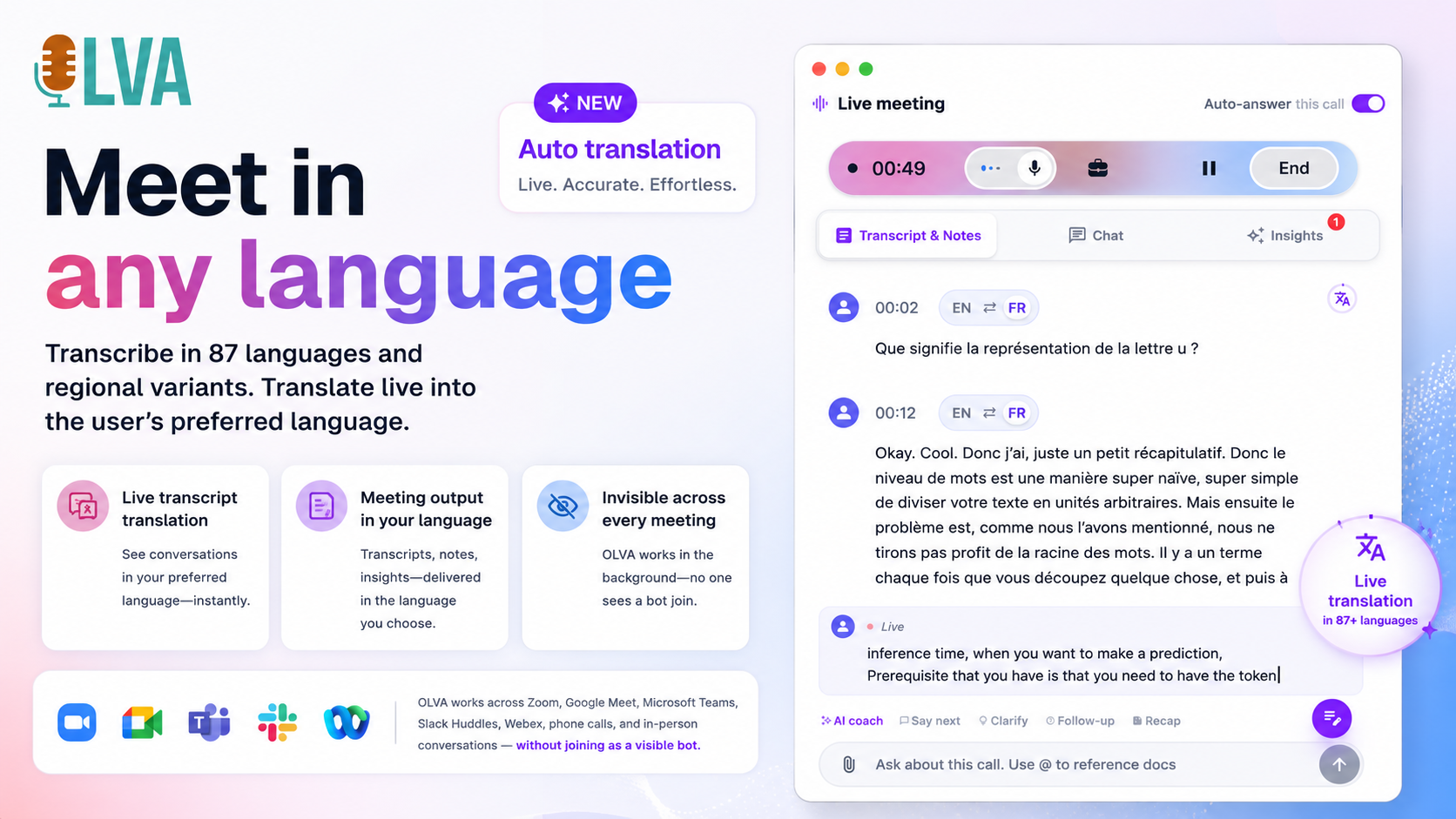
This article explains how to introduce real-time translation into your meeting workflows in a way that preserves conversational flow, respects consent and privacy, and improves outcomes. Wherever helpful, the guidance references OLVA — a botless AI meeting assistant that supports live transcription, multilingual support across 87 languages and variants, and on-demand translation without joining meetings as a visible participant (see https://olva.ai).
Key principles for translating without interrupting the flow
Before choosing a tool or workflow, align on principles that protect meeting quality and team norms:
- Respect conversational rhythm: translation should be available with minimal attention cost and without forcing everyone to pause for interpretation.
- Prioritize understanding over perfect word-for-word translation: context matters, especially with technical terms, acronyms, or idiomatic phrases.
- Give participants control: each person should decide whether to use automatic translation, request clarification, or see a transcript in their preferred language.
- Handle consent proactively: make sure participants know if the meeting will be transcribed or translated and follow applicable legal and organizational rules.
- Provide post-meeting artifacts: searchable translated transcripts, action-item lists, and summaries reduce the need to replay meetings for clarity.
These principles help create a predictable, inclusive meeting experience where multilingual support is an enabler — not a disruption.
Two practical models for real-time translation
There are two realistic patterns teams use for multilingual support. Choose the one that fits your meeting type and culture.
- Passive, participant-side translation (non-disruptive)
- How it works: Each participant runs a local assistant or app that captures audio on their device and either displays a live transcript or translates that transcript into the user’s preferred language.
- Why use it: It preserves natural conversation and avoids adding bots or extra attendees. Non-native speakers can follow in real time without asking the group to pause.
- Typical use cases: Internal project syncs, cross-functional standups, engineering design reviews where only some contributors need translation support.
Example: A Berlin-based product manager follows a design review led in English by viewing a live German transcript. The host speaks uninterrupted while the product manager reads the translation on their laptop or mobile device.
- Shared, meeting-level translation (public or hybrid)
- How it works: The meeting organizer enables translation/transcription as a shared resource (e.g., a translated caption stream or a link to a live transcript). All participants can view the same translated view or switch their language as needed.
- Why use it: Useful for cross-company meetings, town halls, or customer demos where everyone benefits from a common translated record.
- Typical use cases: All-hands meetings, webinars, customer presentations, and vendor negotiations.
Example: A customer success lead runs a cross-border QBR and shares a live Spanish transcript for participants in Madrid, while attendees in the US choose English captions.
Both patterns work when they respect privacy and consent. Tools that can operate without joining the call as a visible bot (botless) let users keep the meeting interface clean and avoid adding extra participants to the meeting roster — but you still need to notify attendees and follow recording laws and policy.
How to choose capabilities that matter for product and engineering teams
Not all translation features are equally valuable. For technical, fast-moving conversations, prioritize these capabilities:
- Accurate live transcription first: If the original transcript is poor, translation will be unreliable. Choose solutions that handle accents and domain vocabulary.
- Context-aware translation: The system should use meeting context (prior turns, shared docs) to disambiguate terms and preserve meaning.
- On-demand manual translation for selected segments: Sometimes a short clarification or a critical specification needs exact translation — let users translate a selected snippet rather than the full stream.
- Multilingual support for many regional variants: Engineering conversations often include local product names, legal terms, or locale-specific phrasing — broader language coverage helps.
- Post-meeting translated artifacts: Action items, decisions, and summaries translated into team languages reduce follow-up confusion.
OLVA’s real-time features are built around these priorities: it transcribes live, supports 87 languages and regional variants, allows users to set automatic translation to their default language, and lets users manually translate selected parts of the conversation when they need extra clarity. Because it runs privately alongside calls and mobile conversations, OLVA supports both passive participant-side translation and shared workflows while keeping the meeting interface uncluttered.
Practical meeting patterns and scripts
Below are practical patterns you can try immediately, with short “scripts” or prompts to set expectations.
- Quick-syncs: use passive translations for minimal interruption
- Before the meeting: Notify participants in the invite that live transcription/translation will be available and provide opt-out instructions.
- During the meeting: Non-native speakers follow a translated transcript on their device. If someone needs a spoken clarification, they ask for it.
- Script to set expectations: “For this 15-minute sync we’ll use live transcription in case anyone needs it. If you prefer not to be transcribed, let me know and we’ll pause when appropriate.”
- Technical deep-dives: combine live translation with manual clarifications
- Before the meeting: Share technical documents (design specs, RFCs) and ask attendees to upload or link them to the meeting assistant so context-aware translation can reference them.
- During the meeting: Use live translation for overall flow. For code snippets, API names, or exact numbers, ask speakers to repeat critical phrases slowly or paste them into chat for an exact copy.
- Script to set expectations: “We’ll have live captions in your preferred language, but please paste important code or exact command lines in chat so everyone can capture the exact text.”
- Cross-regional demos and customer calls: offer shared translation and summary follow-ups
- Before the meeting: Tell participants a translated transcript and executive summary will be shared after the call.
- During the meeting: Share a live translated transcript link or captions; let non-native speakers toggle language on their side.
- After the meeting: Publish a translated summary, identified action items, and decisions.
- Script to set expectations: “We’ll share a translated transcript and a short action-item summary after the demo so nothing gets lost.”
These patterns keep meetings efficient while improving comprehension and participation.
Handling domain-specific terminology and accuracy
Technical meetings are rich with jargon, abbreviations, product names, and code. Generic translation can misinterpret these, so use these practices:
- Build a shared glossary: Collect common terms, acronyms, and product names and make them available to meeting tools where possible. Glossaries improve translation quality and consistency.
- Use document-aware translation: Tools that can reference attached specs or docs while translating will preserve technical meanings better than generic models.
- Allow manual translation of snippets: When a sentence contains a term you can’t risk losing, translate that snippet manually or paste the phrase into chat.
- Encourage explicit phrasing for important items: When stating decisions or numbers, invite speakers to use full sentences and say numbers clearly (e.g., “the budget is ten million dollars, not ten percent”).
OLVA supports document-aware intelligence, which means it can reference uploaded PDFs, specs, and other meeting documents when generating context-aware answers and translations — reducing mistranslations of domain-specific language.
Privacy, consent, and compliance checklist
Before enabling or encouraging real-time translation, follow a checklist to avoid legal and ethical pitfalls:
- Inform attendees in the calendar invite and at meeting start that transcription/translation is available and how the resulting artifacts will be used and stored.
- Verify that local laws and company policies allow recording/transcription in that context (some jurisdictions require two-party consent).
- Offer opt-out mechanisms for participants who do not wish to be transcribed.
- Limit distribution of transcripts and translated materials to relevant stakeholders and apply your organization’s data retention rules.
- When using third-party tools, confirm data handling and storage practices match your compliance needs.
Remember: botless or invisible operation is not a substitute for consent. Even if an assistant runs locally and doesn’t appear as a meeting attendee, you must follow applicable rules and organizational norms.
Example: Running a weekly cross-functional planning meeting with minimal friction
A 60-minute planning meeting includes engineers in Bangalore, product managers in Berlin, and customer success in São Paulo. Here’s a step-by-step design that reduces interruptions:
- Pre-meeting
- Attach the agenda and sprint plan to the invite and upload them to your meeting assistant so it can perform document-aware transcription.
- Add a short note: “We’ll enable live transcription and optional translation in your chosen language. Please review the attached doc in advance.”
- During the meeting
- Engineers speak naturally; non-native speakers follow translated transcripts on their devices.
- When someone calls out a technical dependency or a precise deadline, paste the exact phrase in chat and mark it as an action.
- If a complex design point emerges, the facilitator asks the speaker to restate the key decision slowly so the translation captures the intent.
- Post-meeting
- Publish an editable summary, translated action items, and decisions. Include a downloadable slide deck that highlights the sprint plan (generated automatically from meeting content if desired).
This design preserves conversational speed while ensuring everyone leaves with the same commitments and understanding.
Tools and features to look for
When evaluating solutions for real-time translation, focus on these technical and UX features:
- High-quality live transcription with multi-accent support
- Support for many languages and regional variants
- Local or participant-side operation (botless) if you want to avoid adding visible meeting participants
- Document-aware translation so the assistant can reference specs and proposals during the conversation
- On-demand manual translation of selected transcript segments
- Post-meeting translated summaries, action items, and editable outputs (presentations, docs)
- Clear controls for data retention, export, and deletion
OLVA combines many of these capabilities: botless operation that runs alongside Zoom, Teams, Google Meet, and in-person conversations; live transcription and multilingual support; document-aware intelligence; and translated post-meeting outputs. See https://olva.ai for details and examples of how teams use these features responsibly.
Common pitfalls and how to avoid them
- Pitfall: Over-reliance on automatic translation for legal or contractual language. Fix: Always have human review and, for legal items, use certified translators.
- Pitfall: Treating translation as a technical upgrade rather than a change in meeting norms. Fix: Train teams on how to run multilingual meetings respectfully (announcing transcriptions, opting out, using shared glossaries).
- Pitfall: Assuming a single translation approach fits every meeting. Fix: Use participant-side translation for small team syncs and shared translation for large or external meetings.
Measuring success
To know if real-time translation is improving alignment, track simple metrics:
- Meeting efficiency: are decisions made faster and with fewer clarifying follow-ups?
- Participation rates: do non-native speakers contribute more frequently?
- Post-meeting rework: are fewer items reopened due to misunderstanding?
- Satisfaction: short surveys can capture whether attendees felt understood and able to contribute.
Combining quantitative and qualitative feedback helps refine translation workflows and tooling choices.
Conclusion: Make translation an inclusive feature, not a disruption
Real-time translation can transform distributed collaboration when it preserves conversational flow, respects consent, and focuses on understanding rather than literal accuracy. Adopt clear principles, choose the right working pattern for each meeting type, and use tools that prioritize live transcription, context-aware translation, and post-meeting artifacts.
For teams that need translation without adding visible bots or extra meeting participants, OLVA offers a botless approach that supports live transcription, on-demand translation, document-aware intelligence, and translated post-meeting outputs. Learn more at https://olva.ai and consider a small pilot focused on one meeting type (for example, technical design reviews) to refine your norms before wider rollout.
When done thoughtfully, multilingual meetings stop being a barrier and become an opportunity: more voices heard, faster alignment, and better decisions across your global organization.
If you want, use this checklist to run your first pilot: inform attendees, attach relevant documents, enable participant-side translation, collect feedback after three meetings, and publish translated summaries. Small experiments lead to practical improvements that scale.