Choosing the Right Live Meeting Assistant for Global Sales Calls in 2026
Introduction
Global sales conversations in 2026 are faster, more distributed, and more multilingual than ever. Sales operations, solutions consultants, customer success teams, and international account executives must juggle complex technical details, differing languages, and rapid decision cycles — often in the same call. That creates three practical problems that directly affect win rates:
- Missing or misremembering customer commitments (lost opportunities).
- Failing to respond to technical or pricing questions in the moment (delayed momentum).
- Spending hours after the call converting notes into shareable follow-ups and proposals (low productivity).
A live meeting assistant can help, but not all tools are built for high-stakes, multilingual sales conversations. This guide explains what to evaluate when choosing a live meeting assistant for global sales calls: multilingual transcription and translation, automatic question detection, real-time contextual answers, and post-meeting follow-up capabilities that actually close deals. Where relevant, the article references features offered by OLVA (https://olva.ai) to show how these capabilities look in practice without making absolute comparative claims.
- Multilingual transcription and translation for global calls
Why it matters
International buyers and cross-border teams frequently mix languages, dialects, and regional terms. If a seller or technical expert mishears a commitment or a subtle objection expressed in another language, the cost can be a lost deal or a mis-scoped implementation.
What to evaluate
- Language coverage and dialects: Look for broad language support and regional variants. Coverage for common sales markets (English, Spanish, French, Mandarin, Portuguese, German, Japanese, Korean) is table stakes; regional variants, idioms, and accent handling matter too.
- Live translation vs post-call translation: Live translation lets reps follow and respond in their preferred language during the call. Post-call translation helps localize materials and summaries.
- Speaker diarization and timestamps: Knowing who said what — and when — prevents misattribution of commitments or requests.
- Accuracy under realistic conditions: Evaluate performance with multi-speaker overlap, background noise, and non-native accents.
Practical example
A solutions consultant in Berlin is on a joint call with a Tokyo-based buyer and a São Paulo-based technical lead. Live transcription in English alone misses a detail where the buyer switches to Japanese to ask about a regional compliance clause. A meeting assistant that translates the Japanese question into the consultant’s default language in real time preserves momentum and avoids the need to ask the buyer to repeat or to pause for clarification.
How OLVA fits
OLVA supports 87 languages and regional variants and provides live transcription, speaker diarization, and automatic live translation. That combination reduces cognitive load for reps who must follow cross-language exchanges and helps ensure commitments are captured as they occur. OLVA’s approach is designed for both virtual and in-person conversations on desktop and mobile platforms.
- Automatic question detection: never miss a buyer’s real question
Why it matters
Buyers rarely state their real concerns directly. Questions can be phrased as statements, embedded in long explanations, or asked rhetorically. If a seller misses or delays an answer to a key question, momentum stalls and competitors have time to reframe the opportunity.
What to evaluate
- Real-time detection: The assistant should surface detected questions during the meeting, not only in the post-call transcript.
- Prioritization and triage: Can the tool flag unanswered questions or surface which questions are tied to pricing, risk, technical fit, or commitment?
- Integration with coaching: Does the assistant provide suggested responses, clarifying follow-ups, or objection-handling templates?
Practical example
During a demo, a buyer says: “I’m concerned about uptime if we integrate this with our legacy stack.” That is a question of risk and technical fit, even if it’s spoken as a concern. The assistant detects that as a question, surfaces it to the seller, and recommends a brief, relevant response template and a follow-up action like scheduling a technical deep-dive.
How OLVA fits
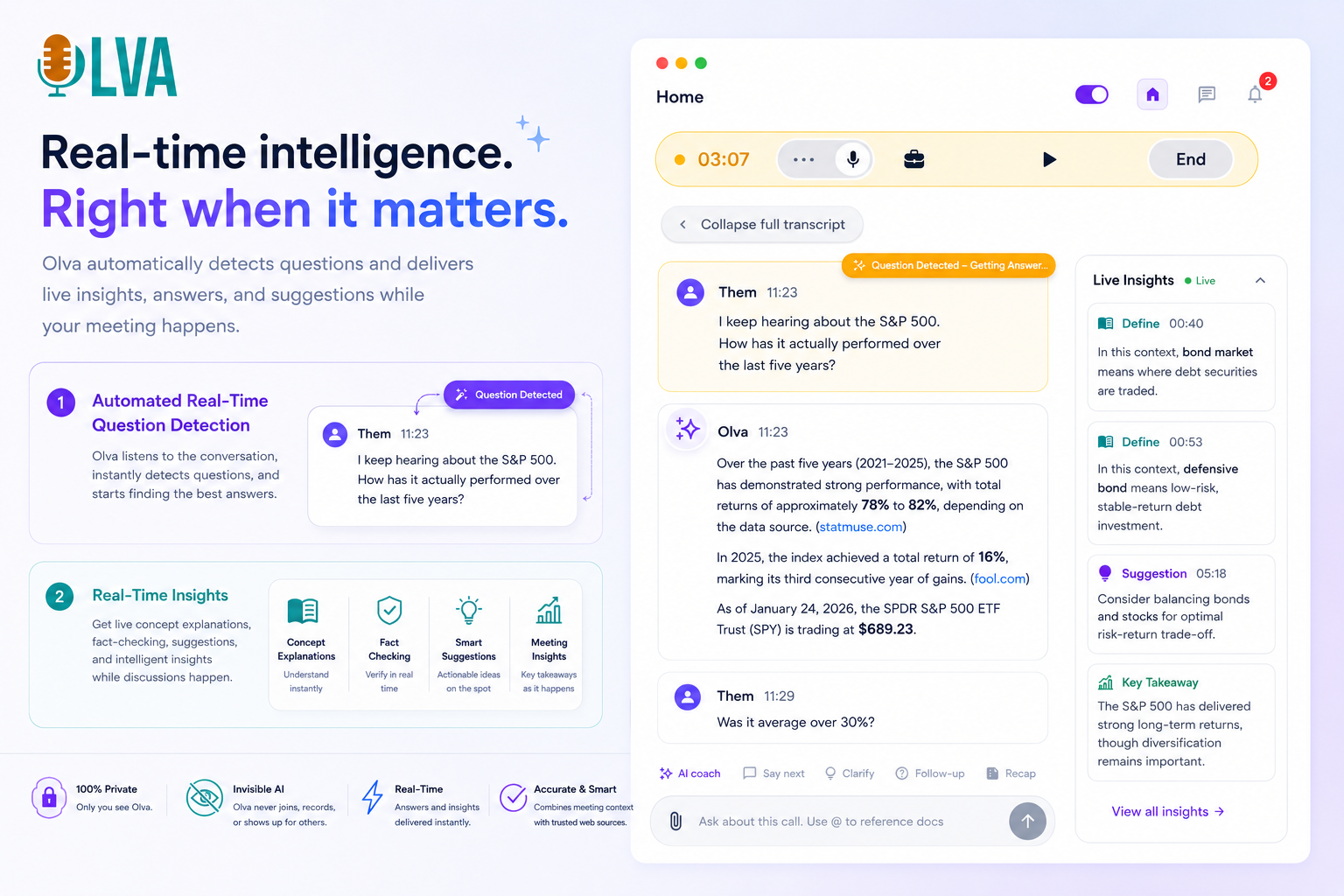
OLVA detects questions automatically during a meeting and can surface them so reps don’t have to jot them down manually. Because OLVA uses the live transcript and surrounding context, it can produce context-aware suggestions and follow-up prompts that reflect what was said earlier in the conversation — providing immediate, decision-relevant support.
- Context-aware, instant answers and document-aware intelligence
Why it matters
Sales teams rely on product specs, pricing decks, SOW templates, compliance documents, and previous meeting history. A good live assistant should use that context to produce accurate, on-topic answers rather than generic replies.
What to evaluate
- Document awareness: Can the assistant search and reference PDFs, proposals, or technical docs during the call?
- Conversational context: Will the assistant use earlier remarks in the same meeting or prior meeting memory to answer a question?
- Fact-checking and citation: Does the tool indicate when answers are derived from an uploaded document or from other sources and encourage human verification for critical claims?
Practical example
A buyer asks whether a specific integration supports OAuth2 and certain scopes. The seller can’t recall the exact line in the integration spec. If the assistant can search the attached technical PDF and surface the exact clause and a suggested phrasing for the reply — with a citation — the seller responds confidently in the moment and preserves perceived expertise.
How OLVA fits
OLVA’s document-aware intelligence allows users to attach relevant files (PDFs, DOCX, PPTX) and use them as context during live Q&A. This supports more confident, evidence-backed answers in the meeting and reduces the need to promise follow-ups simply to check documentation.
- Live coaching, objection handling, and suggested next steps
Why it matters
Even strong product knowledge isn’t always enough. Sales conversations require structure, empathy, and on-the-fly framing. Live coaching can help sellers ask better follow-ups, de-escalate objections, and keep talks aligned to decision criteria.
What to evaluate
- Real-time coaching: Does the assistant offer phrasing suggestions, clarification prompts, or negotiation tactics during the meeting?
- Post-meeting recommendations: Are suggested next steps tailored to the conversation and easy to convert into email drafts, tasks, or calendar invites?
- User control: Can users accept, edit, or ignore suggestions? The assistant should support, not replace, seller judgment.
Practical example
A buyer raises a pricing objection. The live assistant suggests a concise way to reframe value (e.g., tie a feature to a measurable ROI) and offers a follow-up action such as proposing a short pilot with defined metrics. The rep picks the suggested phrasing, keeps the conversation moving, and schedules the pilot before the call ends.
How OLVA fits
OLVA can provide contextual guidance during conversations — suggestions for phrasing, clarifying questions, and follow-up actions — while leaving final judgment to the user. After the meeting, OLVA Live Agent can recommend next steps and generate draft follow-up messages using the meeting transcript and summary.
- Post-meeting follow-up that actually closes deals
Why it matters
Fast, accurate follow-up distinguishes closed deals from lost ones. Reps often spend 30–60 minutes after calls cleaning notes, extracting action items, and drafting follow-ups. The right assistant shortens that cycle and reduces friction between promise and delivery.
What to evaluate
- Action item extraction: Does the assistant reliably identify commitments, owners, and deadlines from conversation text?
- Meeting summaries and decisions: Are outputs structured, editable, and shareable in the formats your team uses (Google Docs, Notion, PowerPoint)?
- Slide and presentation generation: Can the assistant convert conversations into an editable deck for stakeholders or executive briefings?
- Workflow integrations: Are there easy ways to export summaries, tasks, or drafts to CRMs, task managers, or document stores?
Practical example
After a discovery call, the assistant produces a one-page summary with three action items (technical deep dive scheduled, trial access to a sandbox environment, and an internal pricing review). The rep reviews and sends the summary and a short draft email to the buying committee within minutes. The buyer appreciates the clarity and speed, accelerating procurement.
How OLVA fits
OLVA creates structured meeting summaries, identifies action items and key decisions, and can generate editable PowerPoint slide decks from meeting content. It supports Google Docs and Notion exports and offers signed webhooks for custom workflow automation. OLVA’s post-meeting capabilities are designed to move teams faster from conversation to committed action.
- Privacy, consent, and compliant use in sales contexts
Why it matters
Recording, transcribing, or using AI-generated content in sales conversations has legal and ethical considerations. Failure to follow consent requirements or organizational policies can create serious risks.
What to evaluate
- Data handling and storage: Where are transcripts and summaries stored? Can users manage and delete data?
- Consent and notification workflows: Does the tool help teams comply with local laws and internal policies (e.g., notifying participants when required)?
- Controls for sensitive conversations: Are there ways to exclude certain meetings or parts of meetings from capture?
Practical example
A multinational team conducts a meeting with participants in jurisdictions that require explicit consent for transcription. The assistant should not be used without first ensuring required notices or permissions are obtained and documented.
How OLVA fits
OLVA is designed as a user-controlled assistant: transcripts and generated outputs are associated with the user’s account and are private. OLVA does not record or store voiceprints and is intended to be used with attention to consent, workplace policies, and local recording laws. Users are responsible for following applicable rules when enabling transcription and AI assistance.
- Integration with sales workflows and CRMs
Why it matters
A meeting assistant that creates excellent summaries is helpful only if those summaries connect to the systems your team uses to advance deals — CRM entries, project trackers, or collaboration tools.
What to evaluate
- Native integrations and export options: Does the tool support Google Docs, Notion, Google Drive, and webhooks for custom automation?
- Ease of creating shareable artifacts: Can you generate a client-ready deck or a polished one-page summary without leaving the app?
- Speed and reliability: Are exports and webhooks trustworthy and timely enough for fast-moving sales cycles?
Practical example
A rep needs a clean follow-up email and CRM note immediately after a negotiation call. The assistant should create a draft email and a structured CRM-friendly summary that can be copied or pushed via webhook without manual retyping.
How OLVA fits
OLVA supports Google Docs, Notion, Google Drive, and outbound webhooks. It also turns meetings into editable PowerPoint presentations and provides draft follow-ups via Live Agent recommendations so reps can act quickly and consistently.
- Usability and deployment across mobile and desktop
Why it matters
Global sales teams run calls from offices, mobile devices, or conference rooms. A meeting assistant needs to work reliably across platforms and in real-world meeting conditions.
What to evaluate
- Cross-platform support: Windows, macOS, iOS, and Android coverage ensures field reps and remote teams can all use the same assistant.
- In-person mode: Can the tool capture device audio accurately in face-to-face conversations?
- Low-friction start: How easy is it to turn the assistant on during a live call? Does it recognize supported meeting platforms automatically?
Practical example
A rep in the field joins an in-person executive briefing and later a Zoom demo from a laptop. The same assistant should be available on their phone and desktop and handle both environments consistently.
How OLVA fits
OLVA is available on Windows, macOS, iOS, and Android and is designed to capture device audio for virtual and in-person conversations. Features like Meeting Detector and Dashboard Mode help reduce friction when joining or monitoring supported online meetings.
Checklist: Questions to ask vendors
- How many languages and regional variants are supported? Can you show examples with realistic accents and mixed-language speech?
- How does your question-detection work and how are detected questions surfaced to users?
- Can the assistant use uploaded documents during live Q&A and cite sources?
- What post-meeting outputs are generated automatically (summaries, action items, slide decks) and how editable are they?
- Where are transcripts and summaries stored? Who can access and delete them?
- What integrations exist for Google Docs, Notion, CRMs, or webhooks?
- Which platforms (desktop/mobile) are supported and how does the assistant capture audio in each setting?
- How does the product help users comply with consent, recording laws, and company policy?
Conclusion: Choosing for outcomes, not features
By 2026, selecting a live meeting assistant for global sales calls is less about checking boxes and more about ensuring the tool produces outcomes your team can act on: fewer missed commitments, faster evidence-based answers, and follow-ups that convert interest into commitments.
Prioritize assistants that combine reliable multilingual transcription and live translation, robust question detection, document-aware contextual answers, and post-meeting outputs that integrate with your workflows. Evaluate privacy, consent controls, cross-platform usability, and how the assistant helps sellers act during — not just after — meetings.
If you want to explore a bot-free, real-time meeting assistant designed with these capabilities in mind, see OLVA’s product overview at https://olva.ai. Use real meeting scenarios from your team when testing tools: include mixed-language calls, technical deep dives with attachments, and follow-up requirements you actually need to deliver.
Practical next steps for sales teams
- Pilot with representative calls: Run a two-week pilot using real discovery and demo calls that include multilingual or technical participants.
- Measure time to first follow-up: Track how long it takes from call end to sending a client-ready summary and next-step email.
- Track unanswered questions: Measure the number of buyer questions left unanswered at call end and whether they were followed up within the expected SLA.
- Assess adoption and ease of use: Ask reps whether the assistant reduced cognitive load, improved confidence in technical answers, and sped up follow-ups.
Choosing the right assistant will save time, reduce errors, and help reps preserve credibility across language and technical barriers. When your team moves faster and responds more accurately, closing becomes a process, not a sprint.