
Turn every client call into an editable, decision-ready slide deck
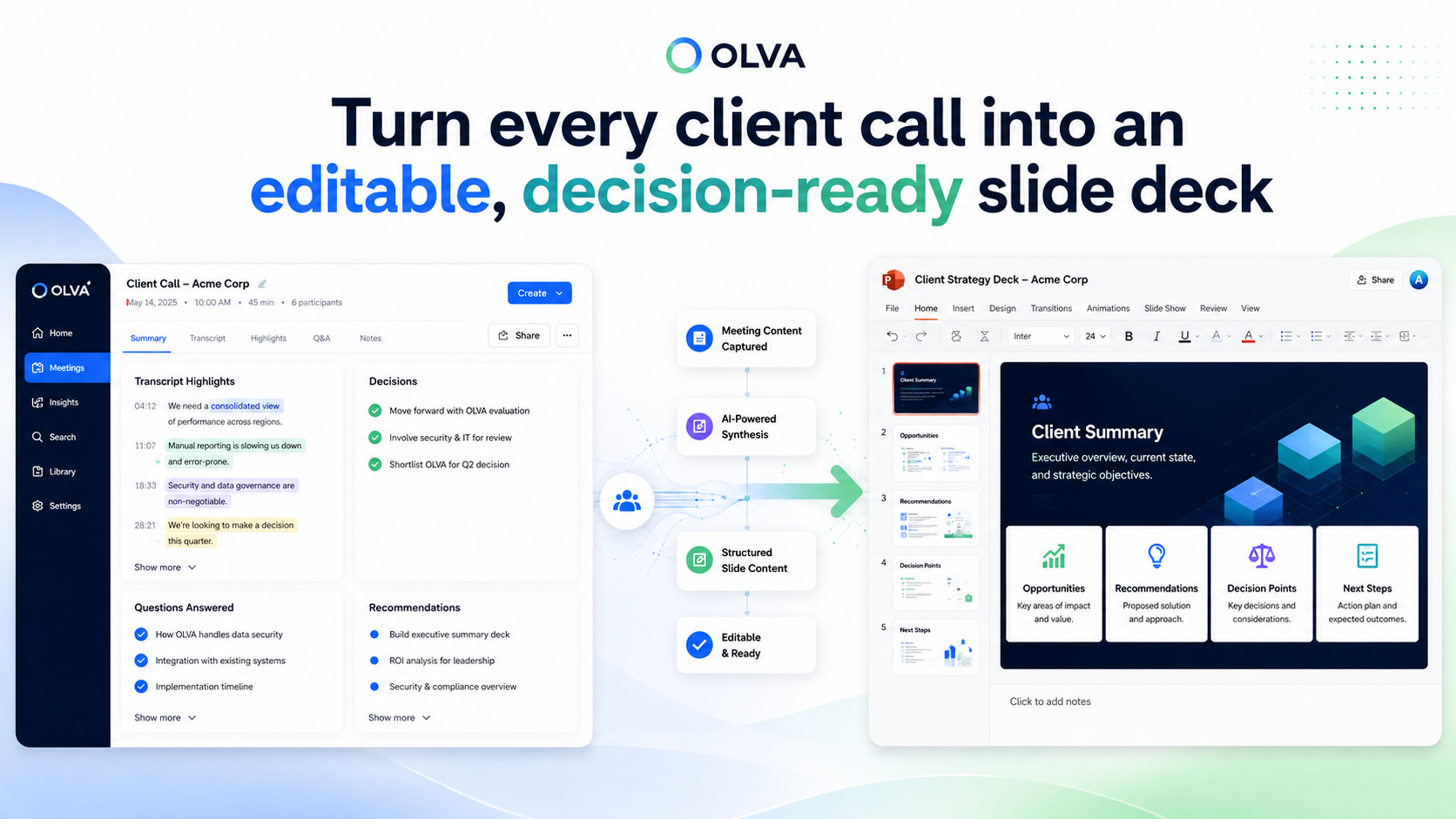
Meetings are where decisions, commitments, and context live — but they rarely end as ready-to-share presentations. For consultants, professional services teams, customer success managers, and delivery leads, that gap means hours of follow-up work: hunting through transcripts, reconstructing decisions, and recreating slides.
This article shows a practical, repeatable approach to convert completed client calls into editable PowerPoint decks in minutes, preserving decisions and action items so you can move faster and present with confidence. It also explains how OLVA’s meeting memory and Slide Decks feature can reduce the manual lift without replacing your final review. For more product details, see https://olva.ai.
Why convert calls into slide decks immediately
A presentation is more than a collection of slides — it’s a narrative that captures context, decisions, and commitments for stakeholders who weren’t on the call. Turning a meeting into a deck right after the call is valuable because:
- It preserves the client’s language and priorities while they’re fresh.
- Decisions and action items are captured before details get lost or misremembered.
- You produce a reusable artifact for internal alignment, billing, and next steps.
- It shortens the time between discussion and delivery, keeping momentum.
For client-facing teams, that speed and clarity translate into fewer misunderstandings, faster approvals, and better retention of project context.
A practical, repeatable structure for every meeting deck
Below is a lightweight slide structure that scales across sales, consulting, project updates, and customer reviews. Use it as a starting template when generating or editing decks:
- Title slide: meeting name, date, client, and owning team
- Objective slide: What we set out to accomplish in this call
- Executive summary: 2–4 bullets summarizing outcomes and requests
- Key decisions: each decision paired with who agreed and the impact
- Action items: owner, due date, and success criteria
- Scope / Deliverables: any confirmed scope changes or clarifications
- Risks & dependencies: what could block progress and mitigation
- Timeline / next milestones: immediate next steps and dates
- Pricing / commercial notes (if relevant): ballpark, constraints, approvals
- Appendix: transcript excerpts, supporting docs, and references
This structure keeps presentations concise and decision-focused. When you generate a draft deck from a meeting, focus your edits on the executive summary, decisions, and actions — they carry most of the value for stakeholders.
How OLVA helps (without replacing your judgment)
OLVA is built to help both during and after conversations. Two everyday ways it helps teams convert calls into decks:
- During the meeting: OLVA provides live transcription, detects questions automatically, and surfaces context-aware insights and relevant document references. That means you capture the phrases, concerns, and decisions that should appear in the final deck without scrambling to transcribe later.
- After the meeting: OLVA Slide Decks turns a completed meeting into an editable PowerPoint (.pptx) file. The generated deck is a structured starting point — it preserves decisions, action items, Q&A, and other meeting outputs so you can review and tailor the presentation for the intended audience.
Remember: generated slides are a starting point. Human review is still required to confirm accuracy, tone, and client-sensitive details.
OLVA Presentation Creation Process
OLVA helps users turn a completed meeting into an editable slide deck without manually copying notes, transcripts, or action items into PowerPoint.
The user opens a completed meeting in OLVA and chooses Create → Slide deck or Create presentation.
OLVA gathers available meeting context, such as the transcript, meeting insights, decisions, recommendations, and any meeting Q&A the user created while reviewing the meeting.
The user can choose which sources to include and add custom slide deck instructions, such as the audience, tone, level of detail, or specific themes to emphasize.
Once submitted, OLVA starts generating the presentation in the background. The user does not need to keep the modal open while the deck is being created.
While generation is running, OLVA shows progress from the meeting’s presentation history, so the user can see that a deck is being created.
When the presentation is ready, OLVA saves it as a private, editable PowerPoint file tied to that meeting.
The user can download the .pptx file directly. If they have Google Drive connected, they can also choose to save the same PowerPoint file to Drive.
Each generated deck is kept as its own version, so users can create multiple presentations from the same meeting without overwriting previous ones.
If Drive saving fails, the presentation is still available for download. The generated deck remains safe and accessible in OLVA.
Practical examples: three use cases with sample slide notes
Below are three real-world examples showing how a generated deck can be edited into a client-ready presentation.
- Consulting: Discovery call → proposal-ready deck
- What OLVA captures: requirements, client pain points, priority use cases, decision to proceed to scoping.
- Editor focus: convert transcript bullets into crisp problem statements and measurable goals.
- Sample slide notes: Problem statement (1–2 bullets), Agreed priority outcomes (measurable KPIs), Suggested scope and next steps (deliverables, timeline), Decision log (client committed to a 2-week scoping exercise)
- Professional services delivery: Weekly status call → stakeholder update
- What OLVA captures: completed milestones, blockers, next deliverables, owners.
- Editor focus: create clear owner-led action items and escalate items that need stakeholder approval.
- Sample slide notes: Completed since last meeting (3 bullets), Current risks and mitigation owners (table), Upcoming milestones with owners and due dates, Decisions made and outstanding approvals
- Customer success: Onboarding Q&A → executive recap for renewal discussion
- What OLVA captures: customer sentiment signals, feature requests, adoption metrics discussed.
- Editor focus: surface adoption wins, open concerns, and an action plan tied to renewals.
- Sample slide notes: Adoption highlights (metrics discussed on call), Open product requests and timelines, Immediate actions assigned to CS and product, Renewal-related recommendations
These edits are the high-leverage changes: move from raw transcript language to concise slide messaging that supports decisions.
Editing checklist: what to validate before sharing
Before sharing a generated deck, run through this quick checklist:
- Confirm key decisions are correct and attributed properly.
- Verify owners and due dates for action items.
- Ensure any client pricing or scope statements match approved language.
- Redact or anonymize sensitive details if necessary.
- Tailor tone and level of detail to the audience (executive vs. delivery team).
- Add visuals where a table or timeline will communicate better than bullets.
- Check that the presentation filename, title slide, and versioning are clear.
A brief review like this typically takes 10–20 minutes for a one-hour meeting — far less than building a deck from scratch.
Tips for making generated decks presentation-ready fast
- Use slide templates: Connect the generated .pptx into your firm’s standard template to ensure branding and slide layout consistency.
- Standardize the executive summary: Keep it to three bullets: outcome, decision, next action.
- Keep decisions visible: Add a ‘‘Decisions’’ footer or badge to slides that record commitments.
- Link to evidence: Include a slide appendix with transcript snippets and attachments for questions reviewers will want to verify.
- Version names that mean something: Use naming like Client_Project_MeetingDate_v1 to avoid confusion.
- Build a short internal review habit: route the deck to a second pair of eyes only when it contains commercial commitments or scope changes.
Security, privacy, and responsible use reminders
Using AI for meeting outputs requires attention to consent, policies, and legal requirements. A few reminders:
- OLVA operates as an invisible, botless assistant that captures audio available on your device. Follow your organization’s recording policies and obtain required consent before using transcription or AI assistance.
- Review and remove any confidential or sensitive information that should not be distributed.
- Treat generated outputs as drafts that require human verification, particularly for pricing, legal, and regulatory content.
For more product-level privacy and operational details, visit https://olva.ai/privacy.
Workflow example: meeting → deck → action with least friction
- During the meeting: enable live transcription, tag decisions and action items as they occur, and save the call.
- After the meeting: open the meeting record in OLVA and choose Create → Slide deck.
- Select which meeting sources to include, add a short instruction (audience: client execs; tone: concise), and submit.
- While OLVA generates the deck in the background, draft any supporting emails or follow-ups.
- Download the .pptx when ready, apply your firm template if needed, run the editing checklist, and share.
This flow concentrates human effort on message and judgment, not repetitive transcription and slide creation.
Measuring value: what to track
Consider tracking a few simple metrics to evaluate the impact of moving from manual decks to generated drafts:
- Time to first presentation after a meeting (hours)
- Number of follow-up clarifications needed after deck distribution
- Percentage of action items closed on time
- Client satisfaction with meeting recaps (short NPS or feedback)
Even small improvements in these metrics compound across a busy consulting or delivery pipeline.
Conclusion
Turning client calls into editable, decision-ready slide decks should be fast, reliable, and repeatable. By preserving the language of the conversation, capturing decisions and owners, and producing an editable .pptx that fits your workflow, teams can reduce rework and accelerate outcomes. OLVA’s Slide Decks feature is designed to create that structured starting point from a completed meeting, while your judgment and review ensure the final presentation matches your standards.
If you want to learn more about how this works in practice, see https://olva.ai and explore how meeting memory and generated slide drafts can fit into your team’s delivery and client communication process.