
Onboarding Newcomers and Immigrants into Professional Meetings: Practical Steps with Live Translation and Meeting Memory
Introduction
Bringing newcomers and immigrants into professional meetings is more than assigning a seat and forwarding calendar invites. Real inclusion requires intentionally reducing language barriers, clarifying expectations, and ensuring newcomers can participate, retain information, and follow-up effectively. For HR managers, D&I leaders, community organizations, and program coordinators, the challenge is operational: how to make meetings accessible in real time and maintain continuity afterwards.
This article offers practical, step-by-step guidance to onboard newcomers into meetings using low-friction practices and modern meeting assistance tools—especially features like live translation, live transcription, and persistent meeting memory. Where helpful, we reference OLVA (https://olva.ai) as an example of a botless, real-time meeting assistant that provides live transcription, multilingual support, context-aware answers, and searchable meeting history. The goal is to give you reproducible tactics that improve understanding, participation, and follow-through.
Why focused onboarding matters
Common pain points for newcomers and immigrant participants include:
- Rapid spoken language that’s hard to follow
- Industry or company-specific jargon
- Limited opportunities to clarify points during fast-moving discussions
- Difficulty remembering decisions, assigned actions, or where to find resources after the meeting
- Cultural differences in meeting norms or turn-taking
Addressing these problems increases engagement, reduces rework, and shortens the time it takes newcomers to become fully productive members of teams.
Before the meeting: set expectations and prepare supports
- Share an agenda and materials early
Provide a clear, time-stamped agenda and any documents (slides, briefings, proposals) at least 48 hours in advance. Make materials available in accessible formats (PDF, plain text, or shared Google Docs) so they can be machine-translated or read with assistive technology.
Practical example: send a 1-page agenda that includes meeting purpose, expected outcomes, roles (facilitator, note-taker), and a short glossary of 8–10 technical terms likely to appear.
- Offer language options and guidance
Ask attendees whether they would prefer live translation or other supports. Make this part of the meeting invitation and provide simple opt-in instructions. Let newcomers know who to contact if they need accommodations.
Practical example: include a line in the invite: “If you prefer live translation, captioning, or a follow-up summary in your preferred language, reply to the organizer.”
- Assign a meeting buddy or facilitator role
Pair newcomers with a buddy who can brief them beforehand and clarify cultural expectations (e.g., how decisions are made, whether interruptions are acceptable). The buddy can also monitor chat and raise typed questions on behalf of the newcomer if that person feels uncomfortable speaking up.
Practical example: for the first three cross-functional meetings, assign an existing team member to send a 10-minute prep call and sit with the newcomer during the meeting (virtually or in-person) to support live clarification needs.
During the meeting: use real-time supports and inclusive facilitation
- Use live transcription and captions
Live transcription provides an on-screen, searchable record of what is said. It helps participants who process written text more easily than rapid speech. Make the transcript visible to everyone or ensure newcomers know how to access captions on their device.
Practical example: enable live captions in your conferencing platform and verify they’re visible before starting. If the platform’s captions are limited, consider running a parallel assistive tool that provides richer transcription.
- Offer live translation for immediate comprehension
Live translation reduces the cognitive load of simultaneous listening-and-translation and allows newcomers to follow conversations in their preferred language. Provide two clear workflows:
- Automatic translation into each participant’s default language for those who opt in.
- Manual translate-any-selected-part option so participants can request translation for a specific sentence or exchange when they need extra clarity.
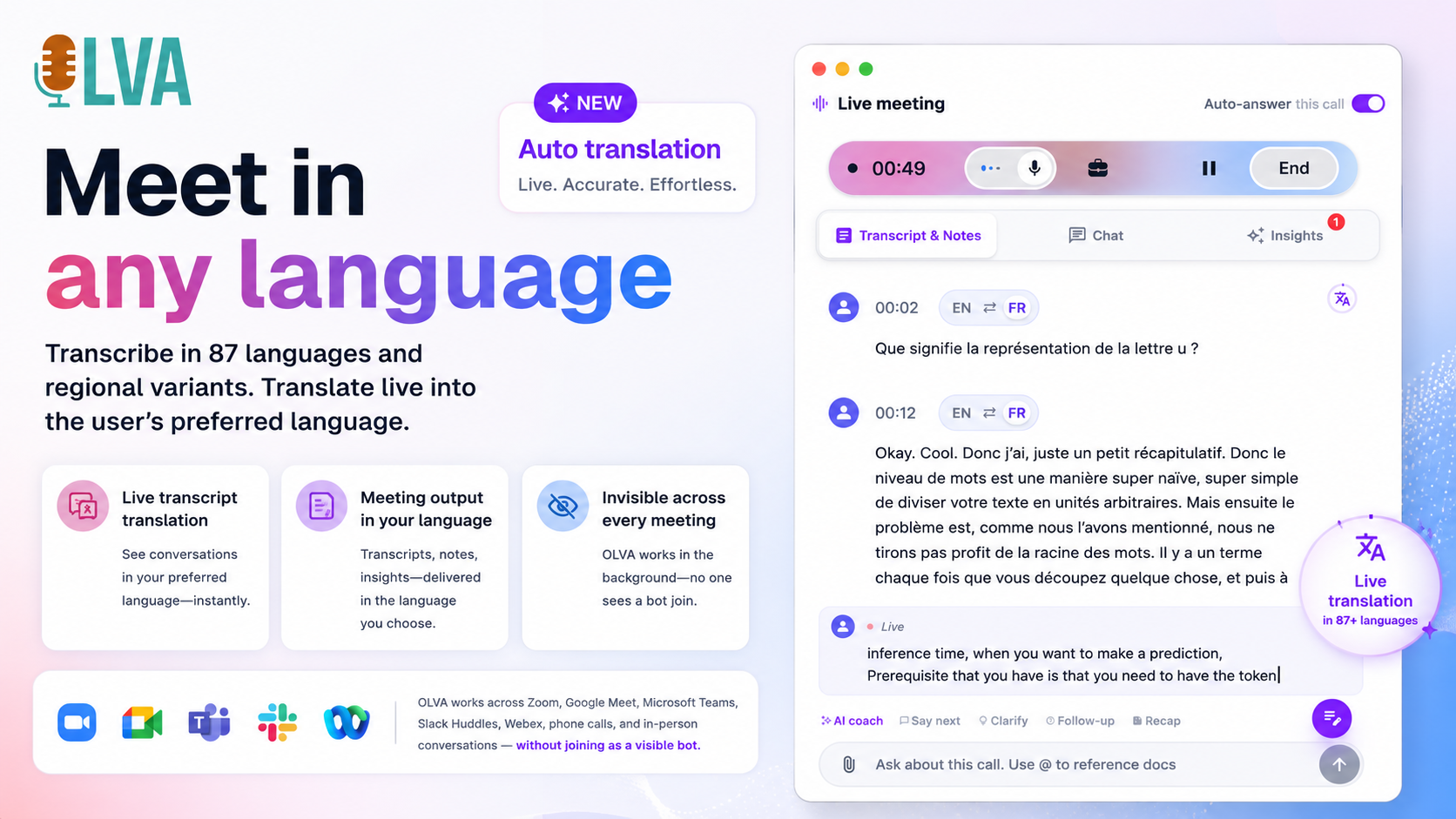
Using a botless assistant with multilingual support (for example, a tool that can translate 87 languages and regional variants) lets participants avoid adding a visible bot to the meeting roster while still getting private translations on their device.
Practical example: allow newcomers to set their default language before the meeting so their view shows real-time translated captions. If someone needs a translation for a particular turn, they can highlight that sentence and request an on-demand translation.
- Slow the pace and invite pauses for clarification
Facilitators should build short pauses into the agenda and signal when they will ask for clarifying questions. These intentional breaks give non-native speakers time to process and ask questions, either verbally or via chat.
Practical example: set a 60–90 second pause after each major agenda item and prompt: “Any clarifying questions or requests for translation?”
- Use automatic question detection to surface unanswered questions
During meetings, tools that detect questions automatically can ensure requests for clarification are not missed. When questions are flagged, the facilitator or buddy can prioritize answering them or assign responses after the meeting.
Practical example: a meeting assistant that highlights every question detected in the transcript allows the note-taker to compile unanswered items for post-meeting follow-up.
- Encourage low-stakes ways to participate
Not everyone will speak up. Encourage participation through typed chat, reactions (thumbs up/thumbs down), polls, or short breakout discussions with the buddy. These alternatives reduce pressure while still giving newcomers a voice.
Practical example: start with a quick anonymous poll to surface concerns or priorities; use small breakout rooms with 3–4 people where newcomers can practice contributing in a lower-pressure environment.
After the meeting: ensure comprehension, capture decisions, and maintain continuity
- Provide translated meeting summaries and action items
Distribute a concise summary of decisions, action items (with owners and due dates), and links to referenced documents. When possible, offer the summary in the newcomer’s preferred language or provide machine-translated drafts they can review.
Practical example: the organizer sends a 300–400 word executive summary within 24 hours, plus a translated version on request.
- Use searchable meeting memory for follow-up and onboarding
Persistent meeting memory stores prior discussions, decisions, and context so newcomers can revisit earlier conversations without asking colleagues to repeat themselves. Searchable transcripts and meeting notes reduce the need for reinventing context during future meetings.
Practical example: make meeting transcripts and an index of key decisions available in a shared project space. Newcomers can search for terms like “budget,” “timeline,” or specific client names to quickly find relevant past discussions.
- Convert meeting outcomes into accessible formats
Turn important meetings into editable slide decks, checklists, or short how-to guides that newcomers can reuse. Presentations built from meeting content save time and provide structured learning artifacts.
Practical example: generate a 5–8 slide recap that highlights decisions, next steps, and where to find supporting documentation; share it as an editable .pptx and a printable PDF.
- Schedule a short follow-up or office hours
Offer 15–30 minute office hours where newcomers can ask clarifying questions about decisions, responsibilities, or jargon. These sessions can be one-on-one with the buddy or a small group drop-in.
Practical example: set weekly 30-minute office hours for the first six weeks and advertise them in onboarding materials.
Practical checklist for inclusive meetings
- Send agenda and glossary 48+ hours before the meeting
- Offer live captions and let participants opt into translation
- Assign a buddy for the first 2–4 meetings
- Ask the facilitator to pause regularly and invite questions
- Use automatic question detection to capture clarifications
- Provide translated summaries and assign clear action owners
- Store transcripts and decisions in searchable meeting memory
- Offer follow-up office hours for targeted support
Practical examples and scenarios
Scenario 1: Multilingual client kickoff
A program coordinator organizes a 60-minute client kickoff with a multilingual group. Steps they took:
- Shared slides and a one-page agenda with a glossary 72 hours before the call.
- Enabled live transcription and allowed participants to opt into automatic translation to their preferred languages.
- Assigned an internal translator/buddy to monitor chat and relay clarifications.
- Used a meeting assistant to detect all questions during the call and compile unanswered ones.
- Sent a 300-word summary with action items and a translated version within 12 hours.
Outcome: Participants reported clearer expectations and fewer follow-up emails asking the same clarifying questions.
Scenario 2: Internal technical review with new immigrant engineer
A product team schedules a design review. A new engineer, whose first language is different from the team’s lingua franca, joins the call. The team:
- Provided the design doc and glossary early.
- Enabled live Q&A so the engineer could ask the assistant what a particular term meant in the meeting context.
- Offered translated captions and a private, translated transcript after the meeting.
- Saved the meeting in a searchable project memory so the engineer could reference earlier decisions when preparing a follow-up.
Outcome: The engineer required fewer one-off clarifications and contributed sooner to design discussions.
How tools like OLVA support this workflow
Practical features that help include:
- Live transcription: keeps an on-screen transcript that participants can read in real time and search later.
- Multilingual support and live translation: translate conversations automatically into participant default languages or manually translate specific parts on demand.
- Automatic question detection: surfaces questions during the meeting so facilitators and buddies can prioritize answers.
- Live Q&A and context-aware answers: let participants ask the assistant to explain a term or pull context from the current meeting transcript and attached documents.
- Persistent meeting memory: stores summaries, decisions, and action items for future search and continuity.
- Editable slide deck generation: turns meeting outputs into structured presentations newcomers can use as oriented learning artifacts.
OLVA provides these capabilities in a botless, private experience that runs alongside standard conferencing tools without appearing as a visible bot or additional participant. This avoids adding visual clutter in participant lists while still offering translations, transcripts, and meeting memory to individual users. More details about these features are available at https://olva.ai.
Privacy, consent, and legal considerations
When you provide transcription or translation, you must follow applicable laws and organizational rules:
- Get participant consent when required by local recording laws or company policy.
- Explain how transcripts and translations will be stored and who can access them.
- Allow participants to opt out of transcription or translation if they prefer.
- Use tools that provide private, user-controlled meeting data and respect deletion and access controls.
Practical example: include a short consent blurb in the meeting invite and the first slide: “This meeting will be transcribed and translated for accessibility. By remaining, you consent to transcription. Contact [organizer] to opt out.”
Measuring impact: what to track
To assess whether these practices improve onboarding and inclusion, track both qualitative and quantitative signals:
- Number of clarification requests during meetings (chat vs verbal)
- Volume of follow-up emails asking for clarification
- Time to first meaningful contribution by newcomers (weeks)
- Newcomer satisfaction scores via short post-meeting surveys
- Usage of translation and transcript features
- Completion and timeliness of assigned action items
Small improvements in these metrics correlate to faster integration and higher confidence among newcomers.
Conclusion
Onboarding newcomers and immigrant participants into professional meetings is a mix of planning, inclusive facilitation, and the right technological supports. Simple operational steps—sharing agendas and glossaries early, assigning buddies, pausing deliberately for questions, and offering low-pressure participation channels—create the cultural foundation. Complementing those practices with live transcription, on-demand translation, automatic question detection, and persistent meeting memory reduces language friction and preserves context across meetings.
Using tools that run privately alongside meetings and provide real-time assistance—such as live translation and searchable meeting history—lets organizations scale inclusive meeting practices without adding friction to the meeting experience. For practical implementations and feature details, visit https://olva.ai.
Taken together, these steps reduce the cognitive overhead newcomers face, help them participate sooner, and protect team time by minimizing repetitive clarifications. Inclusion in meetings is operational and repeatable: with an intentional playbook and the right supports, every meeting can be a place where newcomers learn, contribute, and move forward with clarity.