
Host Flawless Live Shows: Invisible AI for Instant Fact-Checks, Q&A & Topic Ideas
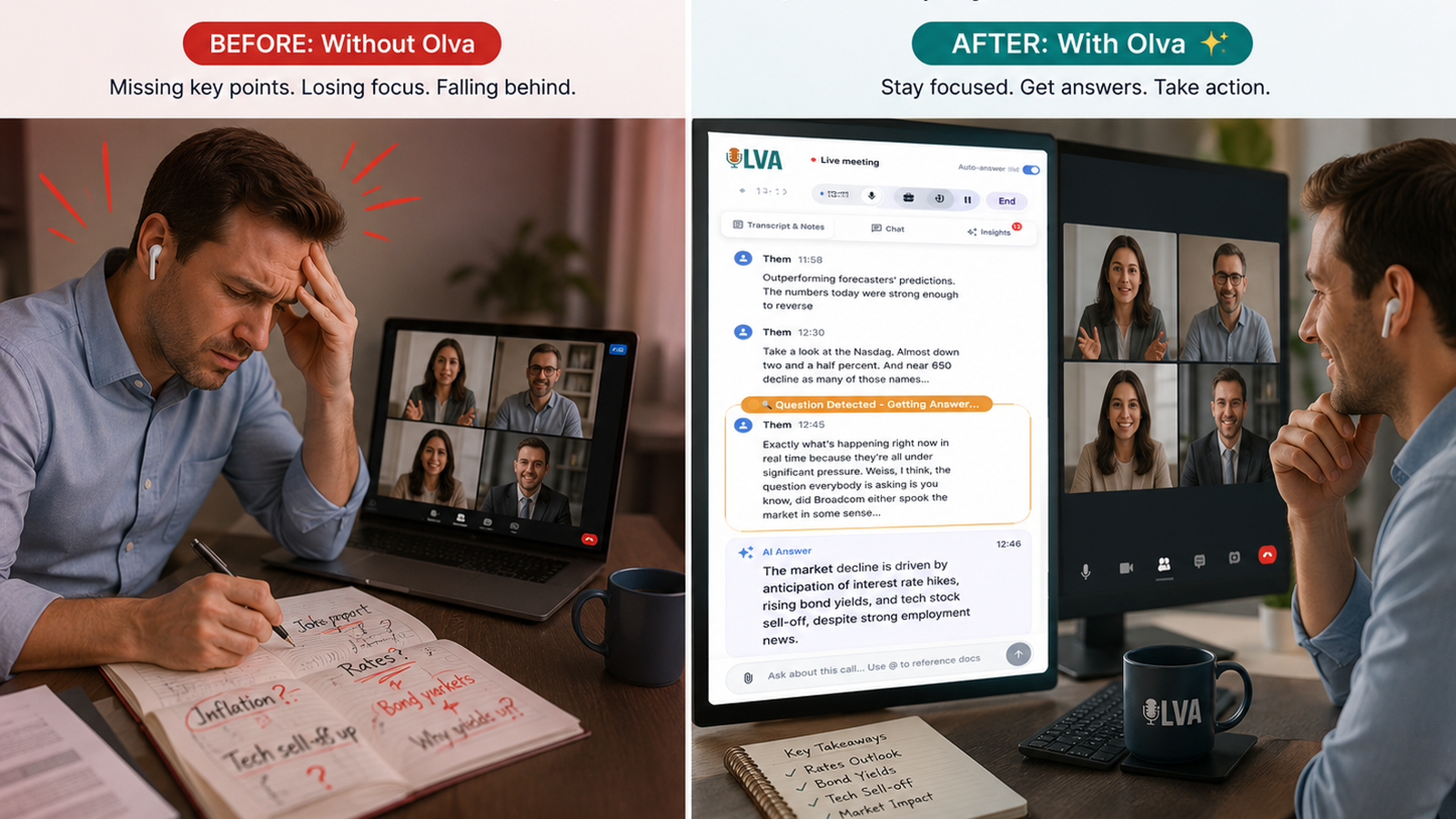
Live shows—whether podcasts, webinars, or large-scale virtual events—demand split-second decisions, clear information, and a steady flow of audience engagement. One missed fact, a confusing answer, or a stalled topic moment can derail an episode and frustrate listeners.
Traditionally, creators relied on producers, co-hosts, or post-show edits to clean up mistakes. Modern meeting tools improved transcripts and summaries, but those solutions mostly help you remember what happened after the fact. For live shows, the real win is assistance that works during the show: instant fact-checks, real-time Q&A, and on-the-fly topic suggestions that keep the conversation sharp and professional.
This article explains how an invisible AI assistant changes live production workflows, practical ways to use it during shows, and how it compares to other tools you might already use—plus real-world examples for podcasters, webinar hosts, and live-event producers.
Why live-focused AI matters for creators
Live content is unforgiving. Mistakes are public, and authenticity matters. You can’t wait until post-production to fix a misleading statistic during a live debate or a brand mention during a sponsor read.
Key live-show needs:
- Instant verification of facts and figures
- Fast answers to audience questions
- Fluid topic transitions and improvisation ideas
- Invisible support that doesn't disrupt the audience experience
- Access to background materials (scripts, guest bios, product sheets) in real time
Traditional tools like Otter.ai, Descript, or standard webinar platforms do a great job with transcription, recording, and post-show editing. They’re indispensable for repurposing content and creating highlights. But they typically act after the show. Olva focuses on delivering intelligence while the conversation is happening—helping hosts perform better live, not just remember the show later.
What an invisible AI assistant does during a live show
An invisible AI assistant blends into your production setup and provides live, private support without joining the call as a visible bot. Here’s what it can do in real time:
- Live transcription of host and guest audio so you never miss a line.
- Automatic question detection that surfaces audience questions, clarification requests, and objections.
- Instant answers based on the show context, uploaded documents, and previous episodes.
- Live Q&A for hosts to pull suggested replies or follow-up questions mid-conversation.
- On-the-fly topic suggestions to bridge awkward pauses or pivot to higher-interest segments.
- Real-time fact-checking and definition of technical terms or acronyms.
- Opportunity detection (e.g., sponsor mention openings, upsell moments, or new topic arcs).
- Private AI coaching: concise phrasing, objection handling, and time management tips.
Olva implements these capabilities invisibly and privately so audiences see a clean broadcast—not a bot participant. You can even share your screen while keeping the assistant hidden with Invisible Screen Share Mode.
Practical examples: How creators use real-time AI during shows
Example 1 — Live podcast interview
You’re interviewing a startup founder who claims “we grew 400% last quarter.” The assistant:
- Flags the claim in real time and provides a quick context note (e.g., "Ask whether this is MRR or total users—400% often refers to a narrow metric").
- Offers an instant follow-up question suggestion: "Can you break that growth down by cohort or channel?"
- If you uploaded the startup’s press release or deck beforehand, Olva can surface the exact language so you avoid misquoting.
Result: The host asks a precise question, gets a clearer answer, and avoids repeating an ambiguous claim on air.
Example 2 — Webinar with live Q&A
During a product demo, attendees flood the Q&A with feature questions. The assistant:
- Automatically detects the most relevant or repeated questions.
- Suggests short, corporate-approved responses based on product documentation you uploaded.
- Provides a concise script for complex answers and flags when a technical specialist should be brought in.
Result: Faster response time, fewer incorrect explanations, and a smoother Q&A segment.
Example 3 — Live event panel moderation
A panel diverges into jargon-heavy territory. The assistant:
- Provides short, private definitions of acronyms and complex terms for the moderator.
- Detects an emerging audience interest (e.g., repeated sentiment about pricing) and recommends a follow-up question to probe that angle.
Result: The moderator keeps the conversation accessible and aligned with audience priorities.
Step-by-step: Using an invisible AI assistant on show day
- Preparation (30–60 minutes before show)
- Upload relevant documents: guest bios, sponsor scripts, press releases, product one-pagers, or show notes.
- Set the assistant’s priorities: fact-checking, audience Q&A help, or topic suggestions.
- During the show
- Keep the assistant hidden from audience view (no bot participants).
- Monitor a private dashboard or receive subtle cues through your earpiece/chat.
- Ask for instant answers when needed (e.g., "Fact-check this statistic" or "How to summarize what they just said").
- Use suggested follow-ups to pivot smoothly or reclaim momentum.
- After the show
- Export a concise show recap with decisions, open questions, and action items.
- Retrieve searchable highlights and clips for repurposing.
This flow focuses on performance during the live moment while preserving post-show benefits like searchable memory and clip generation.
How this compares fairly to other tools
Competitors excel at transcription, editing, or automated summaries. For example:
- Descript provides powerful post-production editing and overdub capabilities for podcasts.
- Otter.ai and Rev offer robust transcription services that make repurposing easy.
- Webinar platforms (Zoom, Crowdcast) provide polling, Q&A, and recording features.
These tools are valuable for cleanup, accessibility, and content distribution. Their strength is in capturing and polishing what happened.
Where live-focused AI differs:
- Timing: Tools like Olva provide guidance while the conversation is ongoing—instant answers and coaching rather than only post-show outputs.
- Automatic question detection: Instead of surfacing every question in a Q&A, Olva identifies the most critical or repeated audience requests and helps draft responses.
- Document-aware intelligence: Olva uses uploaded materials during the show to produce accurate, context-aware replies.
- Invisible operation: No visible bot participants or awkward notifications interrupting the audience experience.
This isn’t an either/or choice. Many creators combine production-focused tools with live AI assistance: record with Descript, transcribe with Otter, and rely on a real-time assistant to navigate the live moment.
Live fact-checking: practical guidelines
Fact-checking live requires speed and caution. Best practices:
- Preload trusted sources and your own show materials so the assistant’s instant answers are grounded in known context.
- Distinguish between verified facts and claims requiring follow-up (Olva can recommend phrasing to avoid overstating certainty).
- Use private cues to your co-host or producer rather than calling out a guest publicly—preserve rapport while clarifying information.
Example phrasing suggested by the assistant: "I don’t have that number verified—can you clarify whether that’s ARR or MRR?"
This preserves credibility without turning the show into an on-air correction session.
Audience Q&A and engagement—make every question count
A major challenge in live shows is triaging questions. An invisible assistant helps by:
- Clustering similar questions and highlighting the most relevant ones.
- Suggesting concise, on-brand answers drawn from uploaded documentation.
- Indicating which questions require escalation to a specialist.
For hosts running high-volume chats or live comments, this triage reduces response latency and improves the perceived value of the Q&A segment.
Topic suggestions and momentum management
Dead air or awkward transitions hurt viewer retention. The assistant provides:
- Suggested segues to bridge topics and re-engage the audience.
- Real-time signals when a topic resonates (based on chat activity and question volume).
- Prompts for deep-dive questions or quick anecdote ideas to keep energy high.
Practical tip: Set the assistant to prioritize audience interest cues during panel sessions to surface timely pivots.
Privacy and production considerations
For creators concerned about guest privacy or producer workflow:
- Invisible AI assistants operate without joining the call as a visible participant—no audience-facing bot names or notifications.
- Data is private by design and visible only to the host or production team. Transcripts can be deleted after the show if needed.
This approach avoids awkwardness for guests and keeps production controls in the hands of the host.
Real-world return on investment (ROI)
Using real-time AI improves show quality in measurable ways:
- Faster, more accurate responses in Q&A segments increase audience trust and retention.
- Reduced on-air mistakes lower the need for time-consuming edits.
- Improved pacing and topic relevance increase average watch/listen time.
- Easier repurposing of verified highlights and accurate quotes creates better marketing assets.
These gains translate to higher listener engagement, better sponsor relationships, and fewer post-production bottlenecks.
Where to start today
Producers and hosts can pilot an invisible assistant on a low-risk episode:
- Upload show notes, guest bios, and sponsor copy to the AI.
- Run it silently for one episode with fact-checking and question detection enabled.
- Review post-show insights and identify which recommendations helped most.
Over time, the assistant becomes a strategic partner—anticipating needs, surfacing opportunities (like sponsor timing), and coaching better on-air performance.
Discover how invisible, live-focused meeting intelligence can transform live shows at https://olva.ai.
Conclusion
Live shows reward clarity, confidence, and responsiveness. An invisible AI assistant delivers those advantages in the moment: instant fact-checks, prioritized audience Q&A, topic suggestions, and private coaching while the conversation is happening. Combine this real-time support with your existing production tools to reduce on-air errors, increase engagement, and make every live show feel expertly produced.
The future of live content isn’t just better after-the-fact editing—it’s intelligent assistance that helps creators perform their best when it matters most.