
From Meeting to Editable Slide Deck in Minutes: Save Hours with OLVA Slide Decks
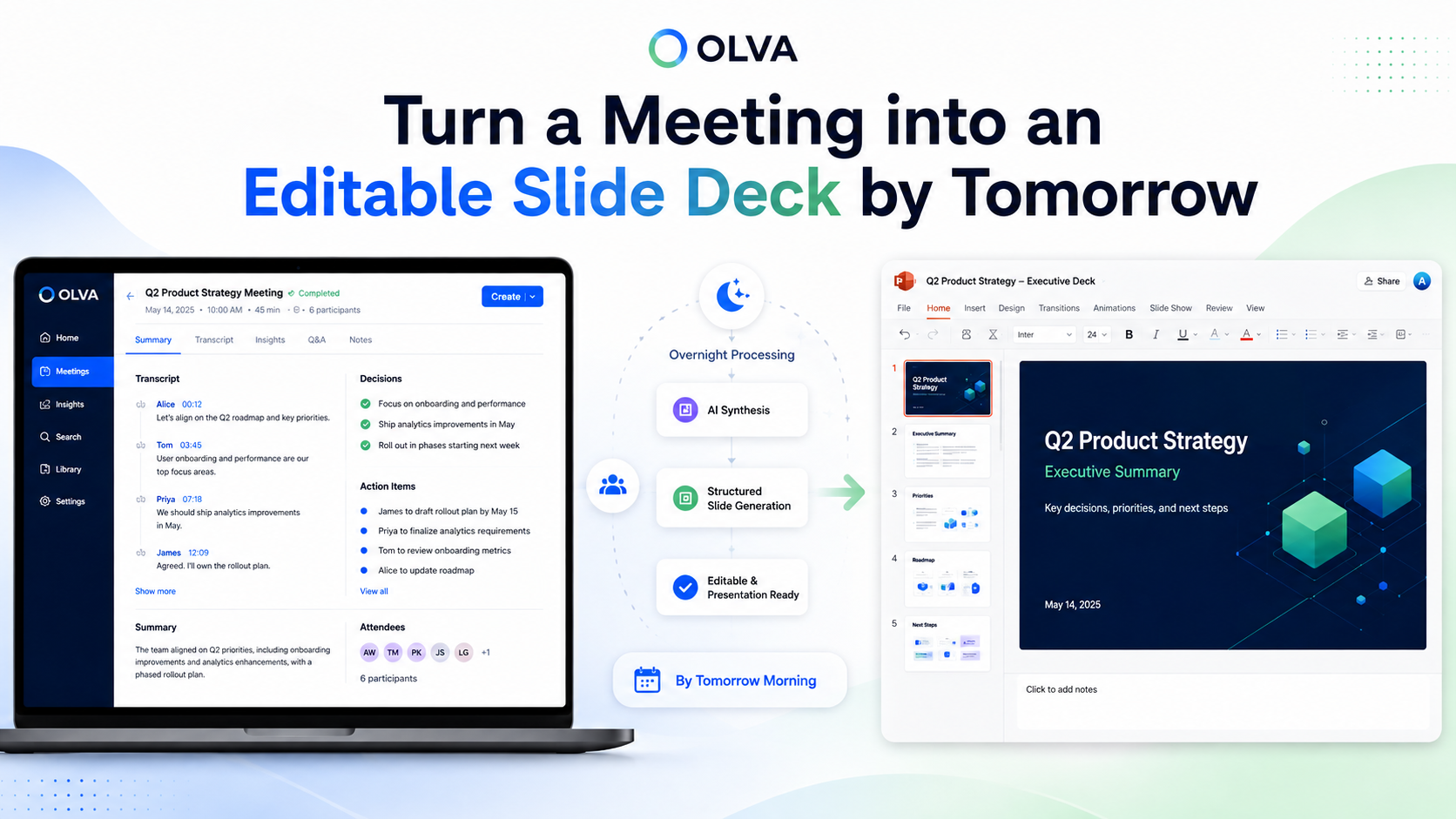
Turn Every Meeting Into an Editable Presentation: How OLVA’s Slide Decks Save Hours Compared to Manual Deck Creation and Uneditable Tools
Meetings are where decisions, commitments, and ideas are created — but turning those conversations into a polished presentation is often the most time-consuming part of the job. Sales reps, customer success managers, product leads, consultants, founders, and remote teams spend hours copying notes, hunting for quotes in transcripts, and rebuilding structure slide-by-slide.
What if the meeting itself could be the source of a structured, editable PowerPoint already organized for the audience and purpose you specify? OLVA’s Slide Decks let you do exactly that: convert a completed meeting into an editable .pptx with context-aware content, decisions, action items, and recommended next steps — without manually copying text across apps.
This article walks through why manual deck creation costs so much time, how uneditable automated tools fall short, and how OLVA’s Slide Decks streamline the post-meeting workflow so teams can focus on outcomes, not formatting.
Why slide creation drains hours (and how that time multiplies)
Common post-meeting tasks that add minutes and hours:
- Extracting decisions, action items, and commitments from a 60–90 minute transcript.
- Rephrasing conversational notes into concise slide bullets and headlines.
- Finding and citing the exact customer quote or requirement that matters.
- Matching tone and structure to your audience: executive summary vs. technical handoff.
- Designing or updating visual assets, timelines, and status slides.
- Re-assembling multiple meeting sources when a presentation should span several calls.
These tasks are often repeated across similar meetings. For a typical sales or customer success rep producing weekly recaps, the aggregate time spent can be sizable — time that could be spent driving opportunities, supporting customers, or advancing product work.
Automated tools that produce static artifacts (PDFs, locked images, or uneditable slides) address part of the problem but create new ones: you still need to edit, reformat, and sometimes retype content into your preferred PowerPoint file for sharing, branding, or version control.
What an ideal meeting → presentation workflow looks like
An efficient workflow should:
- Use the meeting transcript, insights, and decisions as the source of truth.
- Allow you to specify audience, tone, and slide level of detail up-front.
- Produce an editable presentation (.pptx) that can be downloaded and adjusted in PowerPoint or other slide tools.
- Preserve versions so you can generate multiple presentations from the same meeting without overwriting previous work.
- Keep generated decks private until you choose to share them.
OLVA’s Slide Decks were designed to follow this workflow.
How OLVA Slide Decks work (the precise, user-driven process)
Note: deck generation happens only after the meeting is finished and all meeting materials are generated.
- Open the completed meeting in OLVA and choose Create → Slide deck (or Create presentation).
- OLVA gathers meeting context such as the transcript, meeting insights, detected questions, decisions, recommendations, and any meeting Q&A you created while reviewing the meeting.
- Select which meeting sources to include and add custom instructions (audience, tone, level of detail, themes to emphasize).
- Submit and let OLVA generate the presentation in the background — you do not need to keep the modal open.
- Track progress from the meeting’s presentation history while generation runs.
- When ready, OLVA saves the deck privately in your account as an editable .pptx tied to that meeting.
- Download the .pptx or, if Google Drive is connected, optionally save the file directly to Drive.
- Each generated deck is preserved as a separate version so you can create multiple decks without overwriting earlier outputs.
If Drive saving fails, the deck remains available for download in OLVA. This process removes manual copying and reassembly from your workflow, leaving you with a structured starting point that is immediately editable.
Why editable decks matter: three practical scenarios
Scenario 1 — Sales recap for an executive: shorten review time
A solutions rep finishes a discovery sequence with a prospective customer. Rather than copy quotes and decisions into PowerPoint, the rep opens the final discovery meeting in OLVA, chooses Create → Slide deck, and instructs: “One-page executive summary, top 3 opportunities, timeline, key risks.” OLVA generates a .pptx focused on those details. The rep downloads, checks the slides quickly, and shares with the account lead — shaving an hour or more off a normal preparation cycle.
Scenario 2 — Customer success transition: accurate handoffs
During an onboarding review, multiple configuration decisions and deadlines are agreed. A CSM selects the meeting, includes the relevant earlier touchpoint, asks OLVA to emphasize actions and owners, and generates a technical handoff deck. Because OLVA uses the transcript and meeting insights, the handoff deck contains precise action owners and dates, reducing back-and-forth clarification and preventing scope drift.
Scenario 3 — Product review and stakeholder briefing: retain technical nuance
A product manager runs a long technical review with engineers and stakeholders. They need two decks from the same meeting: one technical deep-dive for engineering and one concise summary for leadership. OLVA’s versioning lets the PM create both decks from the same meeting source, specifying different audiences and tone, so each deck is tailored and editable for final touches.
Time savings: where OLVA removes friction
OLVA saves time across several distinct activities:
- Source gathering: instead of opening the transcript, notes, and sticky items, OLVA collects everything used for deck creation.
- Quote extraction: precise phrases, customer concerns, and direct commitments are pulled from the transcript automatically.
- Structure and narrative: OLVA generates a logical slide sequence (title, agenda, summary, decisions, actions, risks, next steps) so the user doesn’t start with a blank slide.
- Versioning: create multiple decks from the same meeting without rebuilding the same content repeatedly.
- Background generation: you can continue other work while OLVA builds the deck.
In practice, these efficiencies convert what was once 1–3 hours of manual work into a 5–20 minute review-and-polish step for many common meeting types.
Editable vs. uneditable outputs: why editability changes adoption
Many automated meeting tools produce static outputs that are difficult to adapt: PDFs, images, or locked slides that require retyping to fix. Editable .pptx files remove that blocker. You get a high-quality starting point but can:
- Apply company templates or brand assets in PowerPoint.
- Insert charts, change bullet language, or resize images.
- Remove or reorder slides for different audiences.
- Track changes and maintain version history offline.
OLVA delivers an editable PowerPoint by design so teams can incorporate presentation standards and final review without rebuilding content from scratch.
Best practices to get the most from OLVA Slide Decks
- Add precise instructions when creating the deck: audience, tone (concise vs. detailed), and slide length preferences.
- Use meeting Q&A and sticky notes during the meeting review to surface items OLVA will prioritize in the deck.
- Select multiple meeting sources when the deck should summarize a series of discussions (e.g., onboarding, multi-call sales cycles).
- Review generated slides for accuracy and context — OLVA creates a solid, editable starting point but human judgment is still essential.
- Save generated decks to Google Drive when you want team-wide access and document governance.
Practical example: step-by-step turn a finished meeting into a client proposal deck
- Finish a client strategy call and allow OLVA to process the meeting.
- Open the meeting in OLVA and click Create → Slide deck.
- Choose meeting sources: the final call plus the pre-call discovery check-in.
- In custom instructions enter: “Create a 10-slide client proposal: Problem summary, proposed solution, benefits, timeline, responsibilities, budget ranges, next steps.”
- Submit and continue other tasks while OLVA generates the deck.
- When ready, download the .pptx, add company branding, and update budget figures before sending.
Total time from finished meeting to shareable draft: typically under 30 minutes versus 2–4 hours rebuilding the same content.
Security, privacy, and responsible use
OLVA saves generated slide decks privately in the user’s account and ties them to the meeting source. Users remain responsible for following local recording laws, consent and workplace policies, and should only use OLVA where authorized. Generated decks should be reviewed before sharing; OLVA produces a draft that’s ready to edit, not a final legal or contractual artifact.
For more details about responsible use and platform capabilities, visit https://olva.ai.
When to use OLVA Slide Decks vs. manual creation
Use OLVA Slide Decks when:
- You want to convert meeting context directly into a structured, editable presentation.
- You need multiple decks from the same meeting tailored to different audiences.
- You want to avoid repetitive copy/paste work and speed up follow-up.
Stick with manual creation when:
- The presentation requires heavy design work or original visual assets not present in meeting content.
- You need to incorporate data that lives outside the meeting and wasn’t referenced in the conversation.
Often, a hybrid approach works best: use OLVA to create the initial draft and then apply design polish and project-specific data before sharing.
Conclusion: spend time on outcomes, not formatting
Creating presentations from meetings is a necessary but often tedious part of modern knowledge work. OLVA Slide Decks reduce that friction by turning a completed meeting into an editable, private PowerPoint tied to the original transcript, insights, decisions, and action items. Because the decks are editable .pptx files and generation runs in the background, teams gain a fast, reusable starting point that preserves meeting nuance and frees time for higher-value work.
If you regularly produce sales recaps, client follow-ups, product updates, or stakeholder briefings from meeting content, converting meetings into editable slide decks can reclaim hours each week. Learn more about how OLVA supports meeting workflows and slide generation at https://olva.ai.
Generated with practical, real-world use in mind — use OLVA Slide Decks to turn your conversations into clear, decision-ready presentations faster.