
Workshops, Lectures, and Brainstorms: Capture Ideas & Action Items with Olva Mobile
Why real-time capture matters
Workshops, lectures, and brainstorms are high-value moments: decisions are made, new ideas surface, and momentum forms. Yet all too often the most important outcomes—clarifying questions, ownership of next steps, insight about priorities—are lost in the shuffle. Traditional meeting tools help you remember what happened. What teams really need is help performing better while the conversation is happening.
This article shows how Olva Mobile can transform facilitation and teaching by capturing ideas in real time, auto-detecting action items, and surfacing live insights—so product teams, managers, workshop facilitators, and educators can act now, not later.
Learn more at https://olva.ai.
The common problems: why capture after the fact isn’t enough
- Notes are inconsistent. Different people take different notes; important subtleties get lost.
- Delayed follow-up. Action items recorded in a document sometimes take days to stabilize, missing the moment of clarity.
- Distracted facilitation. A facilitator who tries to manage a whiteboard and take notes often misses group dynamics or subtle objections.
- Unanswered questions. In lectures or workshops, attendees’ real concerns or misunderstandings can go unaddressed.
These problems are universal—from sprint planning and product discovery to classroom lectures and creative brainstorms. The solution is real-time intelligence that helps participants act and adapt while the conversation is still live.
What Olva Mobile brings to live sessions (short primer)
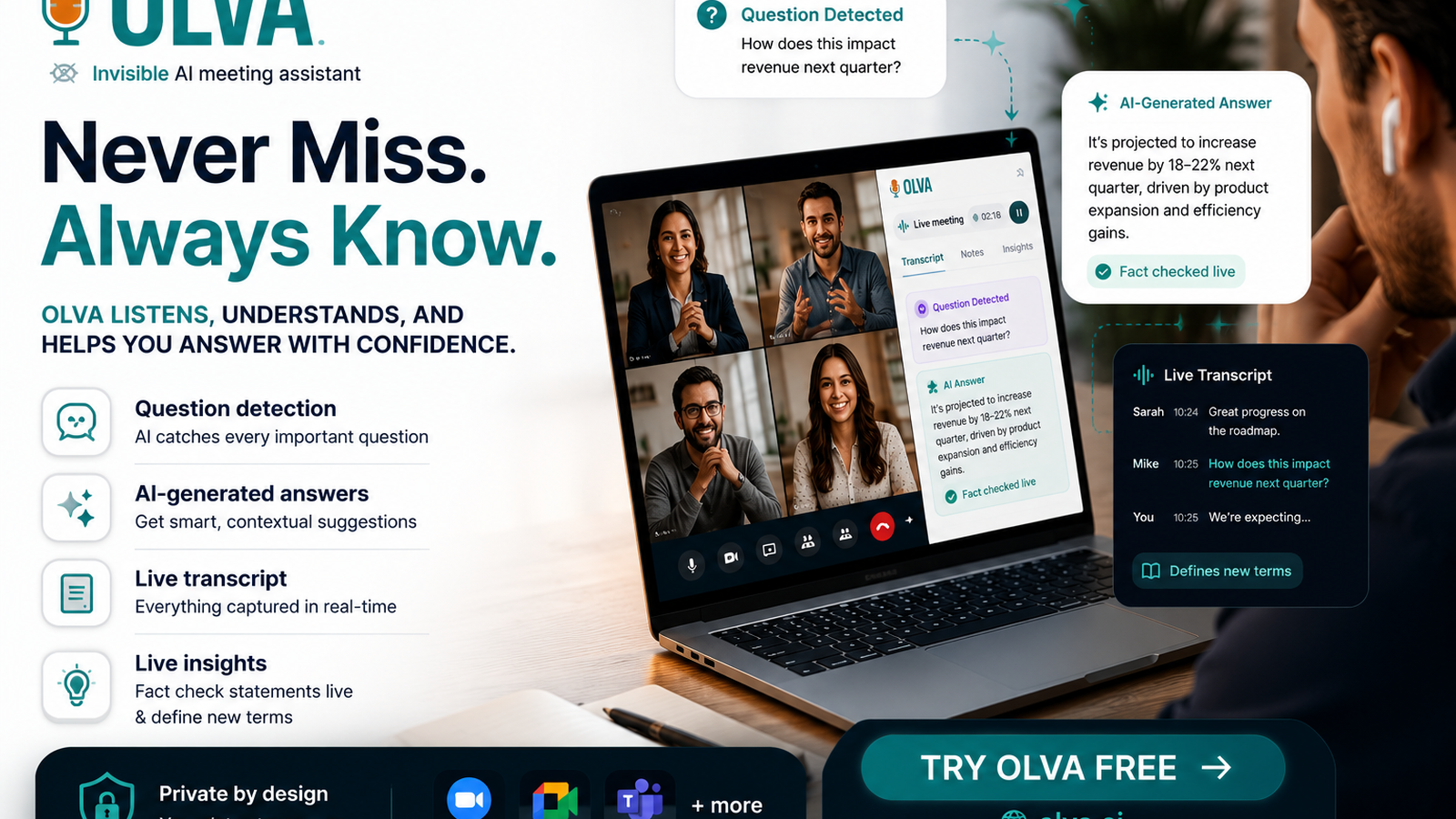
Olva is designed to help users during meetings, not just after them. For live sessions, the capabilities that matter most are:
- Invisible AI Assistant: Olva runs without joining as a visible bot, avoiding awkward notifications and keeping sessions private.
- Live Transcription: Real-time, accurate transcription of both user and participant audio.
- Automatic Question Detection: Olva flags questions, clarifications, and objections as they occur.
- Instant Answers & Live Q&A: Ask Olva to generate responses, summaries, or suggested follow-ups on the fly.
- Live Insights & Opportunity Detection: Olva surfaces buying signals, blockers, or promising ideas as they emerge.
- AI Coaching: Suggests phrasing, objection handling, and strategic prompts for facilitators.
- Document-Aware Intelligence: Use uploaded docs (PRDs, syllabi, specs) as context for instant answers.
- Post-Meeting Memory: Searchable history, action items, and decisions saved for follow-up.
All these features work quietly on mobile, so facilitators can move around the room and participants can focus on the conversation—not on a visible bot.
Practical workflows and examples
Below are concrete, reproducible workflows for product teams, facilitators, and educators using Olva Mobile during live sessions.
1) Product discovery workshop (product teams)
Scenario: A product manager leads a stakeholder workshop to define the next-quarter roadmap.
What Olva does in the moment:
- Real-time transcription captures every suggestion and constraint.
- Automatic question detection flags customer concerns and technical clarifications.
- Opportunity detection highlights statements resembling buying signals or high-priority customer needs.
- Instant Answers pull from an uploaded PRD or competitor analysis to answer feasibility or scope questions on the fly.
- AI coaching suggests how to reframe a stakeholder’s objection into an experiment.
Practical example:
- During a discussion about integrating with a third-party API, a developer says: “We can maybe support that by Q3.” Olva flags this as a tentative commitment and suggests a follow-up: “Confirm API availability and estimate integration effort—owner: backend lead, due: next planning meeting.”
- If a stakeholder asks, “Will this address customer X’s issue?” you can ask Olva: “Olva, does this PRD include requirements for customer X?” Olva references the uploaded PRD and answers immediately.
Outcome: Decisions are captured with owners and deadlines in real time, reducing ambiguity and follow-up overhead.
2) Brainstorm / ideation session (creative teams)
Scenario: A cross-functional team runs a 60-minute brainstorming session to generate growth ideas.
What Olva does:
- Tags and clusters ideas using live transcription.
- Detects recurring themes and surfaces them as summaries.
- Marks ideas that attract enthusiastic responses or commitments as high-priority opportunities.
- Auto-detects action items like “prototype this” or “research costs.”
Practical example:
- As people shout out ideas, Olva clusters them into themes (e.g., “platform features,” “content experiments,” “partnerships”) and shows a live summary: “Top 3 themes so far: A, B, C.”
- When someone says, “We should test an onboarding email,” Olva flags an action item and suggests an owner and timeline: “Action: Create onboarding email test—owner: growth lead—due: 1 week.”
Outcome: Teams walk out with a prioritized, owner-assigned backlog of experiments rather than an unstructured list of ideas.
3) Lectures and classroom Q&A (educators)
Scenario: A university lecturer runs a 90-minute lecture with frequent student questions.
What Olva does:
- Live transcription helps learners focus on the lecture instead of note-taking.
- Automatic question detection surfaces questions that might have gone unsaid.
- Live Q&A provides instant clarifications or definitions for unfamiliar concepts.
- Post-lecture memory creates searchable transcripts and an index of open questions for follow-up.
Practical example:
- A student mumbles a question about a formula. Olva detects it, clarifies the question in the instructor’s private view, and suggests a concise clarification the instructor can use: “Clarify how variable X affects outcome Y with a 2-minute example.”
- If several students ask similar clarifying questions, Olva suggests scheduling a short review session or creating a quick follow-up resource.
Outcome: Lecturers spend less time chasing questions and more time teaching; students get clarifications faster and more reliably.
Live prompts and example phrases to use with Olva Mobile
- “Olva, summarize the last 5 minutes into 3 bullet points.”
- “Olva, mark action items and suggest owners.”
- “Olva, is this request covered in the PRD? Link to relevant section.”
- “Olva, what follow-up questions should we ask to validate this idea?”
- “Olva, check that claim (X costs Y) against uploaded vendor docs.”
These short prompts let facilitators and presenters get precise help without losing momentum.
Competitors: what they do well, and where real-time help is different
Many meeting tools and transcription services (Otter, Zoom transcripts, Fireflies, Gong and others) offer strong post-meeting value: accurate transcripts, searchable records, analytics, and coaching based on recorded conversations. These capabilities are valuable for documentation, training, and sales analysis.
Where Olva differs:
- Focus on during-meeting assistance. Instead of primarily producing after-the-fact summaries, Olva surfaces insights, suggested responses, and action-item ownership while the conversation is happening.
- Invisible operation. Olva doesn’t join as a visible bot or participant, preserving privacy and avoiding interruptions.
- Automatic question detection + instant answers. Other tools often record questions for later; Olva helps you answer them then and there, using meeting context and uploaded documents.
- Document-aware live answers and AI coaching. Olva can reference a PRD, contract, or syllabus on the spot and suggest phrasing or clarification tailored to the current discussion.
Acknowledging strengths: competitors provide excellent post-meeting analytics and established workflows for teams that need deep retrospective analysis. Olva complements those strengths by filling a gap: real-time coaching and decision support that reduces friction in the moment.
Tips for facilitators, product managers, and educators
- Prepare key documents beforehand: upload the PRD, agenda, or lecture notes to Olva so instant answers are context-rich.
- Use invisible mode for participant comfort: run Olva without a visible bot participant so conversations remain natural.
- Ask for summaries regularly: during long sessions, request a 3-point summary to restore focus.
- Treat Olva’s suggestions as prompts, not mandates: the AI surfaces options and clarifications—it doesn’t replace human judgment.
- Capture action items immediately: when Olva detects an action, confirm ownership aloud to lock it in during the conversation.
- Encourage students or participants to ask follow-ups: Olva can help surface and prioritize them.
Privacy and control
Olva is private by design. There’s no visible bot participant, transcripts are accessible only to permitted users, and meeting transcripts can be deleted. This makes Olva well-suited for sensitive workshops, customer meetings, or classrooms where privacy matters.
Quick setup checklist for a live session with Olva Mobile
- Install Olva Mobile and sign in.
- Upload any documents you’ll need (PRDs, specs, slides, syllabus).
- Enable Invisible Screen Share Mode if you’ll share a screen and want Olva hidden.
- Start the session; Olva will transcribe and start detecting questions and actions.
- Use Live Q&A or quick prompts for summaries, suggested follow-ups, or fact checks.
- Confirm action owners and timelines as Olva suggests them.
Final thoughts: act in the moment
Workshops, lectures, and brainstorms are opportunities to move work forward—not just to record what happened. By capturing ideas, surfacing questions, and turning conversation into immediate, actionable items, Olva Mobile helps teams and educators preserve momentum and make better decisions on the spot.
Olva doesn’t replace facilitation or instruction. It augments them—making sure the best ideas don’t get lost, that objections are addressed, and that every session produces clear next steps.
For more details and to see how Olva works in real situations, visit https://olva.ai.
Resources
- Olva product site: https://olva.ai
- Example workshop checklist (Use Olva to capture and confirm): prepare docs → enable invisible mode → ask Olva to summarize → confirm actions