
Recruiting on the Move: How Recruiters Use Olva Mobile to Record Interviews and Share Insights
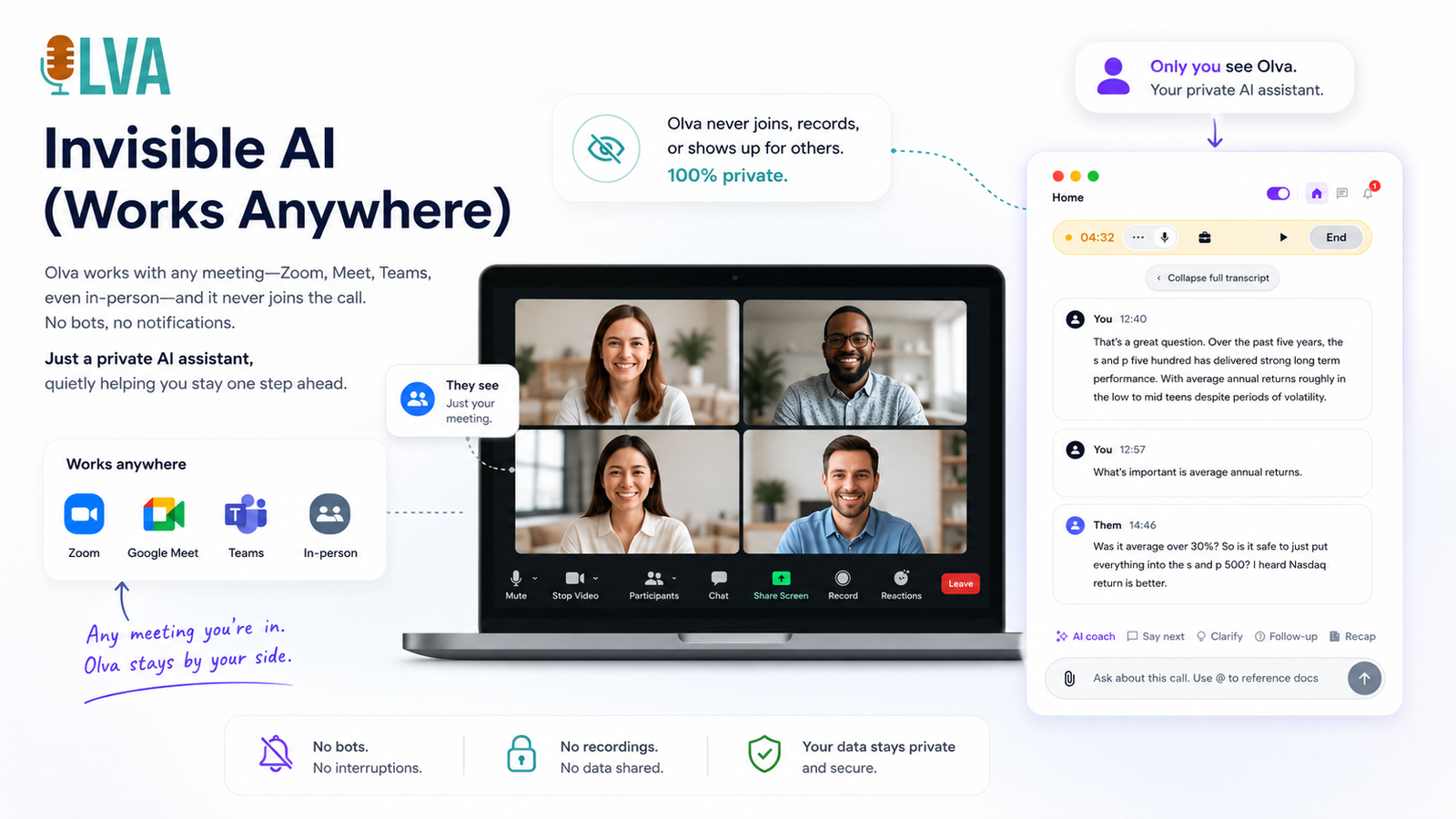
Recruiting rarely happens in a quiet conference room anymore. Phone screens from a train, campus interviews between classes, hiring events in noisy halls — modern recruiters need tools that work wherever candidates are. Olva Mobile is built for that reality: an invisible AI meeting assistant that helps recruiters perform better during interviews, not just remember them later.
This article explains practical workflows, real-world examples, and how Olva Mobile adds value at every stage of the hiring process — from pre-screen to offer — while respecting candidate privacy and the realities of mobile recruiting.
Visit https://olva.ai to learn more about the platform and capabilities described below.
Why mobile-first recruiting needs more than recording
Mobile recruiting is efficient, but it also introduces new challenges:
- Background noise and connectivity issues make note-taking harder.
- Split attention — juggling calendars, ATS entries, and candidate questions — increases cognitive load.
- Important candidate signals (objections, salary expectations, red flags) can be missed or buried in long transcripts.
Many tools address parts of this problem: Zoom and Teams record interviews; Otter.ai and Rev provide transcription; ATS systems store notes and resumes. Those features are useful, but they largely help you review interviews after the fact. Recruiters need real-time support: live cues, suggested follow-ups, instant fact checks, and privacy-aware assistance during the conversation.
That’s where Olva Mobile differs: it’s focused on helping you succeed in the moment.
Core capabilities recruiters rely on — and why they matter
Olva Mobile combines several AI-driven functions designed specifically for recruiters who are on the move.
- Invisible AI Assistant: Olva runs without joining meetings as a visible bot. No extra participants, no awkward alerts, and no interruptions for candidates.
- Live Transcription: Real-time transcripts capture both recruiter and candidate audio so you can stay present instead of handwriting notes.
- Automatic Question Detection: Olva highlights candidate questions and objections instantly — not buried in a later summary.
- Instant Answers & Live Q&A: Ask Olva questions during the interview (for example: "What should I ask next about cloud experience?") and get context-aware suggestions.
- Live Insights & Opportunity Detection: Olva surfaces buying signals, red flags, and candidate strengths as they appear in the conversation.
- AI Coaching: Receive suggested responses and objection-handling phrasing in real time.
- Document-Aware Intelligence: Upload job descriptions, compensation guides, or hiring rubrics so Olva can answer questions using your specific materials.
- Post-Meeting Memory: Generate searchable records, candidate highlights, and shareable summaries after the call.
Each capability is designed to reduce friction and improve decision quality while the conversation is still happening.
Practical workflows for recruiters using Olva Mobile
Below are common recruiting scenarios and how Olva Mobile helps at each stage.
- Phone screen from a coffee shop — stay focused and accurate
- Before the call: Upload the job description and resume to Olva Mobile. The assistant preloads the specifics you'll likely need.
- During the call: Olva transcribes in real time and automatically flags candidate questions like salary expectations or relocation concerns.
- Live help: When the candidate asks about benefits, type or speak "Olva — what should I say about our healthcare plan?" Olva draws from your uploaded benefits PDF and suggests concise language.
- After the call: Olva highlights the candidate's top questions and creates an action item to verify references.
Practical example: You’re on a loud bus and the candidate asks about the PTO policy. Instead of fumbling through emails, you ask Olva for a short answer. Olva returns: "Our PTO starts at 15 days for new hires, prorated in the first year. Would you like me to pull the official policy?" This keeps the conversation natural and accurate.
- On-campus interviews — capture candid candidate signals
- During back-to-back interviews at a campus event, it’s easy to miss subtle cues. Olva detects recurring themes (e.g., repeated questions about mentorship) and suggests probing follow-ups.
- If a candidate repeatedly asks about growth, Olva can suggest a targeted question: "Tell me about a time when you had to learn a new stack quickly." That helps you measure curiosity and fit.
- Panel interviews — coordinate and share insights instantly
- Panel members can view a shared Olva transcript and highlight candidate questions in real time.
- Olva compiles the panel’s notes into a concise summary with suggested interview ratings, making debriefs faster and more aligned.
- Negotiation and offers — use document-aware answers
- Upload compensation bands and offer templates before the final conversation.
- When the candidate asks about salary bands or equity, Olva provides answers that reference your actual compensation guide.
- Olva can also detect negotiation signals and suggest an approach to improve acceptance odds.
Real examples: how Olva improves candidate conversations
Example A — Handling awkward compensation questions on the fly
Scenario: The candidate asks, "What’s the salary range for this role?"
Without live assistance: You pause, open your laptop, search spreadsheets, and risk losing momentum.
With Olva Mobile: Olva recognizes the question instantly and pulls the approved salary band from the uploaded compensation document. You respond confidently and quickly.
Suggested recruiter response provided by Olva: "Our target range for this role is $85k–$100k depending on experience. We also offer performance-based bonuses and equity. Would you like a breakdown of typical packages for similar hires?"
Example B — Spotting hidden red flags or strengths
Scenario: During a technical screen, the candidate repeatedly avoids specifics when asked about production systems.
Olva Live Insights: Detects hesitation and flags a potential concern. It suggests a follow-up like "Can you walk me through a time you diagnosed a production incident?" and recommends probing questions tied to your role rubric.
Example C — Sharing candidate questions with hiring managers
Scenario: A candidate asks detailed questions about team stability and growth trajectory.
Olva automatically highlights those questions and creates a shareable snippet you can paste into your hiring manager follow-up, ensuring interviewers address the candidate’s priorities.
Competitor landscape — what other tools do well, and where Olva adds value
Many platforms offer transcription, recording, or post-call analytics. A fair view:
- Otter.ai and Rev: Strong transcription accuracy and searchable notes.
- Zoom and Teams: Ubiquitous meeting infrastructure and basic recording features.
- Gong and Chorus: Deep post-call analytics focused on sales conversations.
- HireVue and Spark Hire: Video interviewing and assessment workflows.
These tools are valuable: transcription, long-term storage, and post-interview analysis reduce administrative work. However, most are optimized for after-the-call workflows — they help you remember what happened.
Olva adds a different layer: real-time, private, and context-aware assistance that helps you act better during the interview itself. Key differentiators:
- Invisible AI Assistant: Olva operates without adding a visible bot participant, avoiding candidate distraction.
- Automatic Question Detection + Instant Answers: Unlike tools that surface content after the call, Olva detects and helps you answer candidate questions as they occur.
- Live Insights & AI Coaching: Olva suggests next questions and flags risk/opportunity in the moment rather than waiting for a post-call review.
- Document-Aware Intelligence: Many competitors can transcribe, but Olva uses your uploaded documents to provide accurate, policy-aligned answers live.
Acknowledging competitors' strengths while highlighting Olva's live assistance shows why recruiters often use multiple tools together depending on their workflows.
Privacy and compliance — recruiting demands sensitivity
Recruiting conversations often include personal information. Olva is designed with privacy in mind:
- No bot participants: Olva doesn’t join meetings as a visible attendee, so candidates see only the human participants.
- Private by design: Transcript access is controlled and visible only to authorized users.
- Actionable controls: Transcripts can be deleted at any time to support compliance and candidate privacy.
These features make it easier to use Olva in sensitive scenarios like reference checks, salary negotiations, or interviews involving protected classes.
Best practices to get the most from Olva Mobile
- Prepare key documents beforehand
Upload job descriptions, compensation grids, skill rubrics, and offer templates before interviews so Olva can reference them instantly.
- Use short live prompts
Try prompts such as:
- "Olva: summarize the last 3 minutes."
- "Olva: what follow-up should I ask about cloud experience?"
- "Olva: highlight any salary questions."
These keep the interaction fast and unobtrusive.
- Train your hiring team
Share how Olva flags candidate questions and creates shareable highlights. Align on who reviews post-interview insights so nothing slips through the cracks.
- Respect candidate consent and expectations
Even with an invisible assistant, let candidates know you’re taking notes and that you’ll follow up with a written summary. Transparency builds trust.
Measuring impact: what success looks like
Recruiting teams using Olva Mobile often measure wins in these ways:
- Faster time-to-offer: reduced friction in discovery and negotiation.
- Higher interview quality: more consistent probing and fewer missed questions.
- Improved candidate experience: timely, accurate answers during conversations.
- Better hiring manager alignment: shareable highlights focus debriefs on what matters.
These improvements combine to reduce the risk of poor hires and increase acceptance rates.
Conclusion
Mobile recruiting demands tools that do more than record. Recruiters need real-time intelligence, private coaching, and document-aware answers — all without breaking the flow of a conversation. Olva Mobile brings those capabilities together: invisible assistance, live transcription, automatic question detection, instant answers, and AI-driven insights that help recruiters perform better in the moment.
Whether you’re screening candidates from a coffee shop, running a panel interview at a hiring event, or negotiating an offer on the move, Olva Mobile is built to make those conversations clearer, faster, and more effective. For more details and examples, visit https://olva.ai.
Author: Olva Product Team