
Real-Time AI Coaching for Client Calls: Improve Outcomes with Instant Answers and Suggested Responses
Client-facing professionals—consultants, coaches, customer success managers, and account executives—live and die by conversations. The right phrasing, timely follow-up, or a well-timed question can turn a hesitant prospect into a customer, a stalled relationship into an expansion, or a confusing moment into a path forward.
Traditional meeting tools help you remember what happened. Real-time AI coaching helps you perform better while the conversation is happening.
This article explains how real-time AI coaching works, why it matters for client calls, and how features like instant answers, suggested responses, live insights, and document-aware intelligence change outcomes. It also fairly compares common meeting tools and highlights where a tool built for in-meeting assistance—like Olva—adds unique, practical value.
Why real-time coaching matters on client calls
High-stakes client calls are dynamic: new objections appear, assumptions are made, and opportunities show up unexpectedly. Waiting until after the call to analyze these moments wastes a chance to influence the outcome.
Real-time coaching matters because it:
- Strengthens responses during the moment of influence (not after).
- Reduces the cognitive overhead of multitasking—so you can focus on listening while the AI supports you.
- Captures and surfaces tactical opportunities (buying signals, risks, upsell cues) as they emerge.
For consultants and coaches, that can mean nudging a client toward a breakthrough. For CSMs and AEs, it can mean salvaging renewals, closing deals, or expanding accounts.
What real-time AI coaching actually does
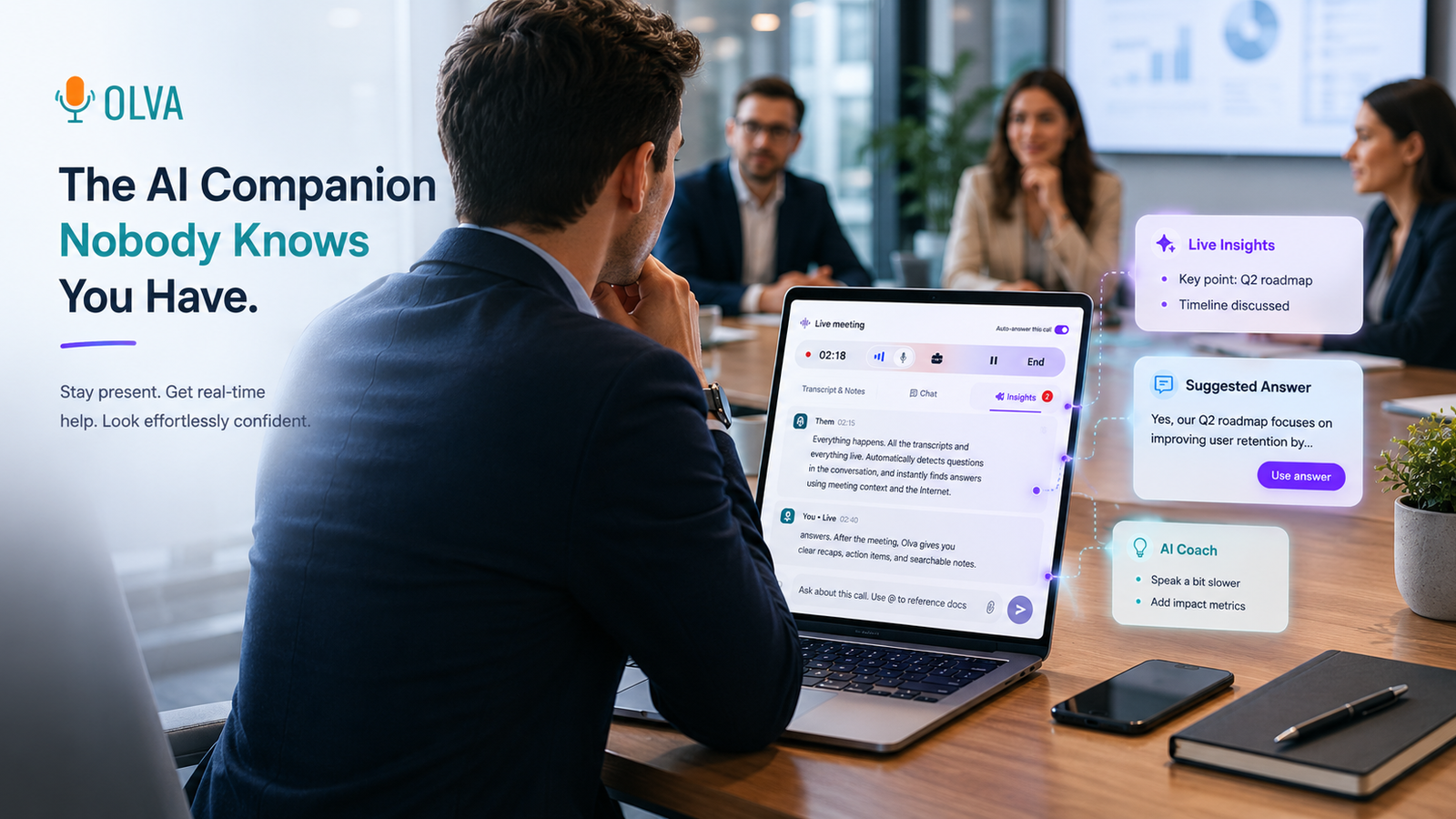
Real-time AI coaching is the combination of continuous conversation analysis, contextual retrieval, and live feedback. Core capabilities include:
- Live transcription: Capture both user and participant audio in real time to remove the burden of note taking.
- Automatic question detection: Identify when a customer asks a technical, pricing, or clarification question—and flag it instantly.
- Instant answers and suggested responses: Provide short, relevant answers or phrasing tailored to the context of the call and supporting documents.
- Live insights and opportunity detection: Highlight buying signals, risks, and recommended follow-ups while the conversation is active.
- Document-aware intelligence: Use uploaded proposals, contracts, or product docs to ground answers in your actual materials.
These elements turn passive recording into active assistance.
Real-world examples: How coaching changes the call
Example 1 — The pricing objection (Account Executive)
Scenario: A prospect hesitates during pricing discussion: “That’s higher than we expected.”
Without real-time coaching: You fumble for a response, try to recall the tiering, or promise a follow-up email—momentum stalls.
With real-time coaching: The assistant detects the pricing objection, checks the uploaded pricing sheet and previous notes, and suggests a concise response: “I hear that—most clients see payback within X months because Y. We can consider a phased implementation or discuss usage-based credits to fit your budget. Would that help?” You use that phrasing and immediately steer the conversation back to value.
Example 2 — Technical nuance (Consultant)
Scenario: A technical lead asks a detailed integration question that requires referencing the spec.
With real-time coaching: The assistant detects the question, fetches the relevant section from the uploaded API doc, and offers a short explanation plus a follow-up question you can ask to surface constraints.
Example 3 — Coaching a hesitant client (Coach)
Scenario: A client resists committing to a behavioral experiment.
With real-time coaching: The assistant suggests an empathetic reframing and offers an example micro-commitment you can propose, increasing the chance of acceptance in the moment.
These examples show that immediate, context-aware suggestions often convert friction into momentum.
Practical features to look for in real-time coaching tools
Not all meeting AI is built the same. When evaluating tools, prioritize capabilities that make a real difference during calls:
- Invisible participation: The AI should assist without joining the call as a visible bot or disrupting participants. Privacy and natural flow matter.
- Real-time transcription of both sides of the conversation.
- Automatic detection of questions and objections, not just a transcript marker.
- Instant answers that combine meeting context with uploaded documents and historical meeting memory.
- Live Q&A: your ability to ask the AI for phrasing, clarifications, or a quick summary mid-call.
- Live insights such as fact-checking, opportunity detection, and suggested next steps.
- Document-aware responses—answers that pull from your own contracts, proposals, or product docs.
- Post-meeting memory for handoffs and follow-ups.
Olva brings these together into a workflow designed to help the user during meetings rather than only after them. Learn more at https://olva.ai.
How Olva compares to other meeting tools (fair and objective)
Many popular tools focus on exceptional transcription and post-meeting analysis. For example:
- Otter.ai and Rev excel at accurate transcription and searchable records.
- Gong and Chorus focus on conversation intelligence after the call—identifying patterns across calls for coaching at scale.
- Fireflies and Zoom’s AI features offer recording, summarization, and meeting notes.
These platforms are strong where they focus: recording, summarization, and analytics for post-call review and coaching programs. They surface trends, enable QA, and create a searchable repository of past conversations.
Where tools differ is in what they do during the live call. Most of the tools above either cannot participate invisibly in a meeting or prioritize post-call insights. That’s where a real-time coaching-first approach adds complementary value.
Olva’s differentiators are not that it transcribes or summarizes—that’s table stakes. The key differences are:
- Automatic question detection with instant suggested responses—helping you answer questions while the conversation is still happening.
- Invisible AI assistance that supports your screen share and audio without showing as a bot participant.
- Document-aware, context-rich instant answers that pull from proposals, contracts, and previous meeting memory.
- Continuous live insights that surface buying signals, risks, and suggested follow-ups during the conversation.
- Live Q&A and AI coaching that help with phrasing, objection-handling, and next-step suggestions in real time.
These features position Olva as a tool built for in-meeting performance—not just post-meeting recall.
Best practices for integrating real-time coaching into client calls
- Prepare core documents in advance
Upload pricing sheets, proposals, contracts, and technical specs ahead of time. Document-aware AIs give more reliable instant answers when they can reference your materials.
- Use suggested responses as a prompt, not a script
Personalize the phrasing so it sounds like you. The suggested line should be a launch pad for authenticity, not a canned reply.
- Leverage live insights for discovery
If the AI detects buying signals or risks, act on them. Ask clarifying questions right away to validate interest or mitigate risk.
- Keep privacy in mind
Choose tools that respect meeting privacy—no visible bots, transcripts under your control, and clear policies about data retention.
- Review and refine after the call
Use post-meeting memory to capture decisions and follow-ups, then refine templates and coaching prompts for future calls.
Examples of specific prompts to use during calls
- "How should I respond to a pricing objection that mentions budget constraints?"
- "Summarize the last 3 minutes for me focusing on risks and next steps."
- "Find the clause in the contract about renewal terms and give a plain-language summary."
- "Suggest two short questions to probe the customer’s timeline."
These live prompts keep the call moving and help you make better choices when it matters.
Measuring impact: KPIs that improve with real-time coaching
Trackable outcomes often include:
- Shorter time to close new deals (faster momentum during discovery and negotiation).
- Higher win rates in competitive situations (improved objection handling).
- Reduced churn and stronger renewals (faster mitigation of risks in renewal conversations).
- Better meeting efficiency and fewer follow-ups (more decisions made during the call).
- Improved client satisfaction scores when interactions feel smoother and more valuable.
Collect qualitative feedback too—ask participants if conversations felt clearer or more decisive.
Privacy and user control
Privacy is essential for client conversations. Choose solutions that emphasize:
- Invisible operation: no extra meeting participants or disruptive bot presence.
- User-only visibility: transcripts and insights visible only to the user unless explicitly shared.
- Data control: ability to delete transcripts and selectively store meeting memory.
Olva is built with these privacy considerations in mind—working invisibly to provide private AI support while keeping control in the user’s hands.
When to use real-time coaching vs post-call analysis
Real-time coaching is best for:
- Objection handling
- Pricing and contract discussions
- Complex technical clarifications
- Opportunity detection and immediate follow-up
Post-call analysis is best for:
- Training and performance programs across teams
- Trend identification across dozens or hundreds of calls
- Deep reflection and strategy development after the fact
Both approaches are complementary. Real-time coaching improves the moment-to-moment outcome; post-call analytics improve long-term performance.
Conclusion: Make client calls an advantage, not a risk
In competitive, client-driven work, the difference between an okay meeting and a winning meeting often happens in real time: an answer delivered clearly, a timely clarifying question, or a quick correction to a mistaken assumption. Real-time AI coaching moves support into that crucial window.
For consultants, coaches, CSMs, and AEs, the payoff is immediate: clearer conversations, fewer follow-ups, stronger negotiations, and better client outcomes. When that coaching is invisible, document-aware, and focused on in-meeting performance, it becomes an active partner—not an after-the-fact tool.
For more on how real-time meeting intelligence can help you perform better in client calls, explore solutions built specifically for live assistance at https://olva.ai.
By bringing instant answers, suggested responses, live insights, and document-aware intelligence into the conversation, you turn every client call into an opportunity to influence outcomes—while preserving privacy and keeping the human connection front and center.