
How OLVA Live Translation Helps Teams Navigate Meetings in a Foreign Language
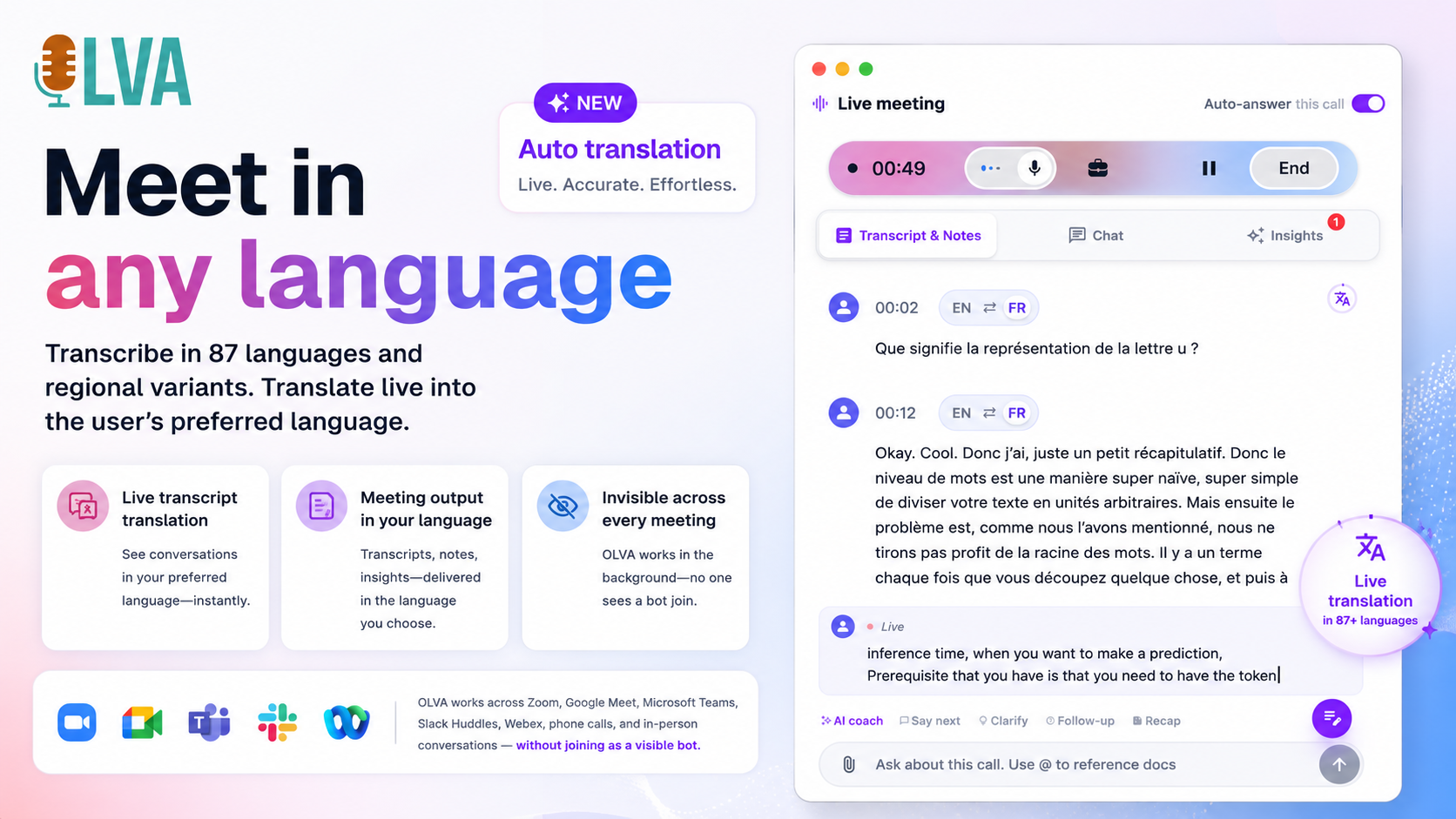
In global work—sales calls with overseas prospects, product reviews with distributed engineering teams, or customer success check-ins across regions—language can be a daily friction point. Juggling translation, note-taking, and real-time responses while trying to follow a fast-moving conversation creates cognitive overload and risks missing opportunities.
This article explains practical ways teams can use OLVA’s Live Translation, question detection, and context-aware answers to reduce that friction. You’ll learn concrete workflows for sales, customer success, technical discussions, and cross-functional meetings, plus step-by-step examples showing how to apply OLVA during and after calls.
Find more about OLVA at https://olva.ai.
Why real-time translation matters
- Meetings move fast. Translating after the fact misses moments when follow-up questions, clarifications, or negotiation points are created.
- Multilingual participants may use idioms, technical terms, or culturally specific phrasing that’s hard to parse mentally while contributing.
- Translating while participating divides attention: listening, mentally translating, composing responses, and capturing action items.
Real-time translation reduces cognitive load by presenting a readable transcript in your preferred language as the conversation happens. But translation alone isn’t enough—teams need question detection, contextual answers, and document-aware intelligence to act on what they hear immediately.
How OLVA combines capabilities to help teams
OLVA is designed to assist users both during and after conversations. For multilingual meetings OLVA pairs three key features:
- Live Translation: Automatically translate the meeting into your default language, or manually translate portions when you need extra clarity.
- Automatic Question Detection: Surface questions raised during the meeting without requiring you to copy or interrupt the flow.
- Context-Aware Answers (Live Q&A): When a question is detected—or when you ask one—OLVA uses the ongoing transcript and any linked documents to produce relevant, context-aware responses.
Because OLVA runs botless and captures audio from your device, it works invisibly alongside platforms such as Zoom, Google Meet, and Microsoft Teams. That means you get this support without adding a visible bot tile to the call.
Practical workflows by role
Below are role-specific workflows showing how OLVA’s live translation and context-aware features add practical value.
- Sales teams: capture opportunities and respond confidently
Scenario: You’re on a discovery call with a French-speaking prospect. They mention a pain point and later ask about pricing in rapid succession.
How to use OLVA:
- Turn on Auto Translation to follow the conversation in your preferred language in real time.
- When OLVA detects a question from the prospect, it surfaces the question text so you can see exactly what was asked rather than relying on short-term memory.
- Ask OLVA a live Q&A: “What did they say about the timeline earlier?” OLVA uses the active transcript to assemble a concise answer so you can confirm details before responding.
Benefits:
- You avoid misunderstandings when pricing or timelines are discussed.
- Opportunity signals—unmet needs, hints at budget—are highlighted so your team can prioritize follow-ups.
- Notes and action items are captured automatically for post-call outreach.
Concrete example:
A prospect says in French, “Nous avons besoin d’une solution qui réduit 30% du temps de traitement.” OLVA auto-translates this to your language and flags a detected question later: “Est-ce que c’est compatible avec notre ERP?” You check OLVA’s context-aware answer referencing the product spec you uploaded and answer confidently on the call rather than asking for time to follow up.
- Customer success: reduce friction in troubleshooting and renewals
Scenario: A renewal conversation includes technical terms and mentions from earlier sessions about integration limitations.
How to use OLVA:
- Use Live Translation for sections you find difficult and manual translation for specific segments you want to reread.
- When the customer asks a clarification, OLVA detects and shows the question and can propose a context-aware answer drawing from earlier transcripts or attached technical docs.
- Capture action items and follow-ups automatically and assign ownership after the call.
Benefits:
- Faster clarification reduces the chance of miscommunication that can undermine renewals.
- You can reference earlier meetings without interrupting the conversation.
Concrete example:
During a German-language call, the customer asks about a previous workaround. OLVA pulls the earlier conversation fragment where the workaround was described and surfaces it alongside a suggested next step you can propose immediately.
- Product and technical teams: keep complex discussions productive
Scenario: An architecture review with engineers across multiple countries includes dense technical terminology and shorthand.
How to use OLVA:
- Keep Live Transcription and Live Translation active to maintain a readable record and translated view for non-native speakers.
- Use document-aware intelligence: upload design docs or specs so OLVA can reference them during responses.
- When a question is detected—e.g., about a specific API behavior—OLVA can generate an answer that uses the current transcript and the uploaded RFC or spec.
Benefits:
- Reduces the need to stop and ask participants to repeat or spell out acronyms.
- Keeps the meeting moving without sacrificing accuracy.
Concrete example:
A Spanish-speaking developer asks, “¿Qué latencia podemos esperar con esta configuración?” OLVA detects the question, checks the current transcript and the attached performance benchmark PDF, and provides a concise, context-aware reply you can confirm and expand on.
- Cross-functional and executive meetings: make decisions with shared understanding
Scenario: Executives and stakeholders from multiple regions need to align on budget and priorities.
How to use OLVA:
- Use Auto Translation so everyone can follow in their preferred language.
- Have OLVA surface detected questions and suggested clarifying questions or risks in real time to prevent misunderstandings.
- After the meeting, use OLVA’s meeting summaries and Slide Decks to create an exec-ready presentation capturing decisions and next steps.
Benefits:
- Fewer follow-up emails to clarify what was decided.
- A reliable record of decisions and action items preserved for stakeholders in different time zones.
Detailed examples showing step-by-step use
Example A — Handling a pricing objection in a French sales call
- Before the call: upload the latest pricing sheet and product spec to OLVA (document-aware intelligence).
- During the call: enable Auto Translation to follow the French conversation in English.
- Prospect raises an objection in French about ROI. OLVA detects a question and surfaces the exact phrasing.
- You ask OLVA in the Live Q&A pane: “Summarize customer concerns about ROI and list related mentions from the past 3 calls.” OLVA uses meeting memory and the transcript to generate a short list.
- You present a tailored response, referencing the pricing sheet and suggesting a phased deployment. OLVA records the action item and recommended next steps.
Result: You respond fast and accurately, preserve the conversation context for the next meeting, and reduce the risk of misquoting previous commitments.
Example B — Technical clarification in a multi-language sprint review
- Before the meeting: team attaches the API spec to the meeting so OLVA can reference it.
- During the meeting: an engineer asks a question in Japanese about an endpoint’s error handling.
- OLVA auto-translates the question, detects it, and provides an immediate context-aware answer using the API spec and recent meeting transcript.
- The team discusses and OLVA captures the decision as an action item assigned to the backend lead.
Result: The team avoids delays caused by language barriers and can continue the sprint without scheduling a separate clarification call.
Best practices for using OLVA Live Translation effectively
- Turn on Auto Translation for meetings where you expect a steady multilingual flow. Use Manual Translation selectively for parts you need to re-check.
- Upload relevant documents (specs, contracts, pricing) before the call so OLVA’s context-aware answers can reference them.
- Use question detection as a prompt to pause and confirm critical customer asks, especially when negotiating terms.
- Treat OLVA’s context-aware answers as decision support: validate the suggestion before making commitments.
- Inform participants and obtain any required consent for transcription or translation, following your organization’s policies and local laws.
Privacy, consent, and responsible use
OLVA operates as a private assistant on your device and does not appear as a visible bot in meeting participant lists. However, botless does not mean consentless. Users remain responsible for following recording and transcription laws, workplace policies, and client agreements. OLVA stores meeting transcripts and outputs in the user’s account and does not use meeting content to train AI models. For more on privacy and features, see https://olva.ai.
Limitations and when to be cautious
- Machine translation is improving but not perfect. For critical legal, financial, or compliance discussions, confirm translations with bilingual colleagues or professional translators.
- OLVA’s answers are context-aware decision support rather than final authoritative advice—use human judgment and subject-matter expertise where stakes are high.
Measuring the impact in your team
To assess whether Live Translation and context-aware features are helping your team, track a few simple metrics over time:
- Meeting follow-up volume: fewer clarification emails and follow-up calls suggests clearer understanding.
- Time-to-response in sales negotiations: decrease indicates better on-call handling of objections.
- Action-item completion rates: improved handoffs show better capture and assignment of next steps.
- Participant satisfaction: ask multilingual meeting participants if they felt included and understood.
Start small with pilot meetings across a few use cases (sales and customer success are good early candidates) and measure improvement before scaling.
Wrapping up: practical ROI from real-time translation and context-aware answers
Language barriers add time, cause missed signals, and increase the risk of miscommunication. OLVA’s Live Translation, automatic question detection, and context-aware answers help teams reduce those risks by:
- Presenting a translated transcript so participants can follow in their preferred language in real time.
- Surfacing questions automatically so important asks don’t get lost in conversation.
- Providing instant answers that reference the ongoing transcript and supporting documents so users can respond accurately and quickly.
Used responsibly and combined with human review, these features let sales reps close deals with fewer follow-ups, customer success teams resolve issues faster, product teams keep technical discussions productive, and leaders make decisions with more confidence.
Learn more and try OLVA in your multilingual meetings: https://olva.ai
Excerpt
Real-time translation helps global teams follow conversations, but combining translation with automatic question detection and context-aware answers is where you gain real meeting-time advantage. This post shows practical workflows for sales, customer success, product, and engineering teams, with step-by-step examples to reduce misunderstandings and capture opportunities.