
How Elite Consultants Use an Invisible AI Meeting Assistant to Close More Retainers
Consultants, coaches, and professional services firms live and die by one simple thing: the meeting. Discovery calls, scoping sessions, executive briefings, and pricing conversations are where trust is built, objections are overcome, and retainers are won.
But the modern meeting is noisy. Juggling agenda, notes, objections, and next steps while actively listening and persuading is a high-skill act. Elite consultants are solving that problem not by working harder, but by working with an invisible partner in the room: an AI meeting assistant that helps during the conversation — not just after it.
This article explains how top consultants use an invisible AI assistant to close more retainers, with practical examples, meeting workflows, fair comparisons to other tools, and concrete ways you can apply the approach today.
The gap most tools leave open
Many meeting tools focus on what happens after the call: transcripts, recordings, summaries, and searchable archives. Those are useful — but they don't help you when a prospect asks a tough pricing question or when an executive expresses hesitation mid-call.
That gap is where high-performing consultants differentiate themselves. They need real-time intelligence: what to say next, how to counter objections, what parts of the contract to highlight, which supporting document to reference — all without breaking the flow of conversation.
What an "invisible" AI meeting assistant does differently
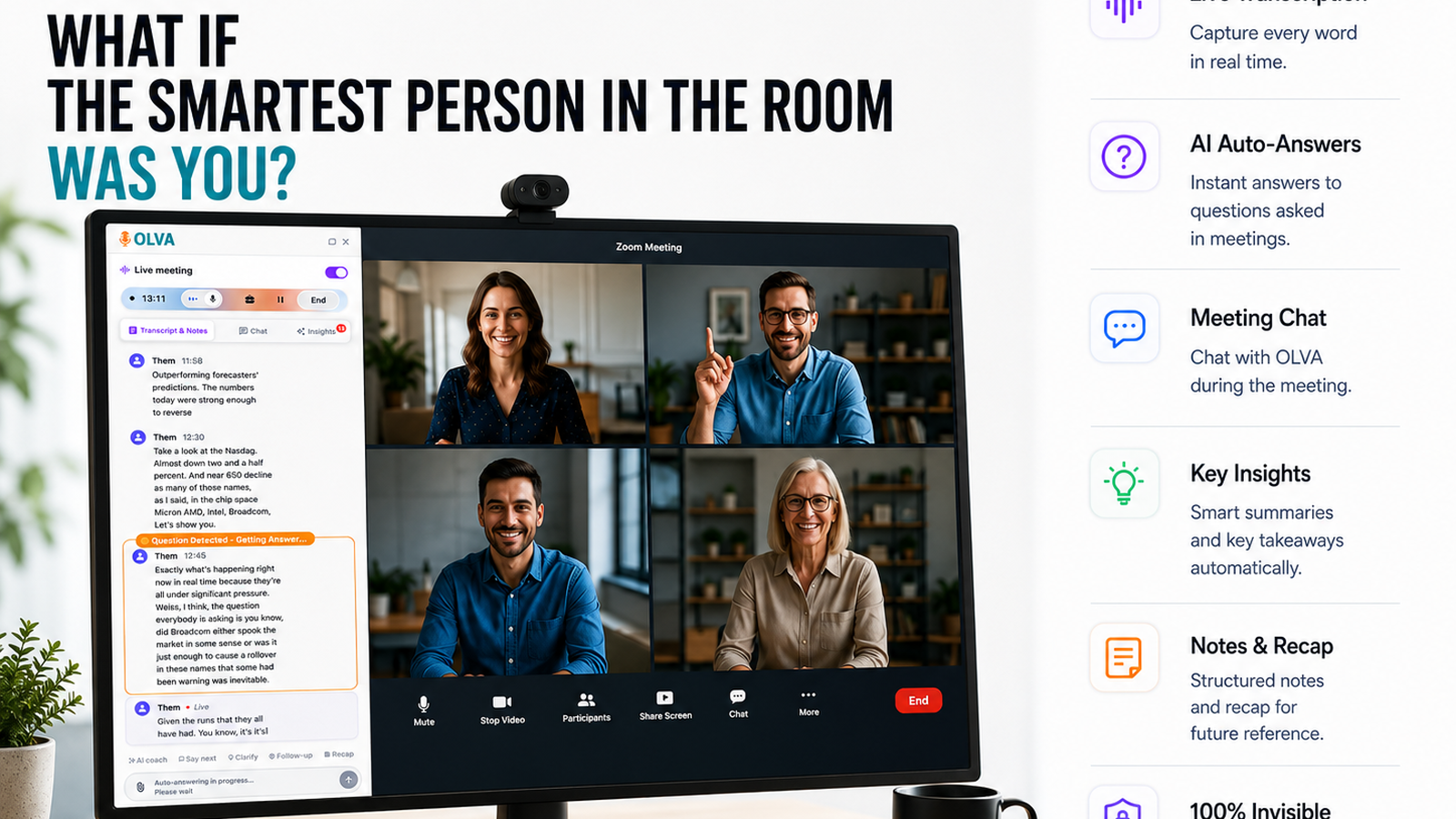
An invisible AI meeting assistant works quietly in the background, delivering live help to the consultant without joining as a visible participant. Key capabilities that matter for closing retainers:
- Live transcription of the conversation so you can stay present without frantic note-taking.
- Automatic question detection that highlights customer objections, pricing questions, technical concerns, or commitment signals as they happen.
- Instant answers and document-aware intelligence: the assistant can pull from uploaded proposals, contracts, or product docs to suggest precise responses.
- Live insights and opportunity detection that surface upsell cues, risk flags, and suggested follow-ups in real time.
- Private AI coaching: suggested language, phrasing, and strategic responses you can use immediately.
- Post-meeting memory for follow-ups, but focused on enabling action during the call.
These features enable a consultant to do two things at once: be fully present and perform at peak influence.
Why this matters for retaining clients
Retainers are won when prospects feel confident about value, risk, and next steps. That requires:
- Rapid, credible answers to pricing and scope questions.
- Clear handling of objections without awkward pauses.
- Demonstrated domain expertise and familiarity with the prospect's materials.
- Timely proposals and follow-ups that capitalize on momentum.
An invisible AI assistant helps at each stage, converting uncertainty into clarity and hesitation into commitment.
Practical scenarios: how consultants use real-time AI in meetings
- Handling pricing questions without losing momentum
Scenario: Mid-call a procurement lead asks, “Can you justify the cost compared to our current vendor?”
What the assistant does live:
- Detects this as a pricing objection.
- Pulls the latest pricing sheet and a nearby case study from the consultant's document library.
- Suggests a 30–40 second script highlighting cost-per-outcome, implementation speed, and two measurable results from the case study.
- Flags any previous commitments from the prospect that support the value claim.
How the consultant uses it:
- Delivers a concise, evidence-backed answer that references a specific case study, then proposes a short pilot with defined KPIs.
Why it closes retainers:
- The consultant answers confidently and specifically, moves the conversation forward to a concrete next step, and reduces perceived risk.
- Turning vague interest into a scoped retainer
Scenario: An executive says, “We’re exploring improvements across multiple departments.”
What the assistant does live:
- Identifies this as an expansion opportunity and suggests clarifying questions to define scope (e.g., "Which departments are highest priority?" "What timeline matters?").
- Recommends a two-phase retainer model (discovery + execution) that matches typical buying patterns.
How the consultant uses it:
- Asks the suggested questions, captures the answers in real time (transcript), and confirms a scoped discovery retainer with a clear deliverable list.
Why it closes retainers:
- The consultant moves the prospect from exploratory language to a defined, billable scope.
- Managing technical objections in a stakeholder meeting
Scenario: A CTO raises a compatibility concern with existing systems.
What the assistant does live:
- Detects a technical question, pulls the relevant product spec and integration notes from uploaded documents, and suggests an explanation plus a mitigation plan.
- If needed, the assistant offers a short follow-up test plan or checklist the consultant can propose.
How the consultant uses it:
- Provides a targeted, document-backed response and offers a proof-of-concept checklist to be delivered as part of the retainer.
Why it closes retainers:
- Technical risk is reduced and replaced with an actionable plan tied to the retainer scope.
A step-by-step live meeting workflow consultants adopt
- Before the call
- Upload proposals, contracts, case studies, and technical documents to your AI assistant’s workspace.
- Flag high-priority issues to monitor (pricing, integrations, timeline).
- During the call
- Trust the live transcription and stop note-taking.
- Use the assistant’s real-time flags: when a question pops, view the suggested responses and relevant document snippets.
- Ask the assistant privately for suggested phrasing or a concise summary of the last 5 minutes.
- Closing the call
- Use suggested follow-ups and an instant templated next-step email generated from the meeting context.
- Confirm a specific retainer proposal or pilot scope while momentum is high.
- After the call
- Use the meeting memory to track open questions and automate follow-up tasks.
This flow preserves presence while giving you the intelligence you need at the right moment.
A fair view of other tools
Tools such as Otter.ai, Fireflies, Gong, and Chorus offer excellent transcription, meeting analytics, and post-meeting insights. Those capabilities are invaluable for coaching, training, and compliance.
Where traditional tools excel:
- Reliable transcription and searchable archives.
- Coaching analytics and conversation playbook adherence.
- Team-wide insights and dashboards for sales ops.
Where consultants need something different:
- Real-time question detection and live answer generation tied to your specific documents.
- Invisible support that doesn’t show as a meeting participant or interrupt the natural flow.
- Immediate coaching and mitigation suggestions during the conversation.
Olva complements the strengths of post-meeting platforms by focusing on live performance: automatic question detection, instant answers sourced from your uploaded documents and past meetings, live coaching, and opportunity detection — all while remaining invisible to participants. That live capability is what helps consultants close retainers in the moment rather than relying solely on follow-up.
Privacy and professionalism: staying invisible by design
One concern consultants raise is privacy and how an assistant appears in the meeting. The invisible model solves multiple problems:
- No bot participants: meetings don’t include visible AI attendees that might distract or trigger compliance questions.
- Private by design: insights and transcripts are visible only to the consultant unless explicitly shared.
- Control over data: transcripts and memories can be reviewed and deleted according to policy.
This preserves professionalism and reduces friction with corporate procurement or legal teams.
Real-world examples (anonymized)
- A B2B strategy consultant stopped losing deals to procurement delays after using live answers to pricing objections. By offering a specific pilot structure and a delivery timeline during the initial scoping call, the consultant converted exploratory conversations into 3–6 month retainers.
- A product consulting firm used document-aware live responses to address technical integration questions from CFOs and CTOs in executive meetings. Instead of promising to "get back with details," they proposed a short POC built into the retainer — and won decisions faster.
These are practical shifts in behavior, not gimmicks: the difference is moving from reactive follow-ups to proactive, document-backed responses in the moment.
Scripts and language that work (examples you can adapt)
- When a prospect questions price: "I hear the pricing concern. Based on similar engagements, we typically structure a three-month discovery retainer that delivers X outcome in Y weeks — would a pilot like that reduce the risk for you?"
- When technical hesitation appears: "That's a great point. I have the integration checklist here — we can propose a short compatibility test during month one of the retainer to prove feasibility and minimize disruption."
- When scope is fuzzy: "It sounds like multiple departments could benefit. Would you prefer a focused pilot with metrics, or a phased retainer that scales after initial impact?"
These responses become more powerful when the assistant supplies the exact case study, KPI, or checklist to cite in the moment.
Measuring impact without hype
The value of live assistance is measurable in three practical ways:
- Shorter sales cycles: more immediate answers reduce the time between first conversation and signed retainer.
- Higher conversion from discovery to paid engagement: clearer scope and lower perceived risk increase client willingness to sign retainers.
- Fewer follow-up loops: document-backed answers given live lower the need for additional clarifying meetings.
Trackable metrics include conversion rate, average days to close, number of follow-up meetings, and retention of pilot-to-retainer conversions.
Getting started: a lightweight experiment you can run this week
- Identify one ongoing discovery process where deals stall on pricing, scope, or technical concerns.
- Prepare a short document library: two case studies, one pricing sheet, and a proposal template.
- Use an invisible AI assistant during one call and practice using its live suggestions to answer questions and propose next steps.
- Compare outcomes: did you move to a clearer next step? Did the prospect accept a pilot or proposal on the call?
If the experiment moves your process forward even once, you’ve unlocked a repeatable playbook.
Conclusion
Closing retainers is about reducing uncertainty and making it easy for clients to say "yes". Elite consultants do this by being present, specific, and actionable — and by using tools that provide those strengths in real time.
An invisible AI meeting assistant shifts the advantage from after-the-fact notes to in-the-moment influence: detecting questions automatically, suggesting document-aware answers, coaching silently, and surfacing opportunities as they appear. It doesn’t replace your expertise — it amplifies it.
To explore how this approach works in practice, see how modern teams are using invisible meeting intelligence at https://olva.ai. The most effective change you can make in your client process is not more prep; it’s better assistance while the conversation is happening.