Bot-Free vs Visible-Bot Meeting Assistants: A Practical Guide for Canadian Customer Success and Technical Teams
As Canadian customer success managers, technical leads, consultants, and recruiters evaluate real-time meeting assistants, the choice between bot-free (botless) and visible-bot tools matters for privacy, real-time usefulness, and workflow fit. This article explains the trade-offs, legal and organizational considerations in Canada, and practical guidance for teams that need secure, context-aware help during meetings — plus concrete examples of how a bot-free assistant like OLVA can be used responsibly and effectively.
Why this matters now
- Real-time meeting assistants are moving beyond passive transcription to actively helping users during conversations: detecting questions, providing contextual answers, translating live, and surfacing follow-ups.
- Canadian workplaces are particularly attentive to consent, privacy rules, and cross-jurisdictional interactions. Teams must balance the value of in-meeting intelligence with legal and ethical responsibilities.
- Choosing the right architecture (bot-free vs visible bot) affects participant experience, privacy posture, and how naturally an assistant fits into existing meeting workflows.
What we mean by bot-free vs visible-bot
- Visible-bot assistants: join a meeting as a named participant (bot), appear in participant lists, and often handle audio or recording via the meeting platform. They are explicit to all attendees and may integrate directly with meeting-provider APIs.
- Bot-free assistants: run alongside the user’s device, capture the device audio (microphone + incoming meeting audio), and provide assistance without appearing as a separate participant in the meeting. This is sometimes described as "invisible" in UX terms; Olva positions its product as bot-free or botless to emphasize that it doesn't create a bot tile or extra attendee.
Both approaches can provide transcripts, summaries, and Q&A — but they differ in user experience, privacy implications, and technical constraints.
Key differences that matter to Canadian teams
- Participant awareness and consent
- Visible-bot: presence is obvious to all participants. This transparency can simplify compliance with workplace policies and consent rules since attendees can see a recording/transcription participant.
- Bot-free: because it does not join the meeting as a participant, some organizations worry it could be used without explicit notification. In Canada, privacy laws (including PIPEDA-influenced workplace expectations and provincial recording rules) require attention to consent and notification. Bot-free assistants must be used with explicit policies and participant notification where required.
Practical takeaway: Bot-free is compatible with legal and ethical use — but teams should adopt clear notification practices (e.g., verbal notice at call start, agenda notes, or calendar invites) and follow organizational recording policies.
- Meeting experience and ergonomics
- Visible-bot: creates a clear signal in the meeting UI, which can be reassuring for compliance but may add a visual tile and interrupt UX, especially for panellists or when screen real estate is limited.
- Bot-free: keeps the meeting UI focused on human participants. This can be preferable for customer-facing conversations and interviews where an extra bot tile feels intrusive.
Example: A customer success manager on a discovery call may prefer a bot-free assistant that provides private, on-device prompts (e.g., suggested follow-up questions) without signalling to the client that an assistant is present.
- Real-time capabilities and context awareness
- Visible-bot: often has deep integration with the meeting platform and can access platform-level events (e.g., who entered, chat messages, screen-share metadata) depending on permissions.
- Bot-free: focuses on the device audio and the participant’s user context. A well-designed bot-free assistant can still provide rich, context-aware help by using live transcripts, document-aware intelligence, and meeting history stored under the user’s account.
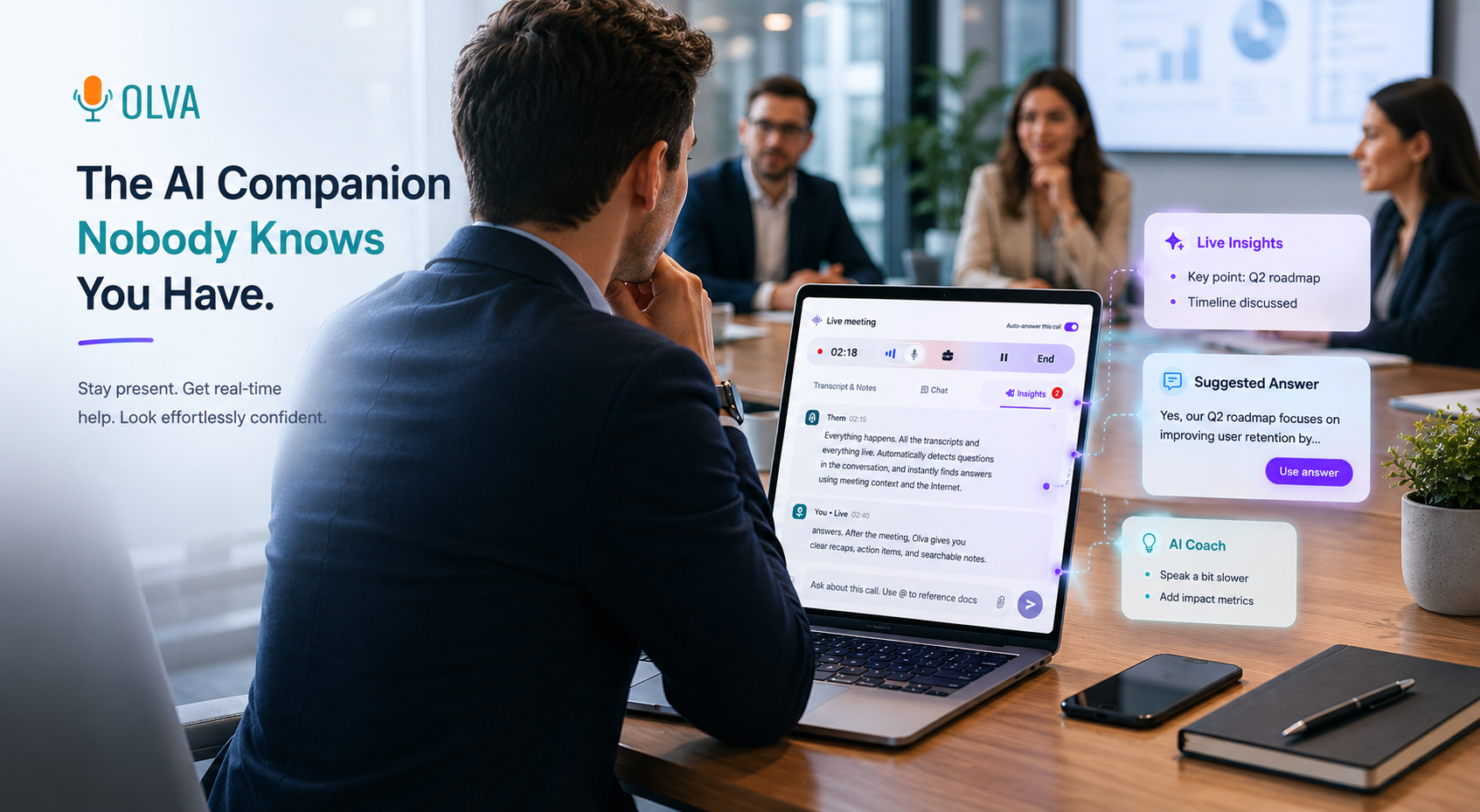
Practical example: OLVA parses live transcript and surrounding context to surface answers, identify questions automatically, and provide technical definitions during the conversation — enabling the user to respond accurately without interrupting the flow.
- Privacy, storage, and data control
- Visible-bot: meeting providers and third-party bots may route audio and transcripts through their servers and store meeting content according to their policies.
- Bot-free: typically stores transcripts and meeting outputs in the user’s account and is designed so meeting content is private to the user. Important: teams must confirm vendor policies for storage, model training, access controls, and deletion capabilities.
Practical takeaway: For organizations prioritizing data control, a bot-free assistant that stores meeting transcripts privately and does not use meeting content for model training can be a strong fit. OLVA, for example, stores transcripts and meeting outputs in the user’s account and positions meeting content as private to the user rather than a data source for model training. Always verify contractual and technical safeguards before deployment.
- Multilingual and cross-region meetings
- Both approaches can support translation, but bot-free assistants that run on the device or use secure channels can offer real-time translation without adding another visible participant. For Canadian teams working with international clients or bilingual stakeholders, live translation and regional language variants are often essential.
Practical example: In a bilingual customer review (English and French), a bot-free assistant that supports 87 languages and regional variants can automatically translate the meeting into a user’s default language, reducing cognitive load and improving clarity across multilingual teams.
Regulatory and organizational checklist for Canadian teams
Before you adopt any meeting assistant, run through this checklist to reduce legal risk and ensure a smooth rollout.
- Consent and notification: Understand federal and provincial rules on recording and notify participants when transcription/AI assistance is active. When in doubt, obtain explicit consent.
- Workplace policies: Update acceptable-use and privacy policies to cover bot-free assistants and clarify when they can be used (e.g., internal meetings vs. client calls).
- Data handling and retention: Confirm where transcripts and outputs are stored, for how long, and whether the vendor uses content to train models. Ensure users can access, export, and delete meeting data.
- Access controls: Use role-based access and SSO integrations to limit who can start automatic transcription or export meeting outputs.
- Human review: Define which artifacts require human verification (e.g., pricing commitments, legal statements, technical specifications) and set internal workflows for review before sharing.
- Training and onboarding: Provide examples and playbooks that show responsible, practical uses during customer conversations.
When bot-free is the right choice for customer success and technical teams
Use bot-free assistants when your priorities include:
- Private in-meeting support for a single user (e.g., coaching, suggested phrasing, quick lookups) without adding visual clutter to the call.
- Working under strict data control requirements where meeting content should remain private to the user’s account and not be visible to other participants or third-party meeting participants.
- Multilingual meetings where real-time translation is needed without introducing another meeting participant.
- Scenarios where you want context-aware answers that rely on the current transcript and reusable meeting memory rather than platform-level events.
Practical use cases and examples
- Customer Success — handling a tricky escalation
Scenario: A CS manager is leading an escalation call where a client expresses dissatisfaction and brings up a specific contract clause.
How a bot-free assistant helps:
- Live transcription and speaker diarization let the CS manager track who said what while taking action.
- Automatic question detection flags the client’s questions and extracts them into the user’s interface for quick reference.
- Document-aware intelligence can surface the relevant contract clause or summary (when the user attaches the contract) so the CS manager can reference it accurately.
- After the call, the assistant generates action items and a structured summary the manager can review before sharing with stakeholders.
Why bot-free: The CS manager may not want a bot tile that signals the client their call is being assisted; private, device-level assistance preserves the client relationship while improving accuracy and follow-up.
- Technical Teams — live Q&A during architecture reviews
Scenario: An architect participates in a multi-stakeholder design review with product, QA, and security leads.
How a bot-free assistant helps:
- Real-time definitions for jargon or unfamiliar acronyms reduce clarification interruptions.
- On-demand, context-aware answers referencing uploaded design documents help the architect confirm trade-offs without opening multiple windows.
- Automatic detection of technical action items and decisions creates a clear record to hand over to the delivery team.
Why bot-free: The architect receives private prompts and quick references while keeping the discussion human-facing, avoiding potential meeting friction from a visible bot.
- Recruiting and interviewing — fair and transparent use
Scenario: A recruiter takes screening calls and wants to ensure consistent questions and accurate notes.
How a bot-free assistant helps:
- Live question detection and suggested follow-up prompts keep interviews consistent.
- After-call summaries and action items help track candidate progress across rounds.
Responsible use note: OLVA (and other meeting assistants) must not be used to covertly evaluate candidates or to violate interview policies. Always inform interviewees when calls are being transcribed and obtain required consent.
How to operationalize a bot-free assistant safely
- Create explicit consent phrases and add them to calendar invites. Example: "We may transcribe this meeting to help with notes and follow-ups. Please let us know if you do not consent." Put this in the invite and read it out at the meeting start when appropriate.
- Limit features for external calls. For sensitive client or regulatory meetings, disable live assistance features or require manager approval before using them.
- Configure retention and sharing rules. Set default retention windows, and restrict exports to those with a business need.
- Train users on human review expectations. Make it standard that generated suggestions, definitions, or fact-checks are decision-support and must be verified for critical actions.
- Monitor usage and audit. Regularly review logs that show when meeting assistance was used and which meetings were transcribed to ensure adherence to policy.
When to prefer a visible-bot approach
Visible-bot assistants are preferable when:
- You need absolute transparency to all participants for compliance reasons and prefer a visible recording participant.
- Deep meeting-platform integrations (e.g., capturing chat messages or platform events) are mission-critical to your workflow.
- Organizational policy mandates explicit platform-level recording controls.
Balance the pros and cons: visible bots add transparency and integration at the expense of meeting UI clutter; bot-free assistants prioritize a private, personal assistant experience while requiring policies to ensure lawful use.
OLVA in practice: a bot-free option built for real-time help
OLVA is positioned as a bot-free, real-time meeting assistant that helps users during conversations and afterward. For Canadian customer success and technical teams, OLVA’s value comes from:
- Live transcription and speaker diarization so users can track who said what in fast-moving or multilingual meetings.
- Automatic question detection and instant context-aware answers using the active transcript, reducing the need to manually summarize earlier parts of the discussion.
- Live Translation across 87 languages and regional variants — useful for bilingual teams and international client calls.
- Document-aware intelligence to surface relevant contract clauses, design specs, or proposals during a meeting when a user attaches supporting files.
- Post-meeting summaries, action items, and editable slide decks to reduce manual follow-up work.
For responsible use, OLVA emphasizes that botless operation does not remove the need for consent, and users must follow applicable recording and transcription laws and workplace policies. See https://olva.ai for product details and documentation.
Checklist for piloting a bot-free assistant like OLVA in Canada
- Legal review: Confirm compliance with federal and provincial recording/transcription laws and your organization’s privacy counsel.
- Policy updates: Add language to privacy and acceptable-use policies to cover device-level meeting assistants.
- Pilot scope: Start with a limited team (e.g., internal CS team and a few consenting clients) and gather feedback on UX and compliance.
- Technical controls: Configure retention, export permissions, and access controls before rollout.
- Training: Provide short playbooks that show how to notify participants, when to disable assistance, and how to verify AI-generated suggestions.
- Evaluate outcomes: Measure time savings on meeting notes, improvement in follow-up accuracy, and any incidents related to policy breaches.
Conclusion: Choose architecture to match risk and use-case
There is no one-size-fits-all answer. Visible-bot assistants give clarity and platform-level integration; bot-free assistants give private, personal intelligence during meetings without cluttering the meeting UI. For Canadian customer success and technical teams that need secure, real-time help, a bot-free assistant can be an excellent fit — provided you adopt clear consent practices, strong data controls, and human-review workflows.
If you need an assistant that provides live transcription, question detection, contextual answers, live translation, document-aware intelligence, and private meeting memory without joining as a visible participant, consider exploring bot-free options and vendor privacy commitments. OLVA (https://olva.ai) is one example of a bot-free, real-time assistant designed specifically to help users during conversations and after they end. Use a careful pilot and clear policies to get the value of in-meeting AI while staying aligned with Canadian legal and organizational obligations.
Further reading and resources
- Draft a short consent script to use at the start of meetings.
- Collect sample scenarios from CS and technical teams to define allowed/forbidden uses.
- Create a one-page data handling summary for any vendor before procurement.
Practical consent script example (one line to add at meeting start):
"We may use a tool to transcribe and assist with note-taking during this call; if you prefer we don’t, please tell us now."
Adopting real-time meeting assistance is both a product decision and a governance decision. When matched with clear policies and the right pilot, bot-free assistants can help Canadian teams communicate more effectively, reduce follow-up overhead, and stay focused on the conversation that matters.