Best AI Meeting Assistants for Sales Teams in 2026: Bot‑Free, Real‑Time Tools That Improve Win Rates
Best AI Meeting Assistants for Sales Teams in 2026: Bot‑Free, Real‑Time Tools That Improve Win Rates and Shorten Sales Cycles
Sales cycles are getting shorter, buyer expectations are rising, and every call matters. In 2026, the most effective sales teams use AI meeting assistants that do more than summarize: they support sellers while conversations are happening. This post explains why bot‑free, real‑time meeting assistants matter for sales, how they improve win rates and cycle times, and practical ways to use them on calls—from discovery to closing. Where relevant, it shows how OLVA’s bot‑free, real‑time capabilities map to sales workflows and examples you can apply immediately.
Why this matters now
- Buyers expect faster, more personalized follow-up and clearer outcomes from each interaction.
- Many deals are lost not from lack of capability but from missed follow‑ups, unclear decisions, and slow internal coordination.
- Sales reps are overloaded: juggling notes, product details, pricing variations, compliance cues, and real‑time objections makes it hard to be present and persuasive.
Bot‑free, real‑time meeting assistants are designed to reduce that cognitive load by helping during the call—not only afterward. Instead of pausing to search or whisper notes, reps get contextual prompts, instant facts, and translated transcripts while the prospect is still engaged.
How real‑time, bot‑free assistants change outcomes for sales teams
- Keep reps present and more persuasive
A rep who is present listens better, reads cues, and adjusts messaging. Real‑time assistants reduce note‑taking friction: live transcription and speaker diarization capture the conversation without forcing the rep to switch attention. That increases empathy and improves objection handling.
Practical example: An AE is on a pricing call with a European buyer who switches to French for a technical detail. Using live translation, the rep follows the French text instantly and uses OLVA’s contextual answers to recall what was said earlier about feature limits—so they answer confidently without interrupting.
- Surface the right facts and documents at the right moment
Many sales losses happen when reps can’t quickly access the correct spec, SLA, or reference. Document‑aware assistants let you attach proposals or product docs before a call so the assistant can pull relevant lines into the conversation.
Practical example: During a discovery call the buyer asks about uptime guarantees. Rather than fishing through a shared folder, the rep asks the assistant for "uptime terms in the attached SOW." The assistant returns the exact clause in seconds, enabling an accurate, rapid response and avoiding misstatements.
- Improve discovery and qualification with automatic question detection
Automatic question detection flags buyer questions you may have missed and surfaces them in real time. That reduces the chance of leaving critical needs unaddressed and shortens the follow‑up loop.
Practical example: A buyer asks, "How will onboarding work for our team?"—but the rep is drafting a follow‑up email. The meeting assistant highlights the question and suggests a concise answer template and next steps (demo, onboarding call, resource packet). The rep addresses the concern immediately and assigns a clear action item.
- Get coaching and objection support in the moment
Real‑time AI coaching helps reps structure responses, propose clarifying questions, and avoid language that can stall a deal. This is particularly valuable for junior reps and during high‑stakes negotiations.
Practical example: When a buyer raises budget objections, the assistant proposes phrasing to reframe value (e.g., focusing on time‑to‑value metrics previously recorded in earlier meetings) and suggests follow‑up materials to send after the call.
- Turn calls into fast, high‑quality follow ups
After the meeting, the same assistant organizes decisions, action items, and a concise summary that can be shared immediately. That reduces time between meeting and follow‑up—a frequent pain point that costs deals.
Practical example: Within minutes of a discovery call ending, the rep has a one‑page recap, a list of action owners, and a draft email to send to the buyer. Quick, accurate follow‑up keeps momentum and shortens the sales cycle.
What to look for in an AI meeting assistant for sales (2026 checklist)
- Bot‑free operation: The assistant runs alongside your meeting without appearing as a visible bot tile or additional participant. That minimizes distraction and respects buyer expectations in some enterprise settings.
- Real‑time transcription and speaker diarization: Accurate, speaker‑separated transcripts let sellers review who said what during and after calls.
- Live translation and multilingual support: Sales teams working across borders must be able to follow and respond in multiple languages.
- Automatic question detection and context‑aware answers: The assistant should identify questions during the call and answer them using the active transcript and related documents.
- Document awareness: Upload proposals, technical specs, and pricing docs so the assistant can reference them instantly.
- In‑call coaching and suggested next steps: The tool should offer phrasing suggestions and follow‑up templates that are easy to adopt in real time.
- Post‑meeting outputs: Summaries, action items, and editable presentation drafts make follow up repeatable and fast.
- Privacy and compliance controls: Sales teams must be able to comply with local recording laws, customer preferences, and internal policies.
How bot‑free, real‑time tools differ from post‑meeting note takers
Traditional AI meeting tools often appear in the call as a visible participant, then focus mainly on recording and summarizing afterward. Bot‑free, real‑time assistants focus on active meeting support: they provide instant answers, detect questions, help you translate or explain terms mid‑call, and offer coaching while the conversation is live. This during‑meeting support is what changes behavior and shortens cycles—because it increases the odds that the rep will handle objections, document commitments, and agree next steps while the buyer is still present.
Where OLVA fits the sales workflow
OLVA is built around the concept of helping during the conversation and after it ends. For sales teams, that means:
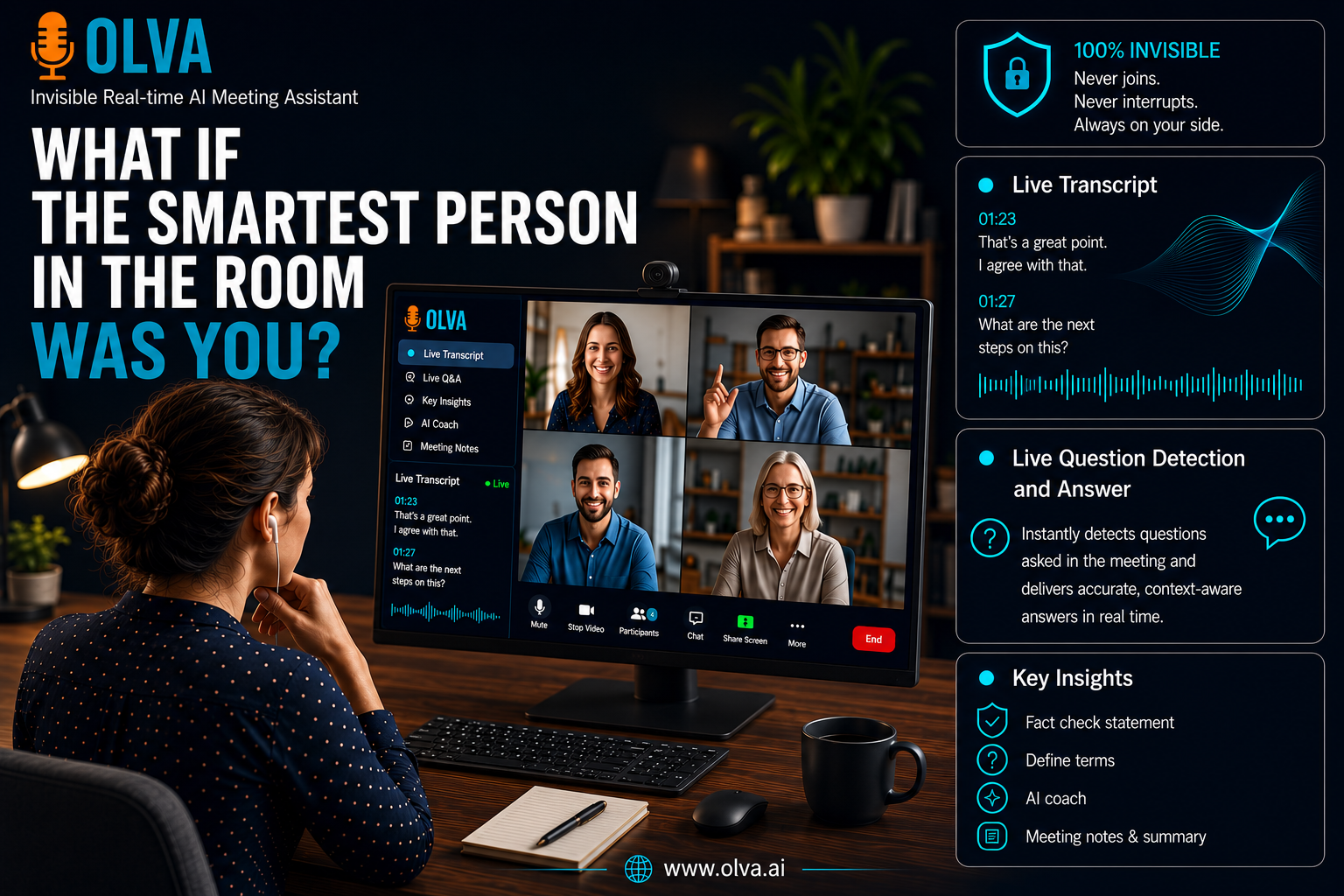
- Live transcription and speaker diarization let reps follow conversations closely and pick up buyer cues even in noisy or multilingual settings.
- Live Translation and Lingo Mode make it practical to participate in non‑native language calls or in‑person meetings with two‑way translation.
- Automatic question detection and Instant Context‑Aware Answers find and answer buyer questions using the active transcript and any attached documents—so sellers don’t have to interrupt or risk inaccurate recall.
- Document‑aware intelligence lets you upload proposals or SOWs before a call; OLVA can reference those documents to answer questions or pull language into the conversation.
- OLVA’s post‑meeting features (summaries, action items, persistent meeting memory, and editable slide decks) convert conversations into concrete follow‑ups quickly, reducing the lag between agreement and execution.
Practical sales scenarios and playbooks
- Discovery calls: Faster qualification and clearer next steps
Before the call: Attach the product brief and a short pricing table to the meeting context. During the call: OLVA transcribes and flags buyer questions. If the buyer asks about integration timelines, OLVA pulls the relevant passage from the product brief and surfaces it. After the call: OLVA creates a summary with decisions and a draft next‑step email that includes a tailored demo link and the exact attachments discussed.
Outcome: Faster, more accurate qualification and a clean next step that preserves momentum.
- Technical scoping calls: Reduce back‑and‑forth with accurate in‑call references
Before the call: Upload the technical spec or SOW. During the call: When a prospect asks a detailed question about latency or data retention, OLVA can display the exact clause and suggest a concise explanation or follow‑up test you can offer. After the call: Action items and decisions are stored in meeting memory so engineers have clear, searchable context for implementation conversations.
Outcome: Fewer clarifications required post‑call and tighter alignment between sales, engineering, and the prospect.
- Pricing and negotiation calls: Improve accuracy and confidence
During the call: The assistant detects pricing objections and offers phrasing templates to discuss ROI and packaging. If a buyer references a prior claim, OLVA can find that earlier remark in meeting history so you address it precisely. After the call: Generate a negotiation brief with the buyer’s stated constraints and suggested concessions for internal review.
Outcome: Deal cycles shorten because questions and concessions are captured and acted upon immediately.
- International sales and channel conversations: Reduce language friction
During the call: Use Live Translation to follow a multilingual discussion and ask OLVA to translate specific segments into your default language. OLVA’s speaker‑aware transcript also clarifies which participant said what. After the call: Summaries can be generated in the language you choose for distribution to your regional teams.
Outcome: More consistent global outreach and fewer misunderstandings that stall deals.
Measuring impact: KPIs to watch
- Win rate: Track whether deals associated with assisted calls close at higher rates.
- Sales cycle length: Measure average days-to‑close for assisted vs. unassisted calls.
- Time to follow up: Monitor median time between meeting end and first outreach.
- Action‑item completion rate: Check whether decisions and tasks identified in meetings are completed on time.
- Customer satisfaction and NPS by stage: Use post‑interaction surveys to see whether clarity and responsiveness improved.
Getting started: practical rollout tips for sales leaders
- Start with a pilot: Pick a sales pod or team that handles medium‑to‑high value deals and run a 6–8 week pilot focusing on discovery and pricing calls.
- Define success metrics: Agree on two or three KPIs (e.g., time to follow up, win rate, and action completion) and gather baseline data.
- Provide playbooks: Prepare short templates (discovery checklists, objection language, templates for post‑meeting emails) so reps can adopt the assistant’s suggestions quickly.
- Train intentionally: Demonstrate how to ask the assistant in real time (e.g., “What did they say about integrations?”) and when to rely on human judgment.
- Address consent and compliance up front: Ensure reps know local recording laws and customer policies and use the assistant only where authorized.
Common adoption concerns and how to handle them
- Fear of becoming over‑reliant: Position the assistant as decision support and remind reps to validate important assertions before committing them to paper.
- Privacy and legal issues: Enforce consent workflows and training. Make it clear when transcription will be used and where artifacts are stored.
- Data accuracy expectations: AI can make mistakes. Encourage human review of summaries and fact checks, especially when they affect contracts or compliance.
Why bot‑free matters for sales
Some organizations and prospects prefer not to see another participant in the call. Bot‑free operation means the assistant runs privately on the user’s device and doesn’t add a visible participant. For sales, that can lower friction during high‑value conversations and reduce the need to explain a visible AI presence to buyers. Bot‑free assistants still require the same consent and lawful recording practices; bot‑free is not a substitute for authorization.
Where to learn more and try real‑time assistance
To explore a bot‑free, real‑time assistant designed for live sales conversations and post‑meeting follow‑up, visit https://olva.ai. The site includes product details, platform support, and use cases tailored to sales teams.
Conclusion: Use AI to improve presence, speed, and accuracy—not to replace judgment
By 2026, the most effective sales teams will use AI meeting assistants that help during the conversation, not only afterward. Bot‑free, real‑time assistants reduce cognitive load, help reps answer buyer questions accurately in the moment, surface relevant documents, and convert meetings into immediate, actionable follow‑ups. Measured pilots, clear success metrics, and a focus on compliance and human review will help sales leaders realize faster cycles and higher win rates. The goal is simple: give reps the tools to be more present with customers, make better decisions during calls, and move deals forward without delay.
Practical next step
Run a one‑month pilot with a small sales pod focused on discovery and negotiation calls. Track time‑to‑follow‑up and win rate, attach a few key documents to meeting contexts, and evaluate whether in‑call coaching and instant answers reduce follow‑up clarification messages. Small experiments will show quickly whether real‑time assistance delivers measurable value for your team.