Which AI Meeting Assistant Should Canadian Knowledge Workers Choose for Everyday Calls?
Introduction
Every day Canadian knowledge workers — sales reps, product managers, executives, and founders — spend hours in meetings. The right AI meeting assistant can reduce cognitive load, catch commitments, surface questions, and help you respond in the moment. But not all tools are built for the same goals. This guide compares practical needs for everyday calls and explains what to look for. It also shows where a bot-free, real-time assistant like OLVA (https://olva.ai) can add value without turning meetings into a tech experiment.
Why this matters for Canadian teams
- Remote and hybrid work is common across Canadian cities and provinces; meetings often include clients, partners, and teammates in different time zones and languages.
- Sales cycles and product decisions depend on accurate commitments and follow-ups. Missed action items cost revenue and time.
- Privacy and consent vary by province; sensitive conversations (legal, HR, healthcare) require clear controls and user responsibility.
In short: you need an assistant that helps during conversations, supports multilingual contexts, stores useful follow-ups, and respects workplace rules.
What most knowledge workers need from an AI meeting assistant
Before evaluating products, clarify the problems you want solved. Common priorities:
- Real-time comprehension: live transcription and speaker separation so you can follow fast or technical discussions.
- During-meeting assistance: quick definitions, suggested clarifying questions, or phrasing help when you’re on a client call.
- Post-meeting outputs: searchable transcripts, concise summaries, action items, decisions, and reusable assets (e.g., slide drafts).
- Multilingual support: live translation or the ability to translate selected segments when meetings include non-native speakers.
- Privacy and control: clear storage, deletion, and usage policies; plus the ability to obtain consent when required.
- Integration and export: easy ways to push summaries, tasks, and slide decks into Google Docs, Notion, or your CRM.
Comparing real-world use cases: Sales, Product, and Execs
Sales: capture commitments, objections, and next steps
Typical call: discovery calls, demos, negotiation/renewal conversations.
What salespeople need in the moment
- Detect customer questions and objections automatically.
- Quick suggested responses and objection-handling prompts.
- Ability to reference relevant collateral or contract clauses during the call.
Practical example
An account executive is on a renewal call and hears “the price is higher than expected.” A meeting assistant that detects the objection and surfaces suggested responses — such as a concise value recap, a precedent discount clause from the proposal, or a follow-up question to probe the concern — helps the AE keep the conversation constructive. After the call, automatically captured action items (e.g., “send revised pricing by Tuesday”) reduce admin work.
How OLVA helps sales teams
OLVA provides live question detection and instant, context-aware answers using the active conversation. It can surface objections, suggest what to say next, and turn the meeting into a draft follow-up or editable slide recap. Because OLVA runs bot-free alongside your calls and supports 87 languages, it’s useful for cross-border Canadian accounts and multilingual customers.
Product and project teams: capture requirements and decisions
Typical call: grooming sessions, stakeholder reviews, cross-functional syncs.
What PMs need in the moment
- Accurate speaker diarization so you know who committed to which task.
- Live clarification and glossary lookup for technical terms.
- Capture decisions, risks, and dependencies without losing focus on the discussion.
Practical example
During a sprint planning call, an engineer mentions a dependency on a third-party API. A PM using a real-time assistant can quickly ask for a short summary of the dependency, note any risks, and create an action item assigning the follow-up. Later, the meeting history helps the PM trace where the decision originated.
How OLVA helps PMs
OLVA’s live transcription with speaker separation and context-aware Q&A helps product teams follow complex discussions. Document-aware intelligence allows you to surface relevant specs or design docs during a call, then capture decisions and action items into searchable meeting history and post-meeting outputs.
Executives and founders: high-level synthesis and meeting memory
Typical call: board updates, investor conversations, leadership reviews.
What execs need in the moment
- Fast, reliable summaries and decision extraction after a meeting.
- The ability to follow multiple threads without missing commitments.
- Privacy controls and exportable executive-ready materials (e.g., slide drafts for a board deck).
Practical example
After a leadership offsite, executives need a short, accurate recap of decisions, assigned owners, and unresolved risks. An assistant that generates structured summaries and editable slide drafts reduces follow-up email chains and helps align stakeholders faster.
How OLVA helps execs and founders
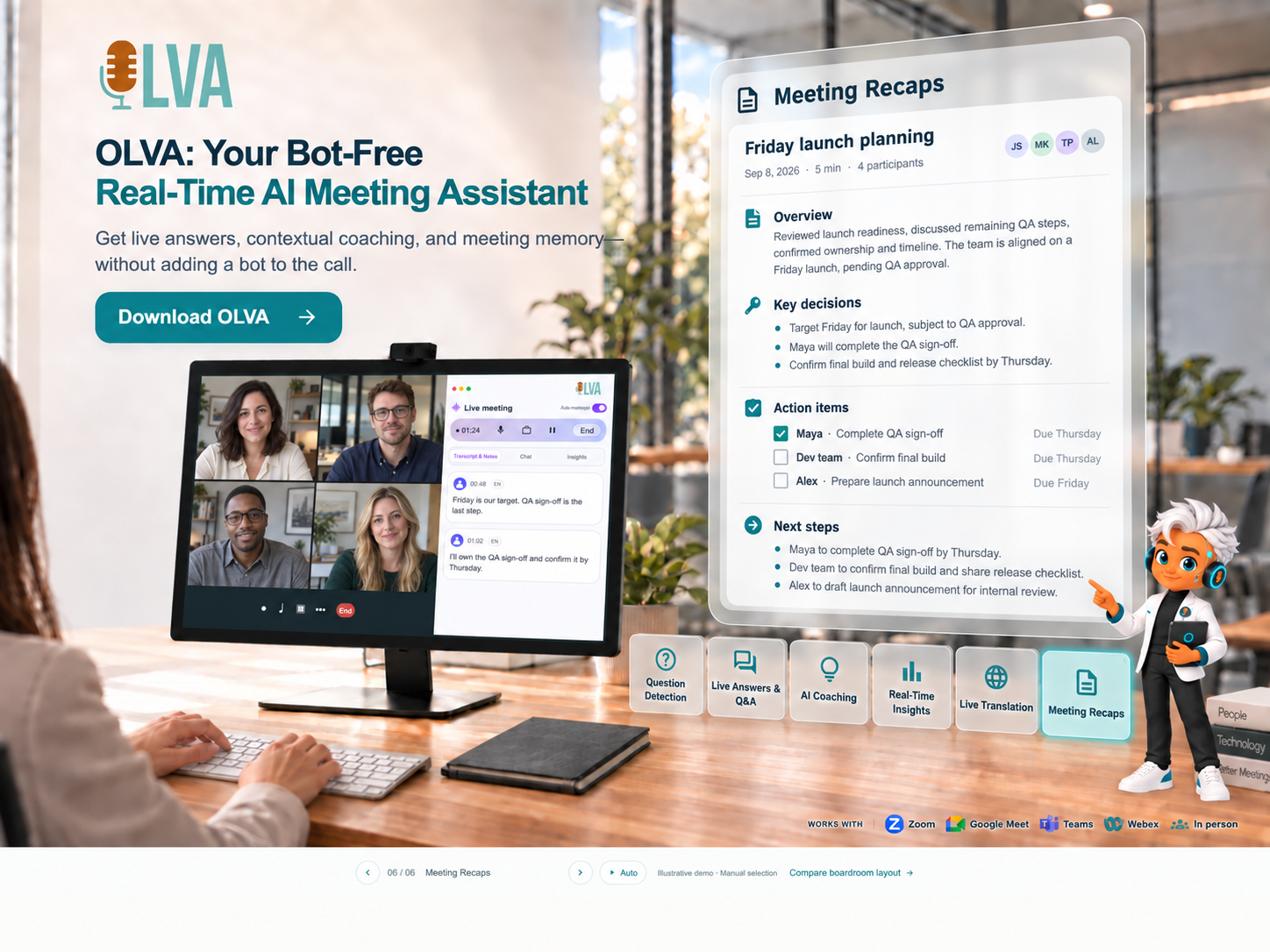
OLVA creates leadership-ready summaries, captures key decisions and action items, and can generate editable PowerPoint decks from meeting content. Because OLVA stores searchable meeting history and persistent meeting memory, execs can pull context from prior conversations when preparing for investor or board calls.
Key product features to prioritize (checklist)
- Live transcription with speaker diarization
- During-meeting Q&A and suggested prompts or phrasing
- Automatic question detection and contextual answers
- Live translation (full or segment-based) for multilingual meetings
- Document-aware intelligence to reference proposals or technical specs
- Action item, decision extraction, and editable post-meeting outputs (summaries and slide drafts)
- Export/integration options (Google Docs, Notion, Google Drive, webhooks)
- Clear privacy controls, storage policies, and user responsibility guidance
Why during-meeting assistance matters more than static note-taking
Many tools focus mainly on post-meeting notes. That helps with record-keeping, but misses opportunities to influence the conversation when it matters most. During-meeting assistance reduces miscommunication, helps with instant clarifications, and can prevent costly follow-ups. For roles that negotiate, define requirements, or make decisions in real time (sales, PMs, execs), that difference is material.
Practical scenarios showing ROI
- Closing more deals: a rep uses real-time objection detection and suggested responses to keep momentum. Post-call, OLVA’s auto-generated follow-up draft saves time and increases response speed.
- Fewer missed commitments: PMs capture action items live with owner attribution and due dates. Searchable meeting history makes it easy to trace commitments across sprints.
- Faster leadership alignment: executives receive concise decision-focused summaries and editable slide decks, reducing the time to prepare board materials.
Multilingual and cross-border calls: why language support matters in Canada
Canada’s bilingual and multicultural workforce means meetings often include French, English, and other languages. Live translation or the ability to translate selected segments helps participants follow nuanced conversations and reduces cognitive load for non-native speakers.
OLVA supports 87 languages and regional variants and provides live translation, making it practical for cross-province or international calls where participants prefer different languages.
Privacy, legal, and ethical considerations for Canadian workplaces
- Consent and local law: Canada’s provinces may have different rules around recording and consent. Inform participants and obtain any required permission before using transcription or recording features.
- Workplace policies: follow your employer’s rules and any client confidentiality obligations.
- Sensitive conversations: avoid using automated assistants in contexts where AI assistance is prohibited (e.g., certain legal or clinical settings) unless permitted.
Note: OLVA is bot-free and private to the user by design, but botless does not mean consentless. Users must follow applicable local laws and organizational policies when enabling live transcription and AI assistance.
How to evaluate tools in a trial (practical steps)
- Test real-time value: run a few live calls and ask whether the assistant helped you during the conversation (phrasing suggestions, live clarifications, fact-checks) — not just after.
- Check transcript quality: are speakers separated correctly? Are technical terms handled well?
- Try document-aware intelligence: upload a proposal or spec and ask the assistant to surface relevant sections during a call.
- Test post-meeting outputs: can you get an accurate summary, action items, and an editable slide draft that saves hours of rework?
- Audit privacy settings: where are transcripts stored, how can you delete them, and what are the export controls?
- Evaluate language support: run a bilingual call and test automatic translation and selective translation of segments.
Decision guide (one-page mental model)
- If you primarily want better archival notes and meeting search: focus on transcript accuracy and post-meeting summaries.
- If you need help during conversations (coaching, phrasing, instant answers): prioritize real-time, context-aware assistance.
- If you work across languages: prioritize live translation and strong multilingual support.
- If you handle confidential or sensitive conversations: prioritize privacy controls, storage policy clarity, and the ability to obtain consent.
Where OLVA fits and when to consider it
OLVA is positioned as a bot-free, real-time meeting assistant that helps while conversations are happening and also produces useful post-meeting outputs. For Canadian sales teams, PMs, and executives who need during-meeting assistance, multilingual support, and private, user-controlled meeting storage, OLVA provides a practical blend of features:
- Live transcription and speaker diarization for clearer conversation tracking.
- Automatic question detection and context-aware answers to help during the call.
- Live translation across 87 languages and regional variants for bilingual and international meetings.
- Document-aware intelligence to reference proposals, specs, and other materials in real time.
- Post-meeting summaries, action items, decisions, searchable history, and editable PowerPoint slide generation.
You can learn more and try OLVA at https://olva.ai.
Limitations and responsible use
No AI assistant is perfect. Treat automated fact checks, summaries, and action-item extraction as draft outputs that need human review, especially when accuracy matters for legal, financial, or clinical decisions. Don’t use meeting assistants in situations where your organization or local law prohibits recording, or where participants have not given consent.
Conclusion: What should you choose?
For everyday Canadian calls where you need help in the moment — phrasing suggestions, live clarifications, question detection, multilingual translation, and quick post-meeting outputs — prioritize a real-time, bot-free assistant that emphasizes during-meeting value and user-controlled privacy.
If your team spends most of its time negotiating, defining product requirements, or working across languages, a tool that supports live assistance and strong post-meeting workflows will yield the most immediate productivity gains. OLVA is one such option designed to provide context-aware help during conversations, plus structured post-meeting outputs that reduce administrative overhead.
Next steps (quick checklist)
- Identify 2–3 concrete meeting pain points (e.g., missed action items, multilingual comprehension, long follow-ups).
- Trial a real-time assistant on a few representative meetings and compare outcomes against your checklist.
- Verify privacy and consent workflows with your legal or HR teams before broad deployment.
- Measure results after 4–6 weeks: reduced follow-up time, fewer missed tasks, and faster preparation for leadership meetings.
Choosing the right assistant means aligning features to the moments that matter in your daily work. Prioritize real-time help, language support, clear privacy controls, and reliable post-meeting outputs. For many Canadian knowledge workers — sales, product, and executive teams — a bot-free, real-time assistant such as OLVA offers practical, modern support during and after everyday calls.
Resources
- OLVA: https://olva.ai