
Using Olva on iPhone for Customer Success: Capture NPS Calls, Detect Churn, Coach Live
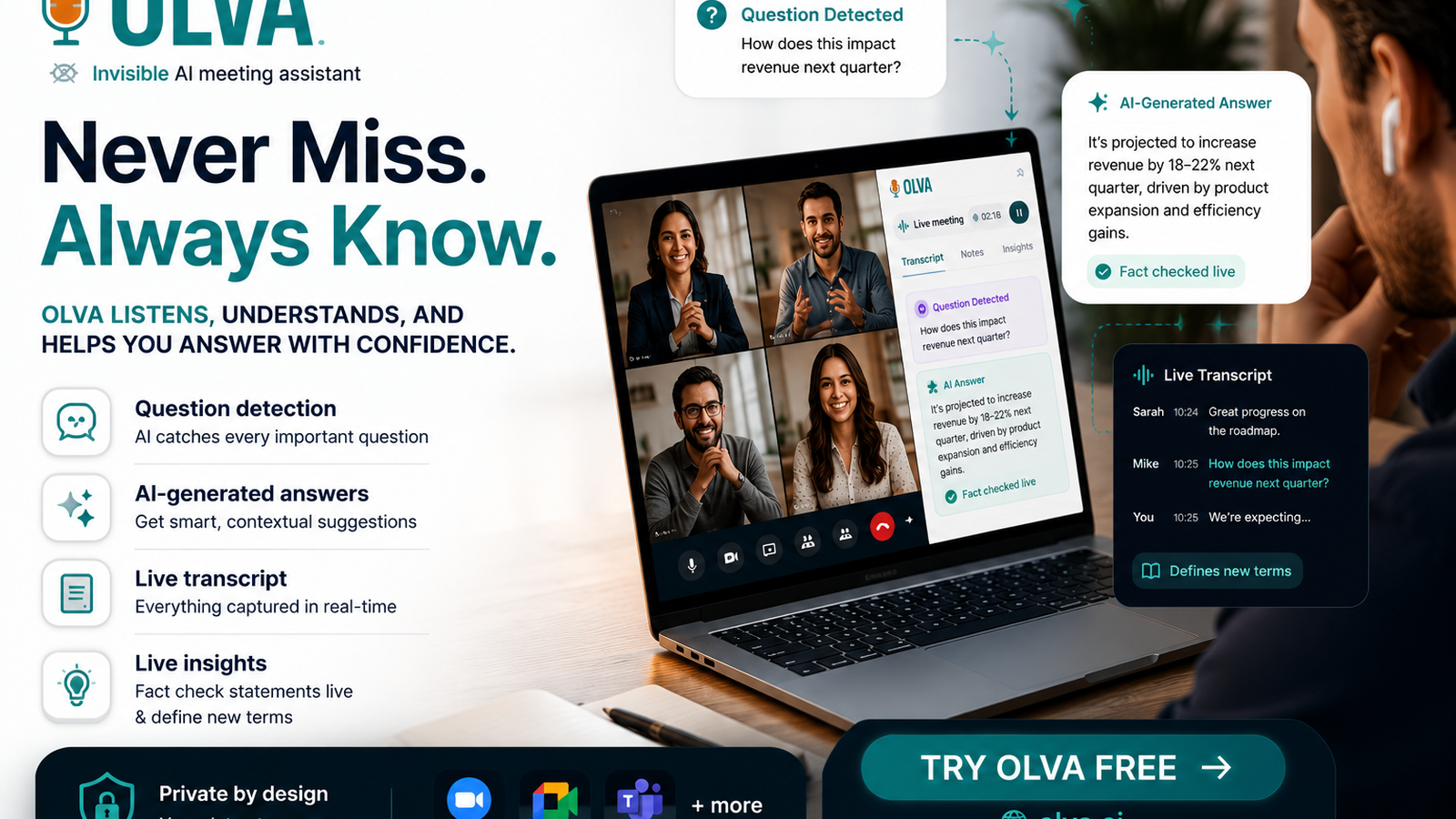
Why live matters: turn NPS calls into retention opportunities
Customer success teams live in conversations. NPS calls, renewal discussions, and escalation meetings are high-leverage moments where the difference between retention and churn happens in real time. Reviewing a transcript after the fact helps you remember, but it rarely helps you change the outcome of the conversation already in progress.
This article explains how to use Olva on your iPhone to capture NPS calls, detect churn signals as they occur, and get live coaching so you can influence the result while the call is still happening. Practical examples and step-by-step workflows are included for customer success managers, account managers, and renewal specialists.
Learn more at https://olva.ai.
The problem with traditional meeting tools for customer success
Most meeting tools focus on recording, transcribing, and summarizing after the meeting. That is helpful for documentation, but it misses three critical needs for customer success professionals:
- Real-time signal detection. Churn indicators often appear early and intermittently. Waiting to analyze them later is too late.
- Live response support. Knowing what to say in the moment, or how to reframe a concern, directly affects retention outcomes.
- Context-aware answers. Customer questions during renewal or escalation often require consulting contracts, SLAs, or product docs instantly.
Solutions like call recorders, post-call coaching platforms, and transcription services do these things well after the fact. They help with training and quality assurance. But they rarely provide discreet, immediate support to the person on the call.
Olva is designed to fill that gap by helping you perform better while the conversation is happening.
How Olva on iPhone changes the equation
Olva brings live meeting intelligence to your iPhone with features built for customer-facing moments:
- Invisible AI assistant: Olva works in the background without joining the meeting as a visible bot. That means no extra participants, no awkward notifications, and privacy by design. Your customer interaction stays natural while you get private AI support.
- Live transcription: Real-time transcription captures both your audio and the participant audio so you can focus on the conversation instead of note taking.
- Automatic question detection: Olva surfaces customer questions, objections, and clarity requests as they happen instead of just logging them for later.
- Instant answers and document-aware intelligence: When a question is detected, Olva generates context-aware answers using meeting context and any uploaded documents like contracts, SLAs, or product specs.
- Live Q&A and AI coaching: Ask Olva for suggested responses, drafts for rephrasing, or follow-up questions without interrupting the call. Olva acts like a private coach in your ear.
- Live insights, opportunity detection, and fact checking: Olva highlights buying signals, churn risk indicators, and incorrect claims so you can act on what matters in the moment.
- Post-meeting memory: Olva creates summaries, action items, and a searchable meeting history you can revisit anytime.
These capabilities combine to make your iPhone a real-time retention tool, not just a recording device.
Practical workflows: NPS calls, renewal conversations, and escalations
Below are concrete workflows you can use on iPhone for common customer success scenarios.
Workflow 1: Capture and coach during an NPS call
Goal: Gather a reliable NPS score, identify drivers of sentiment, and reduce churn risk when a low score appears.
Step-by-step:
- Before the call, upload the account contract and any recent support tickets to Olva so document-aware answers are available.
- Start the call on your iPhone and enable Olva. Olva transcribes the call live and listens for questions and sentiment shifts.
- When Olva detects hesitation, strong negative language, or a lower-than-expected score response, it surfaces the signal as a churn alert.
- Use live Q&A to ask Olva: what recent tickets or outages could be influencing this score, and what is a short, empathetic response I can give now.
- Olva suggests a 1-2 sentence response and recommended follow-ups, for example a proactive offer for a dedicated support review or a near-term product demo addressing the customer concern.
- After the call, Olva generates a concise recap, assigns action items, and links supporting documents for the account owner.
Practical example of suggested phrasing from Olva:
- Suggested response to an unhappy customer: I hear you — that level of disruption is not acceptable. I can schedule a technical review with our support lead this week and follow up with a remediation plan within 48 hours. Would Wednesday or Thursday work better for you?
Why this matters: The customer feels heard, you demonstrate immediate ownership, and you create a concrete next step that reduces the chance of churn.
Workflow 2: Detect price sensitivity during renewal talks
Goal: Spot early signs of price objections and present an informed offers or alternative packaging immediately.
Step-by-step:
- Upload pricing decks, contract terms, and your playbook into Olva before the meeting.
- During the renewal conversation, Olva automatically detects price-centric questions and flags them.
- Use live Q&A to request suggested negotiation language, potential discounts aligned to internal policy, or upsell opportunities based on usage data.
- Olva pulls from your uploaded documents and previous meeting memory to recommend positions that protect margin while retaining the account.
- After the call, Olva logs the objection and recommended next steps for the renewal team.
Practical example:
- Live coaching snippet: Olva proposes two paths — a value-driven renewal at current price with an added phased deployment plan, or a one-time concession tied to a 12-month signed commitment. It also suggests asking which feature provides the most value to them now, which informs the negotiation approach.
Workflow 3: Turn technical escalations into retention wins
Goal: Reduce churn risk when a customer escalates a technical problem during a call.
Step-by-step:
- Preload product docs and the most common troubleshooting guides into Olva.
- When a customer describes a technical issue, Olva detects technical question patterns and recommends clarifying questions to narrow root cause.
- Olva instantiates suggested language for triaging, offers to pull an internal ticket template, and proposes a timeline for next steps you can commit to.
- If the customer asserts inaccurate facts, Olva flags potential inaccuracies and supplies context-aware fact checks without interrupting the flow of the meeting.
Practical example:
- Clarifying question suggested by Olva: Could you share when you first noticed this behavior and whether it coincides with any recent configuration changes or API usage spikes? This pinpoints scope and reduces back-and-forth post-call.
Competitor comparison: what they do well and where Olva differs
Many platforms help teams with call recording, transcription, and post-call coaching. Products like Gong and Chorus provide powerful analytics and playbooks for sales and customer success; Otter and Fireflies make transcription accessible and easy to search. Those tools excel at trend analysis, rep coaching, and QA workflows.
Where Olva is different:
- Live assistance vs post-call analysis: Olva focuses on improving outcomes during the live conversation rather than only after. That immediate impact is crucial for retention and renewals.
- Invisible assistance: Olva works without joining the meeting as a visible bot, keeping interactions natural and private. Many other tools require a bot participant or explicit recording indicator.
- Document-aware instant answers: Olva uses uploaded contracts and product docs in real time to answer customer questions. Other platforms often require post-call searches or manual context switching.
- Opportunity and churn detection inline: Olva surfaces buying signals, expansion chances, and churn indicators as they appear so you can act in the moment.
That said, many competitor platforms provide deep analytics and robust integrations that are valuable for enterprise reporting. A pragmatic approach is to use Olva for real-time assistance on the iPhone and complement it with post-call analytics platforms when necessary.
Privacy and compliance considerations
Olva is private by design. Because the assistant is invisible and works on the user side rather than acting as a visible meeting participant, there are fewer disruptions and clearer boundaries around data visibility. Transcripts are available only to the user and can be deleted anytime. This matters for sensitive customer conversations and compliance workflows.
Always follow your organization and client policies about recording or transcribing calls. Olva supports settings that align with those policies, and you can choose when to enable transcription or data retention.
Quick setup tips for using Olva on iPhone
- Upload relevant documents before the call: contracts, SLAs, pricing sheets, release notes, and high-priority support tickets.
- Enable live transcription and automatic question detection for NPS and renewal calls.
- Use headphones to prevent audio leakage and ensure Olva captures clear audio from both parties.
- Practice a few live prompts in non-critical meetings to get comfortable with live Q&A and coaching suggestions.
- Integrate Olva outputs into your CRM by exporting action items and recaps to ensure follow-through.
Measuring impact
To quantify Olva's value for customer success on iPhone, track metrics like:
- Renewal rate changes for accounts where Olva was used during renewal conversations.
- Reduction in time-to-resolution for escalations where Olva suggested triage language or documentation.
- Improvements in NPS follow-up conversion when Olva surfaced churn risk and recommended recovery steps.
- User satisfaction among success managers vs their historic baseline when they received live coaching support.
Combining these signals provides a clear ROI story that links live assistance to retention outcomes.
Conclusion: perform better in the moment
NPS calls, renewals, and escalations are not just events to document. They are moments to act. Using Olva on your iPhone means you have an invisible, document-aware coach listening with you, surfacing churn signals, and providing instant, context-rich responses that improve outcomes while the conversation is still happening.
Olva is not a replacement for post-call analysis or enterprise analytics platforms. Instead, it complements them by focusing on the one thing that matters most for customer success teams: being able to influence the result in real time. For more details and to try Olva on iPhone, visit https://olva.ai.
End of article.