
How Invisible AI and Real-Time Question Detection Help Autistic Professionals Perform Better in Meetings
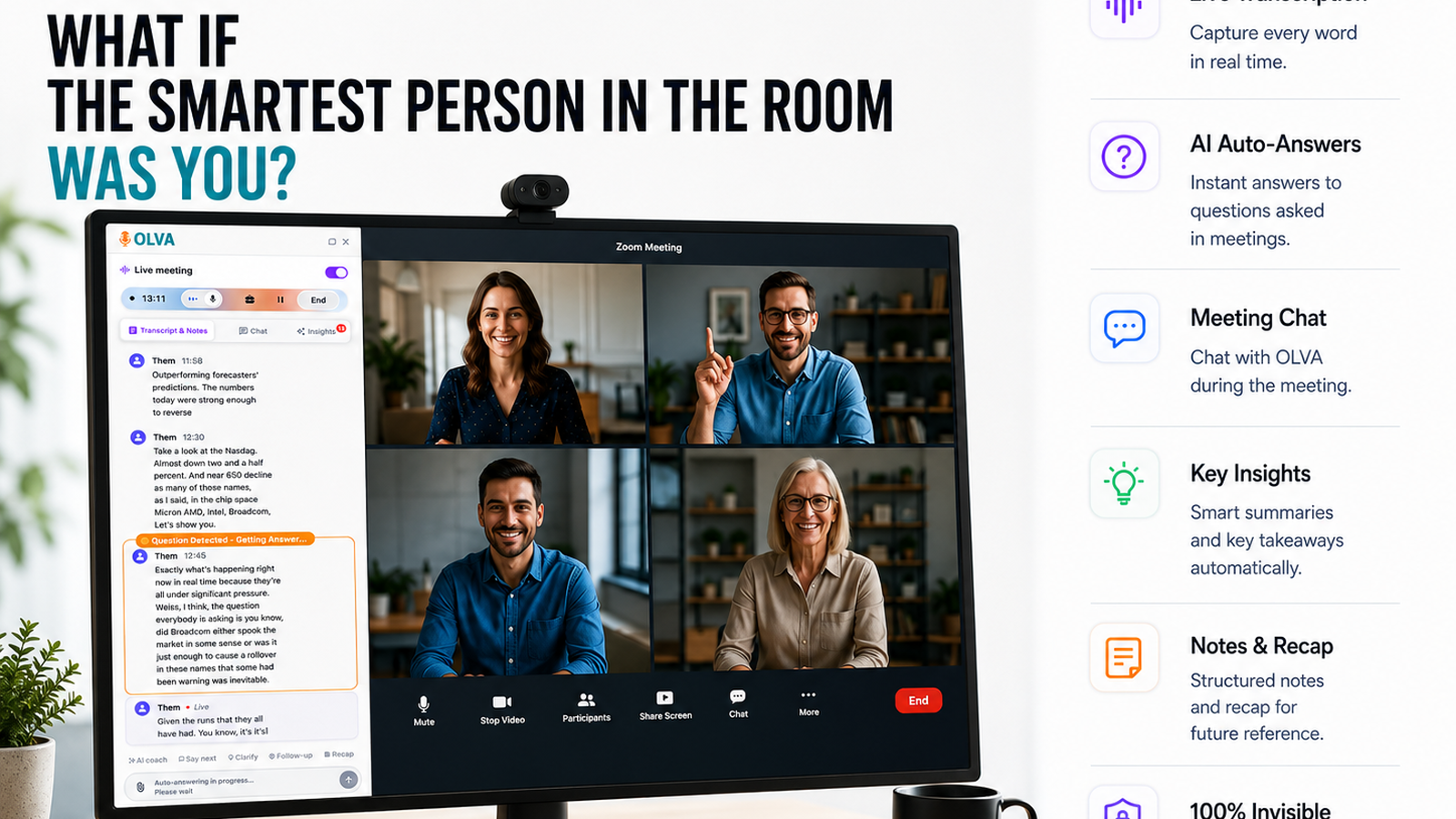
Meetings are where decisions are made, relationships are built, and work gets aligned — but they can also be high-stress environments for autistic professionals. Unexpected questions, overlapping voices, pressure to respond instantly, sensory overload and the constant need to interpret social cues can turn a routine call into an uphill battle.
Modern meeting tools often focus on what happens after the meeting: recordings, transcripts, summaries, and notes. Those features are helpful — but they don’t address the moment that matters most: during the conversation. For autistic professionals, in-meeting support can be transformative.
This article explains practical challenges autistic professionals face in meetings and how invisible AI combined with real-time question detection, live transcription, and context-aware assistance can reduce cognitive load, increase confidence, and improve outcomes. Examples and use cases are included for product managers, technical teams, executives, consultants, recruiters, junior employees, remote workers, and sales or customer success teams.
If you want to explore a platform built specifically to assist in the moment, see https://olva.ai.
Why meetings are uniquely challenging for many autistic professionals
Autistic people are diverse, but common meeting-related challenges include:
- Sensory overload: multiple speakers, background noise, and visual stimuli can be distracting.
- Processing time: formulating a thoughtful response may take longer than a conversation's pace allows.
- Social ambiguity: interpreting tone, sarcasm, or implied meaning can require extra effort.
- Multitasking: listening, note-taking, monitoring chat, and planning a reply at once is cognitively expensive.
- Anxiety about impromptu responses: fear of being interrupted or asked something unexpected.
These stressors reduce the ability to contribute ideas, handle objections effectively, or follow the flow of technical discussions — especially in high-stakes meetings like product demos, stakeholder reviews, or sales calls.
Technology that reduces realtime cognitive demands — not just post-meeting recall — can make meetings more equitable and productive.
Core capabilities that help during the meeting (not after)
The most meaningful improvements come from tools that operate invisibly and provide assistance in real time. Key capabilities that support autistic professionals include:
- Invisible AI Assistant: provides help without joining as a visible participant or interrupting the conversation.
- Live Transcription: converts speech to text in real time so users can read, scan, and focus instead of juggling audio and notes.
- Automatic Question Detection: highlights when questions are asked — including subtle or buried ones — so users don’t miss requests or objections.
- Instant Answers & Document-Aware Intelligence: pulls answers from uploaded docs, specs, or prior meetings and suggests concise, context-aware responses on the spot.
- Live Q&A and AI Coaching: allows users to privately ask "What should I say next?" and receive phrasing suggestions, clarifications, and rebuttals tailored to the situation.
- Live Insights & Opportunity Detection: surfaces buying signals, risks, or follow-ups so users can prioritize what matters right away.
- Fact Checking: verifies statements as the discussion unfolds to avoid committing to incorrect details under pressure.
- Post-Meeting Memory: records decisions, action items, and open questions for later review — without replacing the live assistance that made the meeting manageable.
These capabilities shift the emphasis from remembering to performing: rather than relying on after-the-fact notes, the user gets discreet guidance while the meeting is happening.
Practical examples by role
Below are realistic scenarios showing how invisible AI plus real-time question detection helps.
Product Manager in a cross-functional review
Scenario: During a sprint review, an executive asks an unexpected question about a technical constraint.
How assistance helps:
- Automatic question detection flags the executive's question immediately even if it’s embedded in a longer comment.
- Live transcription provides a searchable text of the phrase so the PM can re-read and absorb the exact wording.
- Instant answers pull relevant specs or previous decisions from uploaded design docs and suggest a succinct, accurate response the PM can adapt.
- AI coaching offers a short script (e.g., “From our spec, the constraint is X; we can mitigate it by Y or adjust timeline Z.”) so the PM can reply confidently.
Outcome: The PM answers clearly, preserves credibility, and keeps the meeting on track without pausing or asking to follow up later.
Sales or Customer Success team on a demo call
Scenario: A prospective customer raises a pricing objection mid-demo.
How assistance helps:
- Question detection highlights pricing discussion and tags it as an objection.
- Live insights identify buying signals (e.g., “asks about scale or timeline”) and suggests tailored upsell or packaging options.
- Document-aware intelligence references the pricing sheet or contract clause and generates a precise response.
Outcome: The rep addresses the objection confidently in the moment, turning friction into an opportunity.
Developer in a technical design workshop
Scenario: Rapid back-and-forth with multiple technical terms and acronyms.
How assistance helps:
- Live transcription and defined-term popovers reduce the cognitive load of tracking unfamiliar acronyms.
- Automatic question detection separates clarifying questions from proposals so the developer can prioritize answers.
- Instant answers consult code references or architecture docs the user uploaded and return a quick, accurate explanation.
Outcome: The developer participates more effectively without needing to interrupt the flow to request clarifications.
Recruiter handling candidate interviews
Scenario: A candidate asks a question about benefits mid-interview and the recruiter needs to be precise.
How assistance helps:
- Document-aware intelligence searches HR docs for the exact benefit details and returns a short answer to the recruiter privately.
- AI coaching suggests phrasing that’s compliant and friendly.
Outcome: The recruiter answers confidently and accurately, improving candidate experience without a delayed follow-up.
Why invisibility matters for comfort and privacy
Some meeting tools add a bot as a visible participant or create notifications that change meeting dynamics. For many autistic professionals, that visibility can increase anxiety, alter social dynamics, or distract others.
An invisible AI assistant works quietly in the background: it doesn’t join the call, show up in participant lists, or create awkward notifications. The user receives private, real-time assistance (visual cues, suggested phrasing, or private Q&A) without altering how teammates or clients experience the meeting.
Privacy matters too. Look for platforms designed with private-by-default policies where transcripts and memories are accessible only to the user and can be deleted at any time.
How to use these tools without becoming dependent on automation
Assistive tools are most effective when they extend human capability rather than replace it. Here are practical usage tips:
- Use live transcription to reduce cognitive load, not as the sole source of context. Skim key passages but keep attention on verbal cues you prefer.
- Treat instant answers as a first draft. Edit suggested responses to match your voice and tone.
- Use private coaching prompts sparingly during the meeting — short, actionable suggestions are better than long scripts.
- Combine pre-meeting preparation with live help: upload agendas, specs, or contracts ahead of time so the AI can be document-aware.
- Post-meeting, review memory and action items to reinforce learning and reduce future reliance on the tool.
Comparing common meeting tools fairly
Many meeting platforms and transcription services (e.g., Zoom transcription, Otter.ai, Fireflies) do excellent work capturing conversations and creating searchable records. They help teams remember what happened and streamline note-taking.
Where these tools often stop — and where an invisible AI assistant differs — is in-the-moment support:
- Most competitors transcribe and provide post-meeting summaries. That’s essential, but it helps after the fact.
- A few services offer live notes or highlights, yet they can still join meetings as visible bots or require manual attention.
- Fewer tools actively detect questions in real time, generate context-aware answers from uploaded documents, or provide private, moment-to-moment coaching.
An invisible AI assistant designed for real-time question detection, instant answers, and live coaching fills that gap: it helps users perform better while the meeting is happening, not just remember what was said later. For many autistic professionals, that real-time support is the difference between staying silent and contributing confidently.
Implementation checklist for teams and individuals
If your team wants to adopt invisible AI to support neurodiversity in meetings, consider the following checklist:
- Choose a solution that supports invisible operation (no visible bot participants) and strong privacy controls.
- Ensure the tool offers live transcription and accurate automatic question detection.
- Upload relevant documents (product specs, pricing sheets, contracts) ahead of important meetings to enable document-aware answers.
- Train team members on how to use private coaching and live Q&A features responsibly.
- Monitor outcomes: track participation, response quality, and whether fewer follow-ups are needed.
- Encourage a culture that allows people to use assistive features without stigma.
A short technical note on reliability and fairness
Real-time AI assistance depends on high-quality audio, stable connectivity, and well-trained models. Expect some variance in noisy environments or when multiple people speak at once. Tools that allow user corrections and that reference uploaded documents for authoritative answers will reduce errors.
Accessibility and fairness extend beyond technical performance. Adopt practices such as allowing extra response time, sharing agendas in advance, and creating a meeting culture that supports different communication styles. Technology is an enabler, but human-centered norms make the biggest difference.
Conclusion: helping people perform in the moment
Autistic professionals bring deep expertise, attention to detail, and unique perspectives. Yet meetings often privilege quick social responses and rapid multitasking — areas that can be exhausting or unfairly challenging.
Invisible AI combined with real-time question detection, live transcription, instant answers, and private coaching shifts the balance. Instead of helping only after a meeting ends, these tools equip people in the moment: they reduce cognitive load, flag questions, suggest accurate responses, surfacing what matters while the conversation is still happening.
For product managers, engineers, recruiters, salespeople, and remote workers who want to participate more effectively and with less stress, in-meeting intelligence is a practical accessibility tool. When paired with thoughtful meeting culture, it can broaden participation, improve decision-making, and create more inclusive meetings.
Explore platforms that prioritize invisible, document-aware, private assistance for real-time help at https://olva.ai.